4-31
Electrical Shock Hazard
Disconnect power before servicing.
Replace all parts and panels before
operating.
Failure to do so can result in death or
electrical shock.
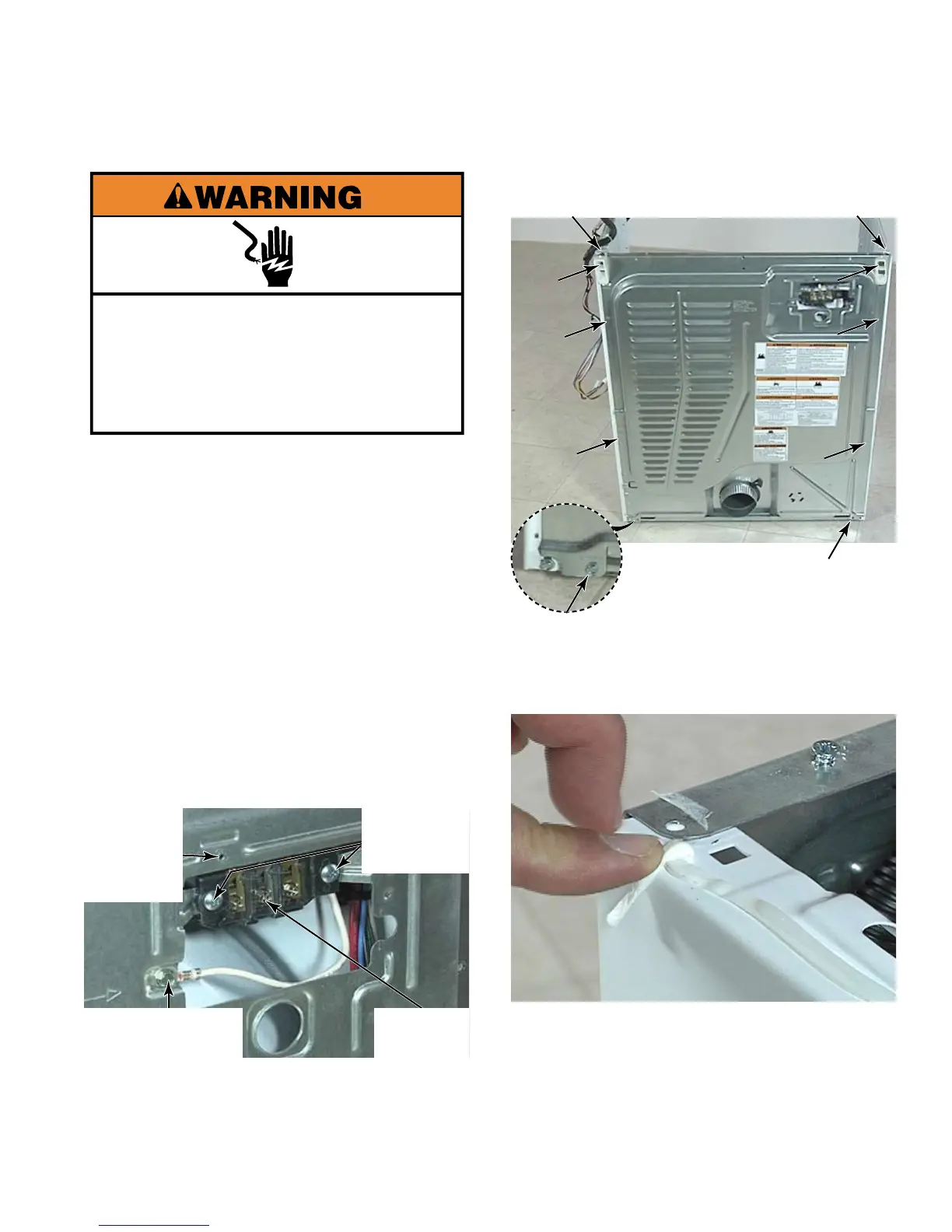
Remove dryer top (See page 4-11).
Remove the 1/4” hex head screw that
secures the electrical connections cover to
the rear panel.
On electric heat models, disconnect power
cord from terminal block connections. On
gas heat models, lift the power cord retainer
clip off the power cord bushing, disconnect
the power cord connector.
Remove the 5/16” hex head screw that
secures Earthing cable to rear panel.
Remove 2 star head pan screws that secure
the terminal block to the rear panel.
1.
2.
3.
4.
5.
Remove ten 1/4” hex head screws that
secure the rear panel to the dryer.
Peel end of insulation strip off of upper edge
of rear panel, leaving it attached to upper
edge of side panel, so that it does not tear
when removing rear panel.
Pull rear panel straight away from dryer until
exhaust duct is out of its hole, and remove
rear panel.
6.
7.
8.
Terminal
Block
Cover
Plate
Mounting
Hole
2 Star
Head Pan
Screws
5/16” Hex Head
Earth Screw





 To Next Page