4-35
Electrical Shock Hazard
Disconnect power before servicing.
Replace all parts and panels before
operating.
Failure to do so can result in death or
electrical shock.
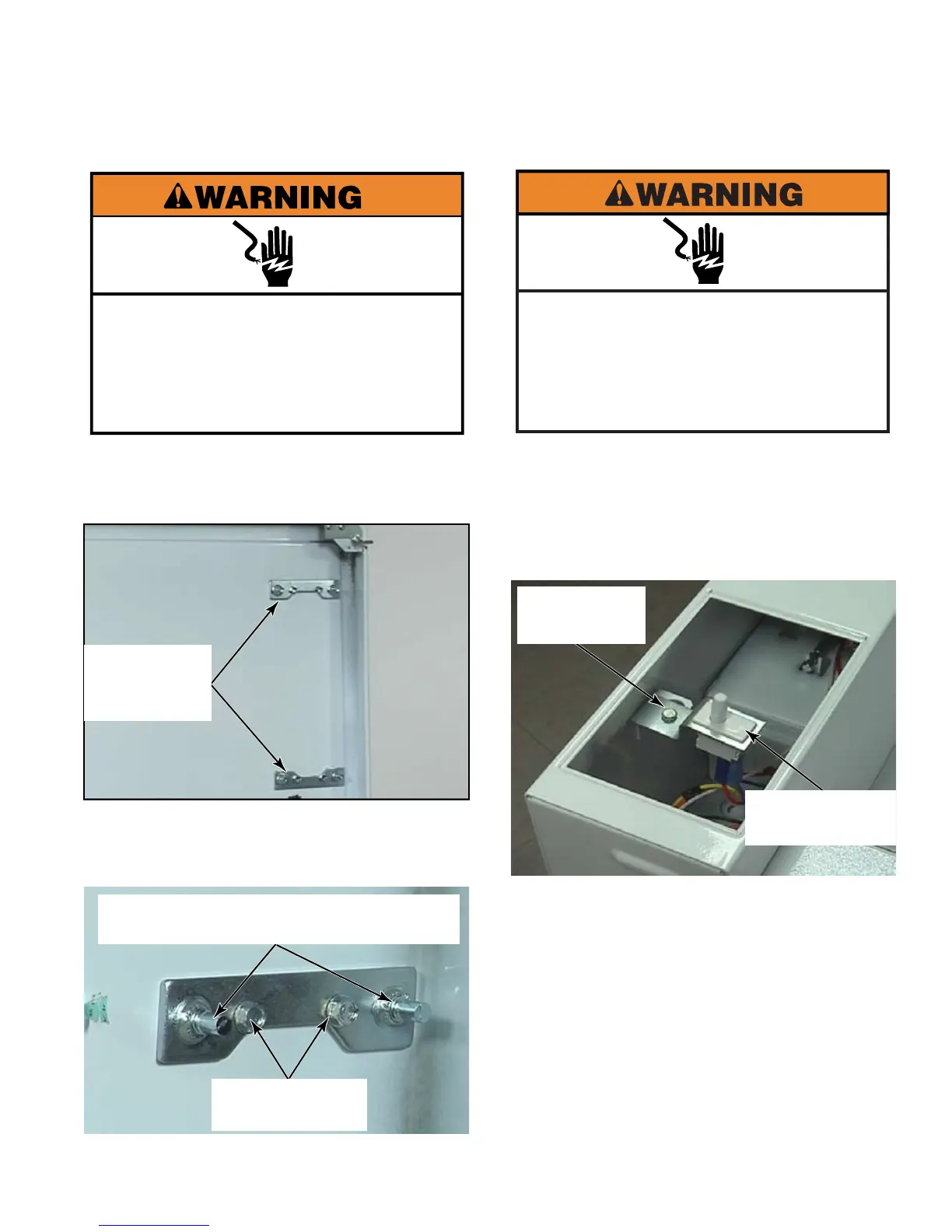
Remove metercase (See page 4-34).
Open top of dryer (See page 4-3).
Remove two 5/16” hex head screws in each
bracket. Remove bracket. These brackets
are what the metercase bolts screw into.
1.
2.
3.
Metercase
Mounting
Brackets
Remove the service access door from the
top of the metercase.
Remove the 5/16” hex head screw to
release the bracket that holds the service
switch.
Disconnect two wire connectors from the
switch terminals.
To remove the service access switch from
the mounting bracket, press the locking tabs
on both ends of the switch and push the
switch up out of the mounting bracket.
1.
2.
3.
4.
5/16” Hex
Head Screw
Service Access
Switch
Two 5/16” Hex
Head Screws
Two Metercase Bolts (these would be
gone if the metercase was removed).
Electrical Shock Hazard
Disconnect power before servicing.
Failure to do so can result in death or
electrical shock.
Replace all parts and panels before
operating.





 To Next Page