4-24
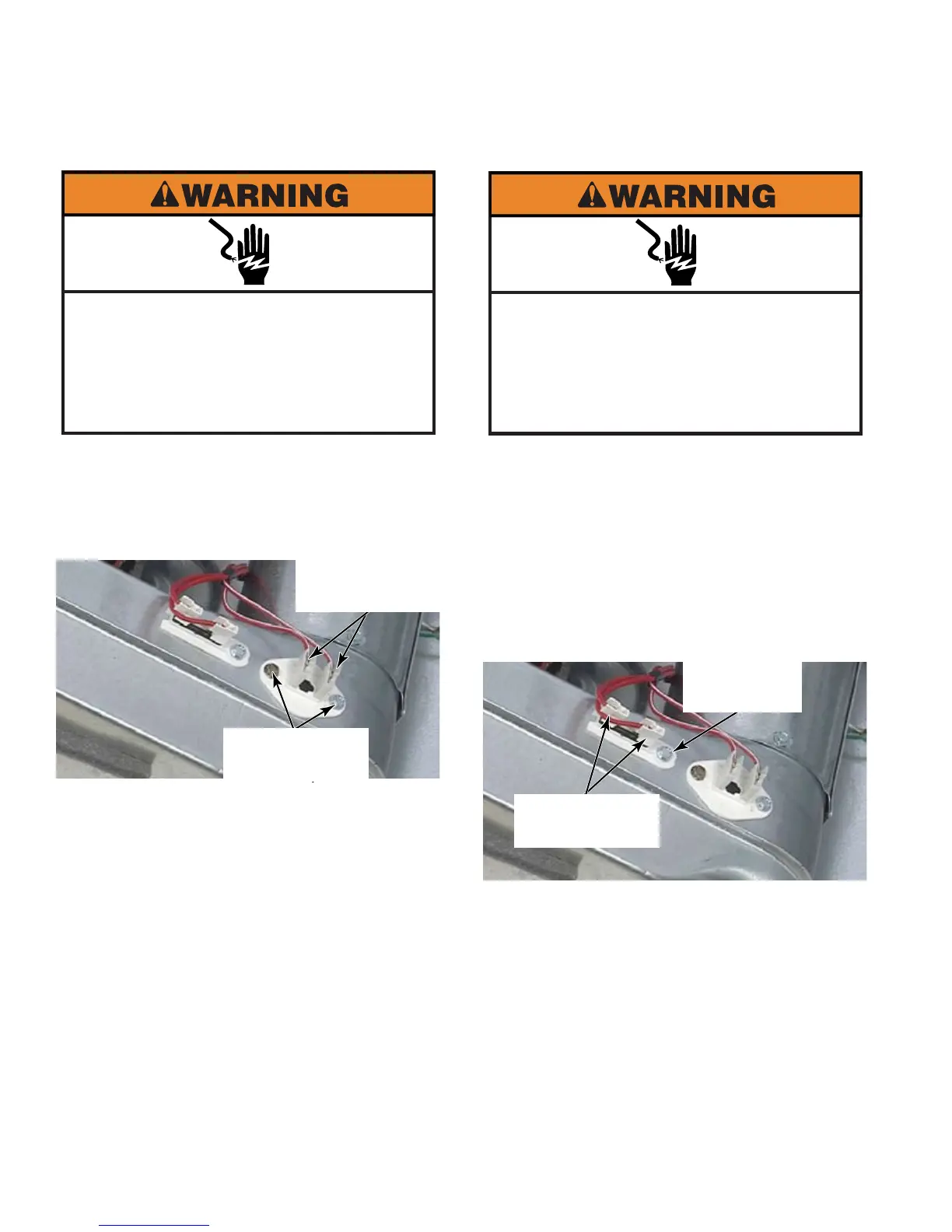
Remove lint filter housing
(See page 4-18).
Remove two wire connectors from
thermistor.
Remove two 1/4” hex head screws and
remove thermistor.
The resistor mounted in the
thermistor changes resistance as heat
changes. The electronic control can
determine the operating temperature of the
dryer based on the resistance being read
from the thermistor.
1.
2.
3.
Remove lint filter housing
(See page 4-18).
Remove two wire connectors from thermal
fuse.
Remove the 1/4” hex head screw, lift and
slide to release the hook from the other end
that secures the thermal fuse to the blower
housing.
1.
2.
3.
Two Wire
Connectors
Two 1/4” Hex
Head Screws
Two Wire
Connectors
1/4” Hex
Head Screw
Electrical Shock Hazard
Disconnect power before servicing.
Failure to do so can result in death or
electrical shock.
Replace all parts and panels before
operating.
Electrical Shock Hazard
Disconnect power before servicing.
Failure to do so can result in death or
electrical shock.
Replace all parts and panels before
operating.





 To Next Page