4-16
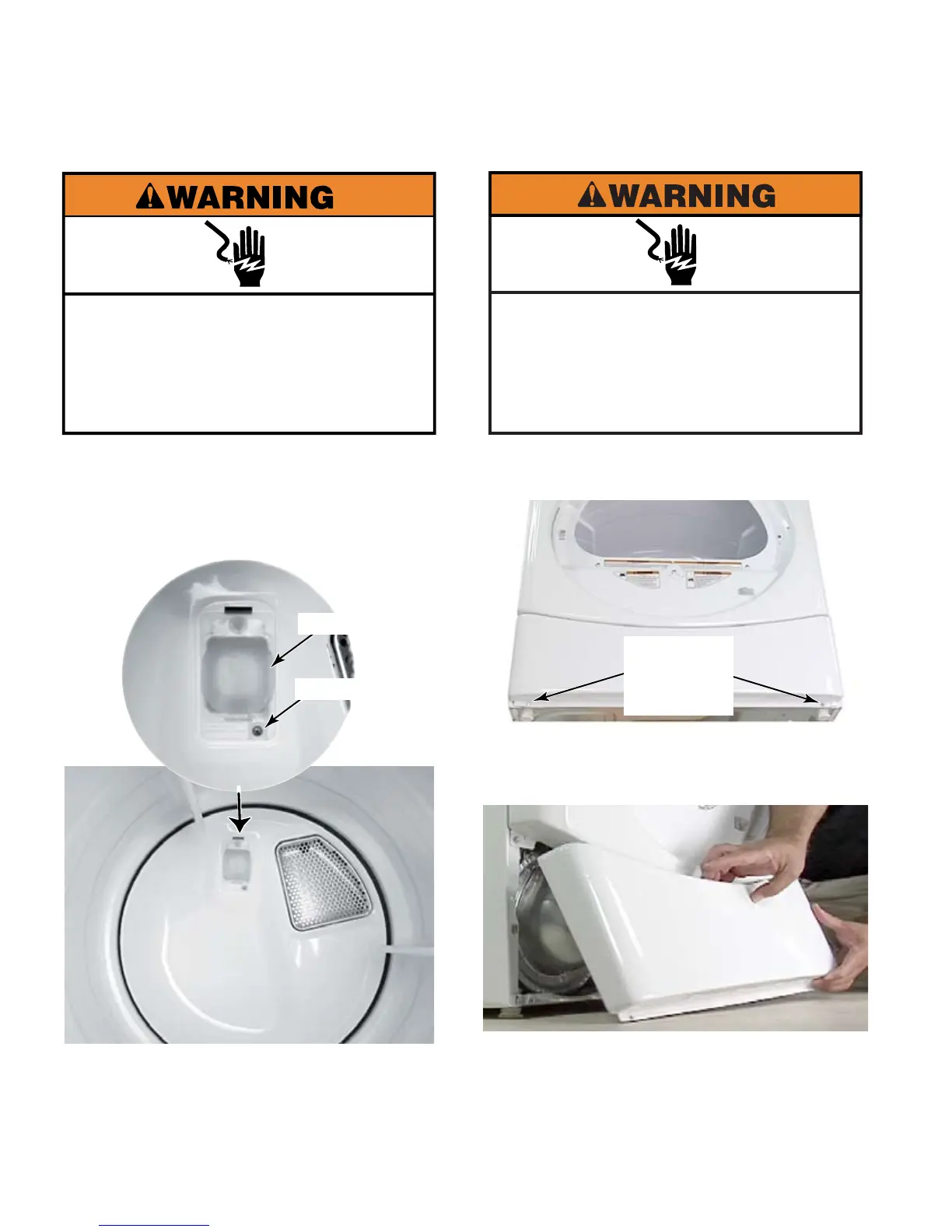
Remove two 1/4” hex head screws from the
bottom corners of the service panel.
Pull service panel out from the lower edge
and allow panel to drop down to release top
edge from dryer and remove service panel.
Tech sheet, parts list and wiring diagrams
are located behind the service panel.
1.
2.
3.
Two 1/4”
Hex Head
Screws
Electrical Shock Hazard
Disconnect power before servicing.
Replace all parts and panels before
operating.
Failure to do so can result in death or
electrical shock.
Open dryer door.
Remove screw from drum light lens.
Remove lens.
There is no light socket on a
commercial dryer, nor is there capability of
adding a light on commercial dryers. The
lens is maintained as a safety device.
1.
2.
3.
Lens Screw
Drum Light Lens
Electrical Shock Hazard
Disconnect power before servicing.
Failure to do so can result in death or
electrical shock.
Replace all parts and panels before
operating.





 To Next Page