26
PC Monitor and Connections
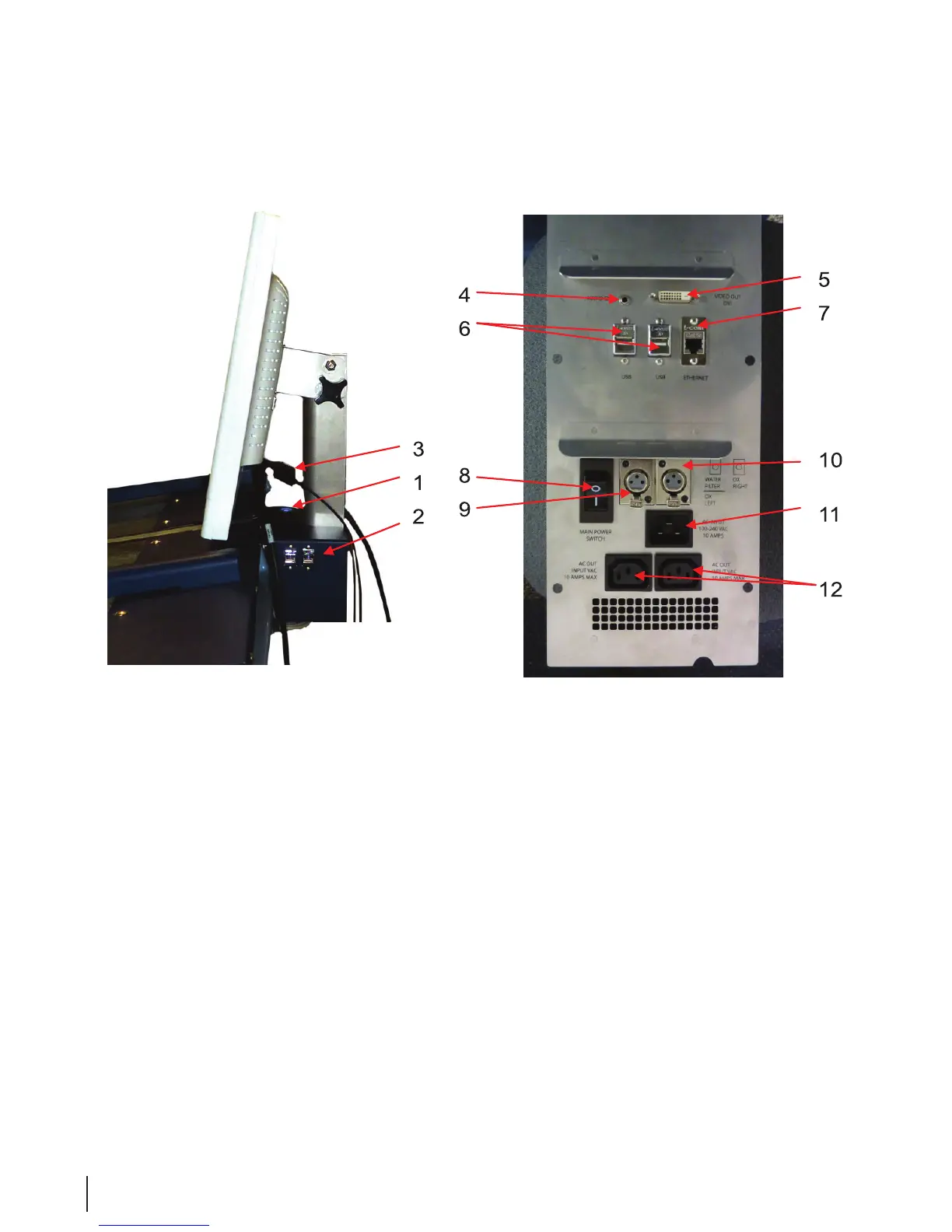
Figure 5 PC Monitor and Connections
1. On/Off Switch : Turns the computer on or off.
2. USB Ports : Connector between the PC and external peripherals, (i.e. mouse and keyboard)
3. Power Connection : Bottom of monitor in back (not shown)
4. Audio Out : Audio output connector for connection to monitor
5. Video Out DVI : DVI-I connector fro connection to monitor
6. USB : Extra USB connection for accessories (Printer or Barcode scanner)
7. Ethernet : Ethernet connection for Network or internet.
8. Main Power Switch : 10 Amp breaker with integrated main power switch.
9. Water Filter/OX Left : Low voltage output for connection to Water Filter System or left side of
Sterilox Control Box.
10. OX Right : Low voltage output for connection to right side of Sterilox Control Box.
11. AC Input : IEC 60320 C20 Inlet connector for Main input power connection.
12. AC Out : IEC 60320 C13 outlet connector for accessory power.



 To Next Page