49 of 271
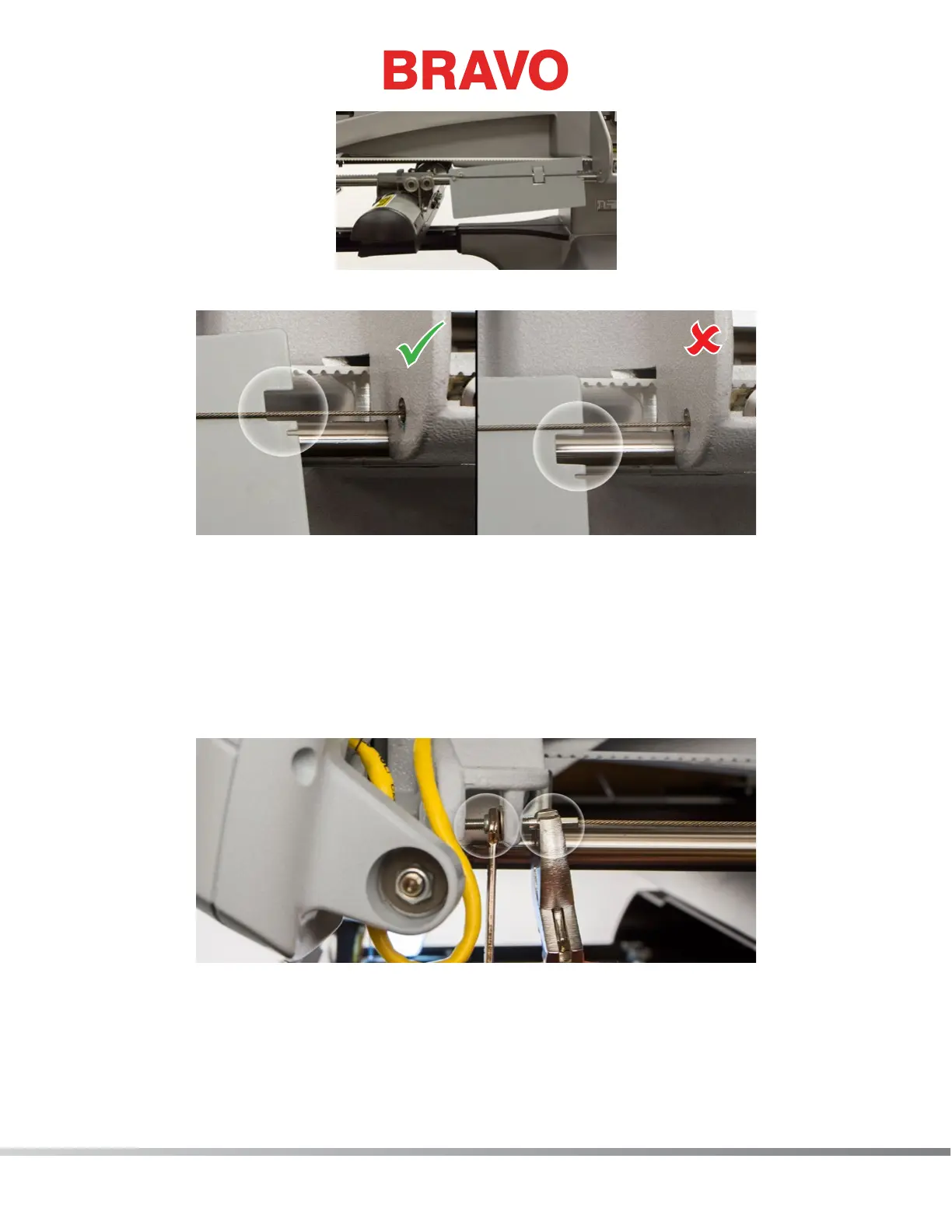
24. Determine if the cable tension is within specication.
• If the x-cable is positioned within the large cut-out on the right side of the x-cable tension
gauge as shown in the image, the tension is within specication. Continue to step 25.
• If the x-cable is not positioned within the large cut-out on the right side of the x-cable tension
gauge as shown in the image, the tension is out of specication and needs adjustment.
a. Remove, but do not discard, the side cover support foam.
b. Locate the M4 nut and the x-cable tension stud and the end of the x-cable where it
mounts to the front of the upper arm as shown in the image.
c. Using a 7mm wrench, grip the M4 nut and with a pair of pliers or adjustable wrench, grip
the x-cable stud at the end of the x-cable as shown in the image.
d. To increase tension, rotate the M4 nut with the wrench counter clockwise while holding
the x-cable stud with the pliers or adjustable wrench.



 To Next Page