Microtronix Access User Guide
7.2 LAPB Link Layer
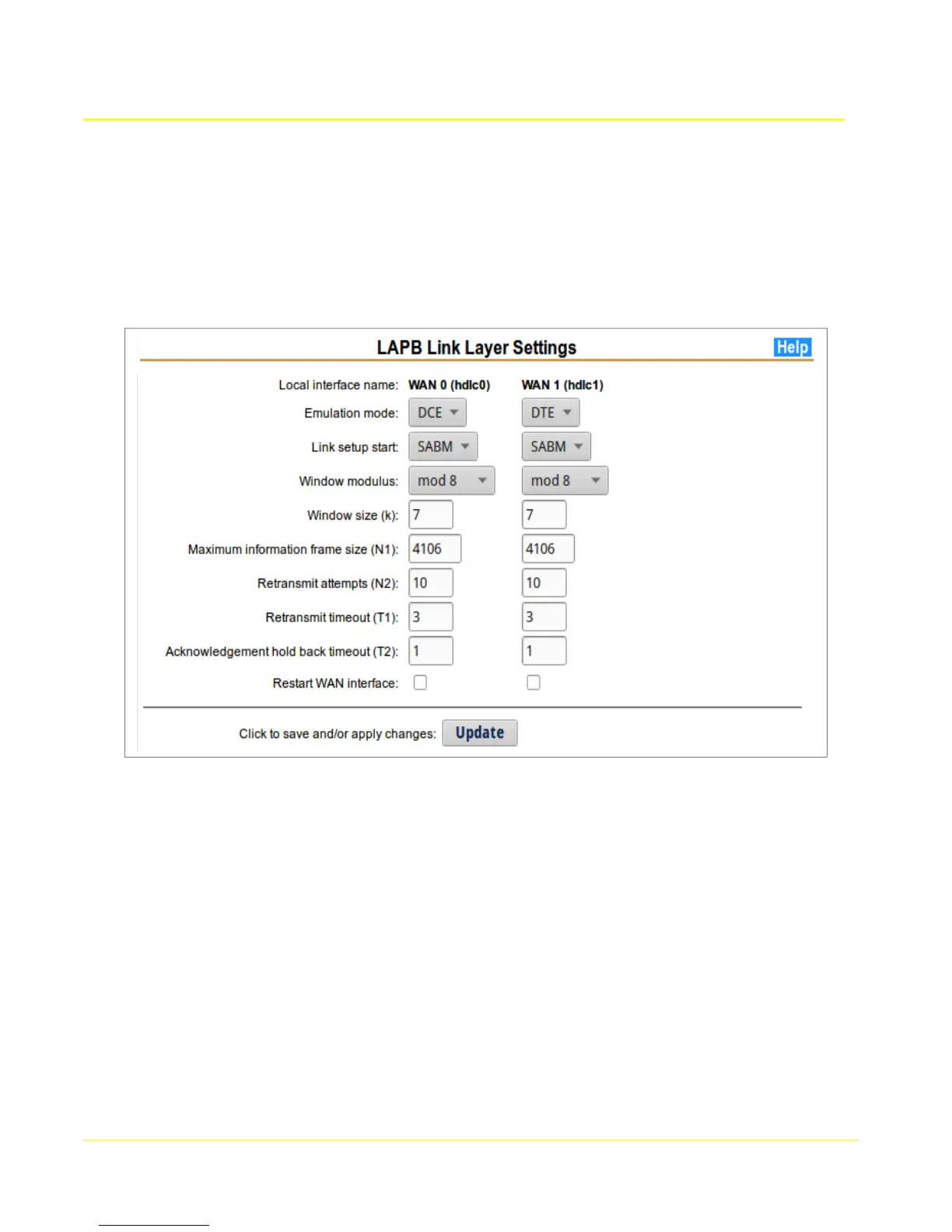
The LAPB Link Layer configuration page allows any of the X.25 data link layer 2 parameters to be set.
The values that MUST match to the attached X.25 equipment are the default window size and modulus.
The Emulation mode (DTE/DCE) MUST be set to the opposite of the attached peer. Other parameters
are not usually changed, but can be modified to fine-tune an interface.
7.2.1 LAPB Setup
1. Choose the Local Interface name column for the WAN interface to configure.
2. Modify the parameters to be compatible with the attached device.
3. In order for the configuration to take effect, the Restart WAN interface box must be checked.
Otherwise the saved configuration not take effect until the next time the interface is restarted.
4. Click the Update button to save changes, and restart the interface if selected.
7.2.2 LAPB Parameters
Local Interface name: The X.25 WAN Interface being configured. This will be WAN 0 (hdlc0),
or WAN 1 (hdlc1). WAN 1 is only present on the Access 4000.
Mode: The emulation mode may be specified as Data Connecting Equipment (DCE) or Data
Terminating Equipment (DTE). This MUST be opposite to the attached peer device.
Link Setup Start: This configures the first mode setting frame that will be sent (or passive
operation) when the link is starting up. SABM is the usual default, but other settings may be
used to resolve compatibility issues with the peer device.
51



 To Next Page