Microtronix Access User Guide
8.3 X.25 Connection Status
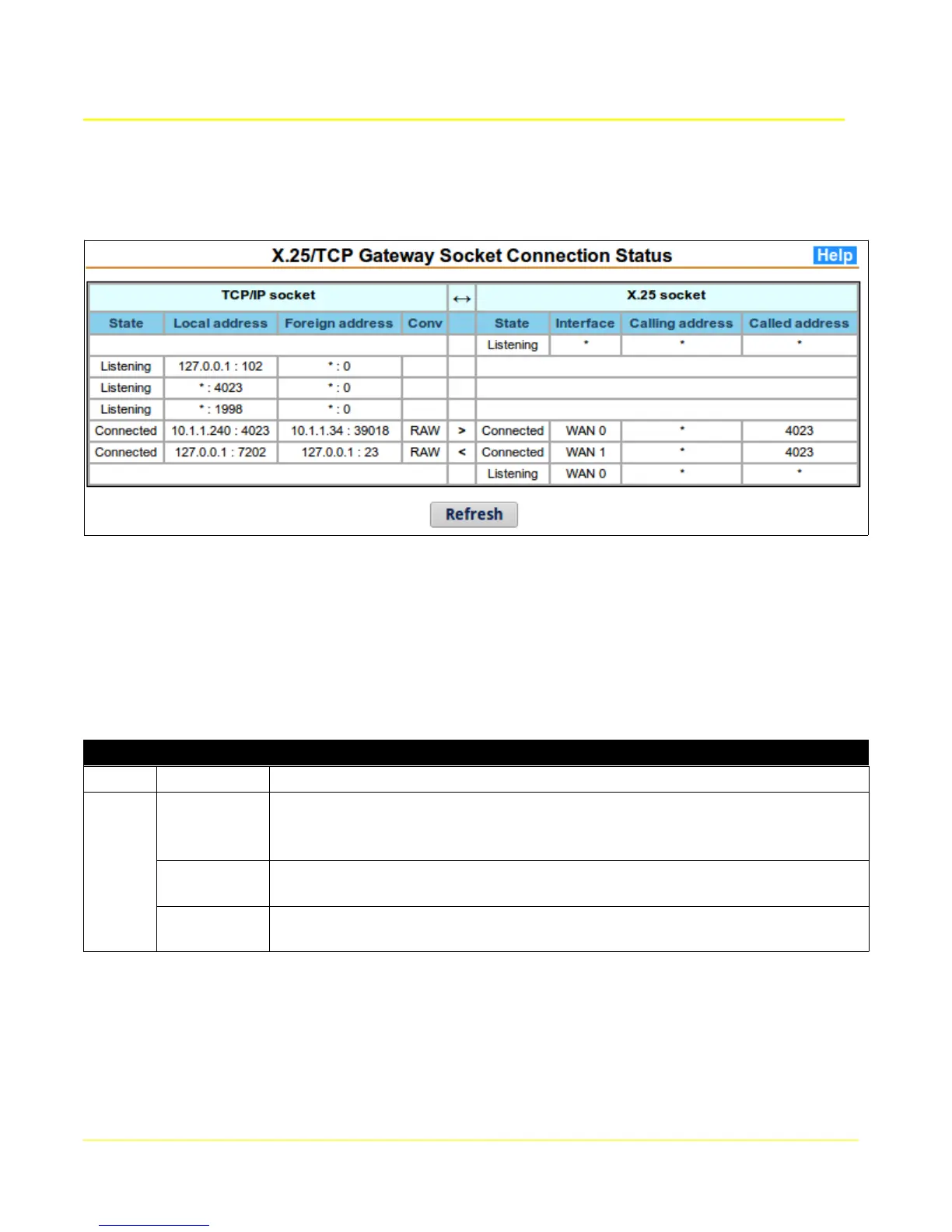
This page provides information on the current active sessions within the X.25-TCP gateway application.
These connections have been established in accordance with the Routing tables.
The table is divided into two parts, TCP/IP and X.25 sockets. Information is provided for each
TCP/X.25 gateway interconnection on a row, showing the X.25 and TCP counterpart sockets. Listening
and waiting sessions do not show a counterpart. The “<” and “>” arrows between the TCP and X.25
counterparts show the direction of the original connection.
Clicking the Refresh button will update the table to reflect recent changes.
The following table provides the meaning of each column.
Gateway Connections
Parameter Description
TCP/IP
State The current state of the gateway session towards the TCP/IP socket.
Disconnected / Connecting / Listening / Retry Listen / Reconnect /
Connected / Flow Control
Foreign
address
The IP address and TCP port number of the remote host associated with the
TCP socket.
Local
address
The IP address and TCP port number of the local interface associated with
the TCP socket.
71



 To Next Page