9-6 Patient Data Management
⚫ Press <Review> to exit from the image analysis to the Review status.
In image analysis status, the selected image is open on the screen, and the thumbnails
of the same exam are displayed on the Thumbnail area, you can turn the pages, delete
or send a selected image.
9.2.9 iVision
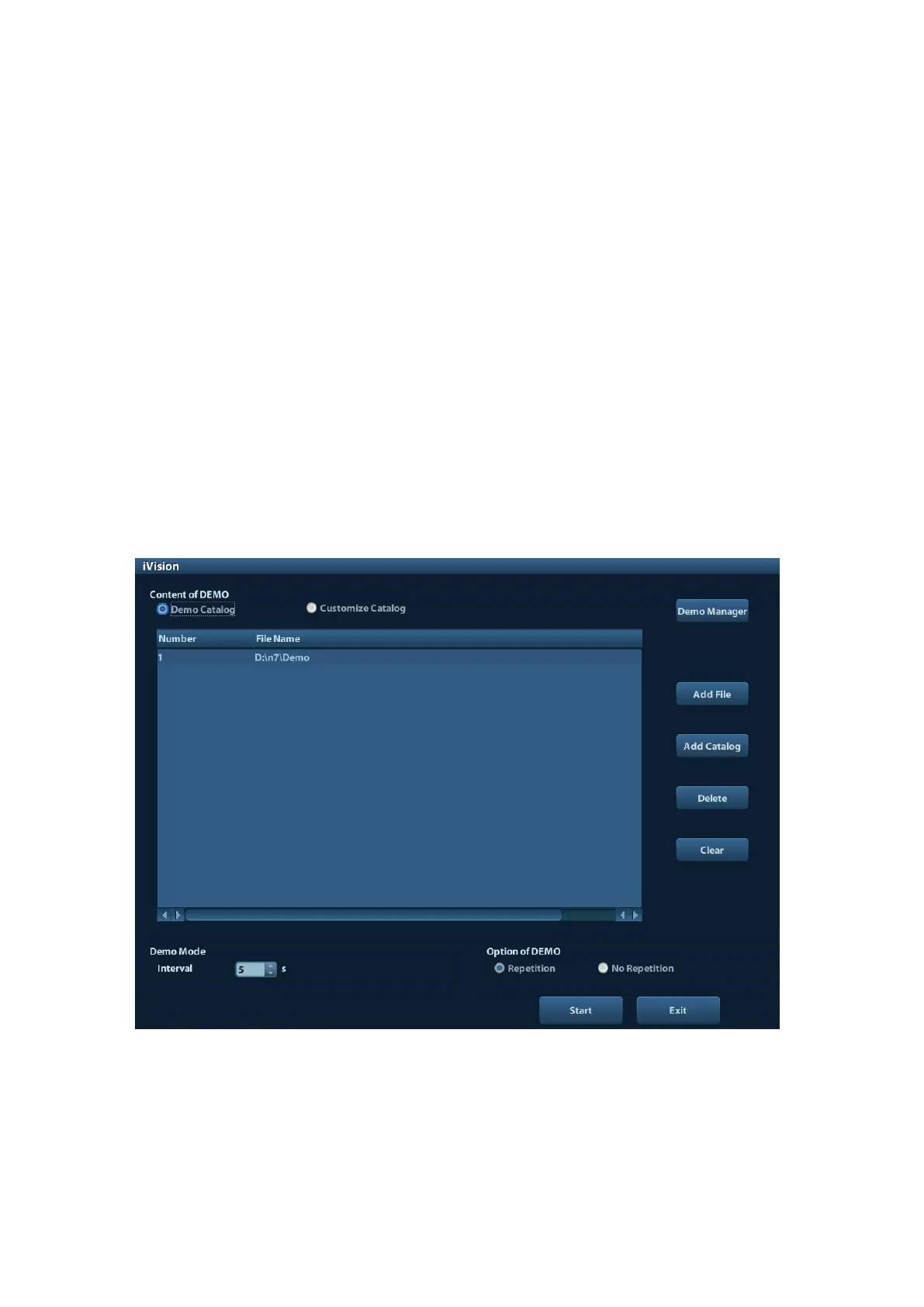
iVision function is used for demonstration of the images stored. Image files are played
according to file names one by one (including the image of system-relevant and PC-
compatible format).
To perform image demonstration:
1. Enter iVision screen:
Press the user-defined key for iVision on the control panel (setting path: [Setup]→
[System Preset]→[Key Config]).
2. Add the contents to be played and select the demo mode.
3. Select an item in the list, and click [Start] to begin the demonstration.
4. Click [Exit] or press <ESC> to exit the iVision status.
The iVision screen is shown as follows:
◼ Demonstration item
The demonstration items are the image files in the formats that the system supports.
You can add the exam data in patient database or system supported image files and
folders to demonstration list. For files and folders in demonstration list, the images in the
directory and subdirectory are played one by one, and the system will automatically
jump over the files that can’t be opened.



 To Next Page