4-2 Exam Preparation
◼ Click [Quick Register] on the screen to save the patient information quickly and return to
the main screen.
4.2.1 New Patient Information
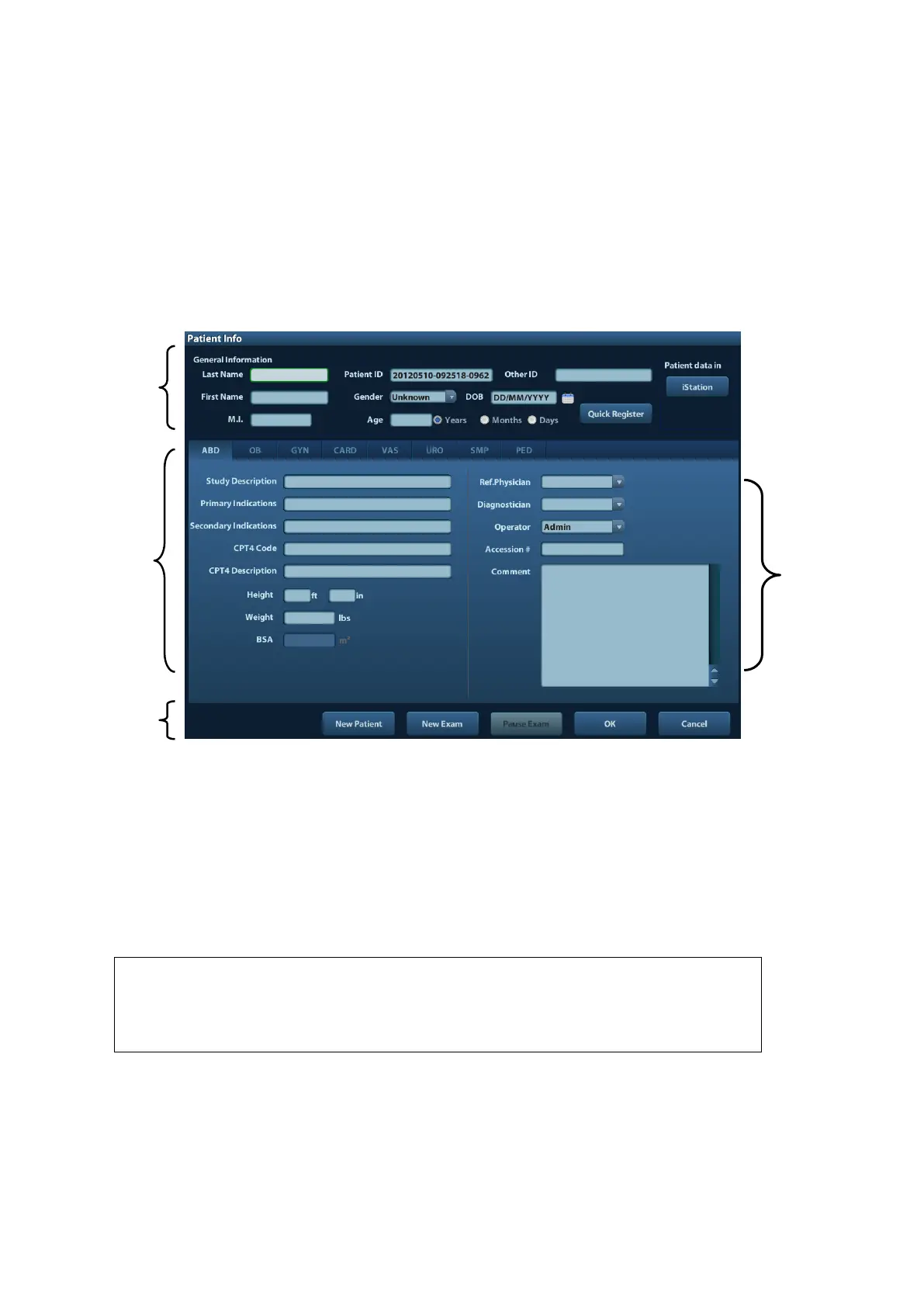
The Patient Info page is shown as below:
Place the cursor onto the targeted box. The field box is highlighted and a flashing cursor
appears. Information can be entered or selected from the options.
You can also change the cursor position by <Tab>, <Enter> or up/down controls.
Information includes:
1. General information
⚫ Name
Enter patient name through the keyboard. Characters of A through Z and 0 through 9
and “.” are allowed. “\”, “^” and “=” are not permitted.
⚫ Patient ID
Patient ID is generated automatically by the system after starting a new patient, and can
be modified manually. Once you enter the ID and confirm it, you are not allowed to
change it.
If enter an ID that is already existed in the system, a warning “The ID
existed, load data” prompts, and you can import the patient data. The
patient data can be edited after importing.
⚫ Other ID
The second ID of the patient used for other information like insurance ID.
⚫ Gender
Select Male, Female or Unknown for patient gender in the drop down list.
⚫ DOB (Date of birth):
You can either enter the birth date of a patient manually;


 To Next Page