System Maintenance 16-3
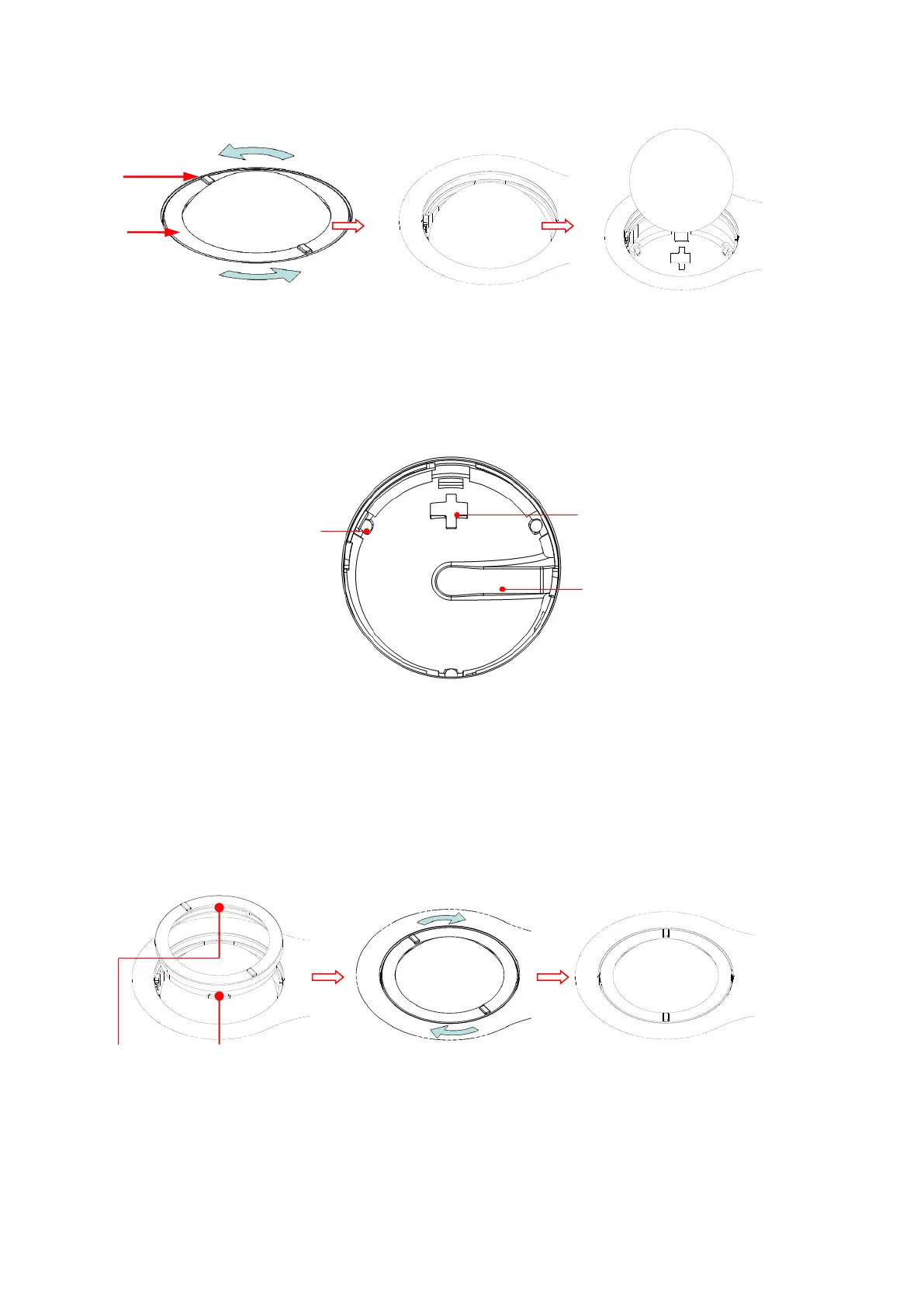
Rotate clamp ring 35 degrees anticlockwise Remove clamp ring Draw out the ball
b) Cleaning
Clean the lens slightly using the tissue until there is no foreign matter. Then clean the other
parts and the dust excluder. Make sure to exert force properly when clean the small ball,
otherwise, the small ball may drop down. See the figure below. No system shutdown is
required during the whole clean. Reinstall the ball and clamp ring after the clean is finished.
When liquid is spray onto the trackball area, most of the liquid can be discharged through
the waterspout, besides, you can dry the leaving water using the tissue or cloth.
c) Installing the trackball
Put back the ball, align the buckle with gap of the front cover, press the clamp ring with both
hands and rotate it 35 degrees clockwise to click the buckle. At this moment, the clamp ring
cannot be moved any further, it indicates that the clamp ring clicks in position. See the figure
below. See figure below.
◼ Cleaning the peripherals
Do the cleaning maintenance according to your actual peripheral configuration; items which
are not configured can be skipped.



 To Next Page