PRELIMINARY
miniDSP Ltd, Hong Kong / www.minidsp.com / Features and specifications subject to change without prior notice 23
4.4 NETWORK AUDIO
For streaming network audio, the miniDSP SHD Series processors use the popular network endpoint Volumio,
running on its own Linux processor board within the processor chassis. Volumio has a wealth of functions for
controlling and delivering network audio at sample rates up to 192 kHz.
This section will provide a few pointers to get you started. Additional Volumio features may be covered in the
Applications section of our website.
Please note however that since Volumio and the other software mentioned in this chapter is third-party
software, miniDSP support for this software is limited. We recommend using the support resources for each
software package.
4.4.1 Getting connected
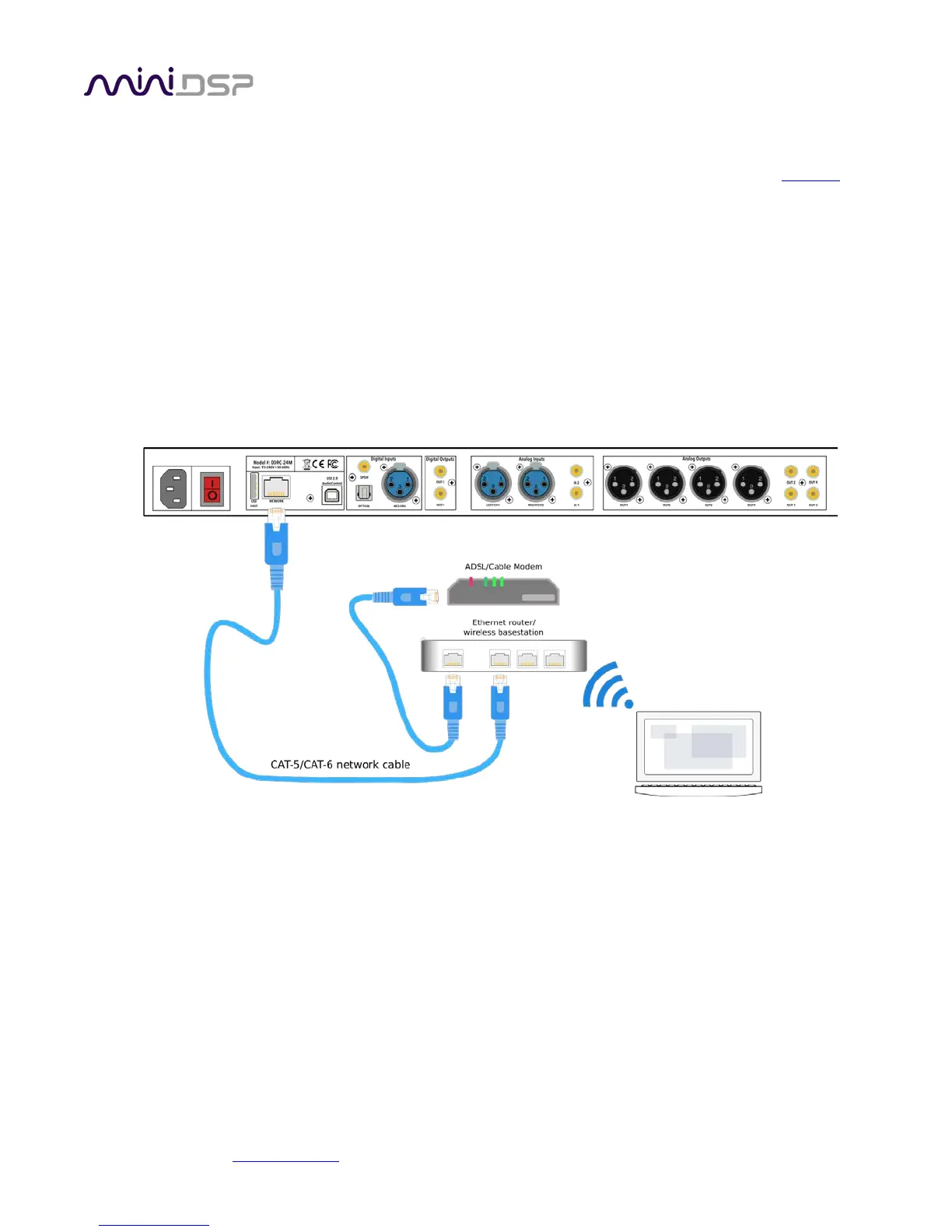
Connect an Ethernet cable from your home network router to the Ethernet port on the rear panel.
A short Ethernet cable is provided with the unit. If a longer cable is required, these are readily available from
computer stores and online. The recommended maximum length for Ethernet cables is 100 meters (330 feet).
Note that your router must be set to allow dynamic IP addresses i.e. DHCP. Most routers will have this function
enabled by default.
Note: Wi-Fi connection is not supported. Please use a hard-wired Ethernet connection.



 To Next Page