PRELIMINARY
miniDSP Ltd, Hong Kong / www.minidsp.com / Features and specifications subject to change without prior notice 57
8.6.2 Add single subwoofer
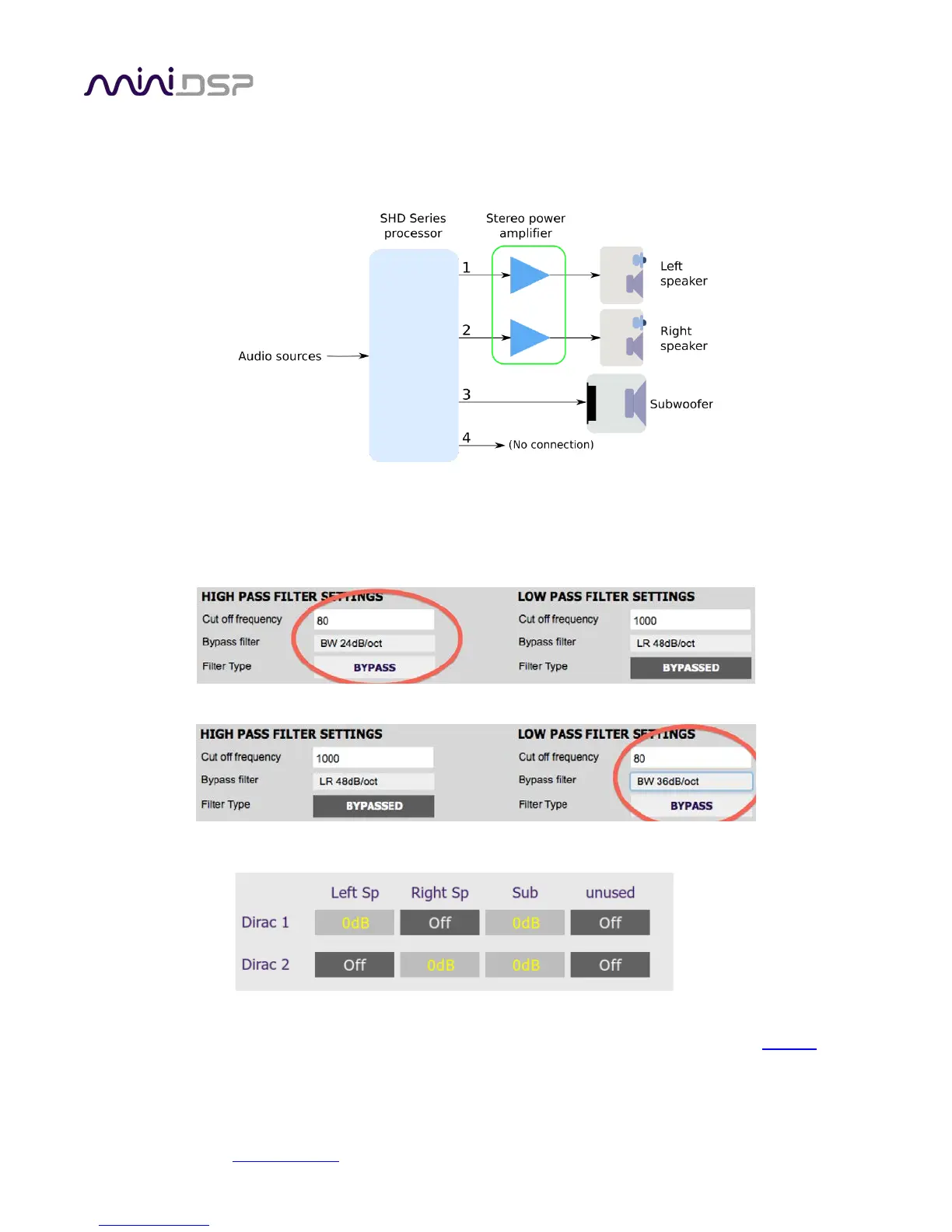
In a stereo room correction with subwoofer integration configuration, the plugin is set up to route low
frequencies from the left and right inputs to a single subwoofer output. This diagram illustrates the connections:
On the Outputs tab:
• Rename the output channels (from left to right) to “Left Sp”, “Right Sp”, “Sub” and “Unused”.
• Mute channel 4 (“Unused”).
• Set a high pass crossover filter on channels 1 and 2 (“Left Sp” and “Right Sp”). For example:
• Set a low pass crossover filter on channel 3 (“Sub”). For example:
On the Routing tab, set the matrix like this:
You may wish to do acoustic measurements to check and fine-tune your subwoofer crossover settings. The main
thing that you want to avoid is a large dip around the crossover frequency; for more detail, check this link
. After
you have set up the SHD plugin, save your configuration to a file. Then quit the SHD plugin, start DLCT and run
Dirac Live calibration as described in Sections
6 and 7.



 To Next Page