PRELIMINARY
miniDSP Ltd, Hong Kong / www.minidsp.com / Features and specifications subject to change without prior notice 61
9 PLUGIN REFERENCE
This section provides full details on each of the plugin processing blocks.
9.1 INPUT CHANNEL STATUS
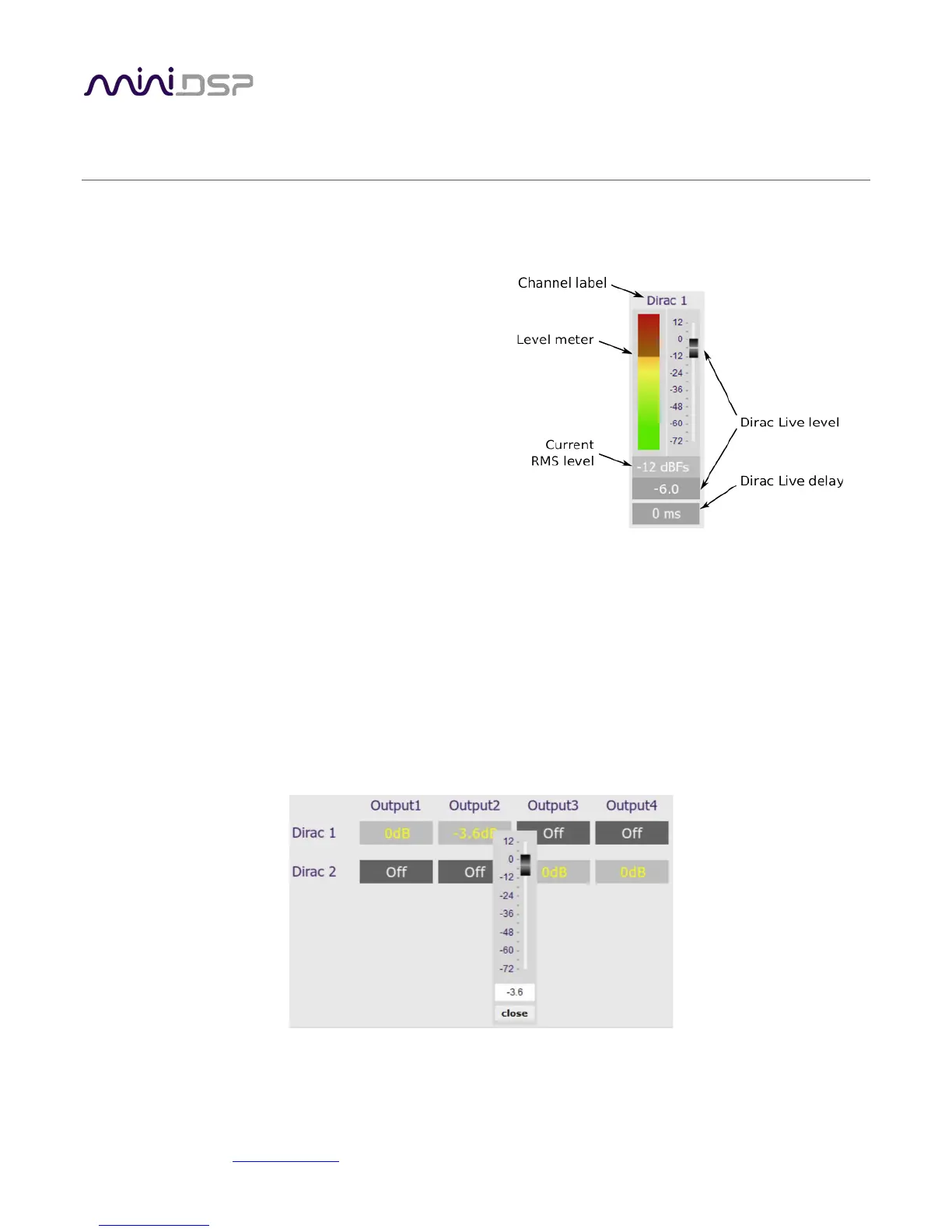
Each input channel strip displays useful information about
the levels and Dirac settings on that channel. The plugin
must be online to display information here.
Channel label
The name of the channel. These are set to “Dirac 1”
and Dirac 2” and cannot be renamed.
Level meter, Current RMS level
Displays the current signal level in real time.
Dirac Live level
Graphical and numerical display of the gain (in dB) that Dirac live has set for this channel.
Dirac Level delay
Numerical display of the delay (in milliseconds) that Dirac live has set for this channel.
9.2 ROUTING
The Routing matrix mixer is used to direct input channels (along the left) to output channels (along the top). To
turn on routing for a cross point, click on that cross point. At each cross-point, the gain of the signal being mixed
can be adjusted to a value between -72 and +12 dB. To adjust the gain, right-click on the cross point and a gain
control will appear. Adjust the gain with the slider, or by typing in the value directly, then click close.



 To Next Page