PRELIMINARY
miniDSP Ltd, Hong Kong / www.minidsp.com / Features and specifications subject to change without prior notice 48
8 CONFIGURING BACKEND PROCESSING
If you intend to run a configuration that is more than straight stereo room correction processing, then you will
need to configure the back-end processing prior to running Dirac Live calibration. Typically, this applies to
applications such as subwoofer integration and two-way active speakers.
If you are just using straightforward stereo room correction processing, you don’t need to read
this section.
8.1 HOW IT WORKS
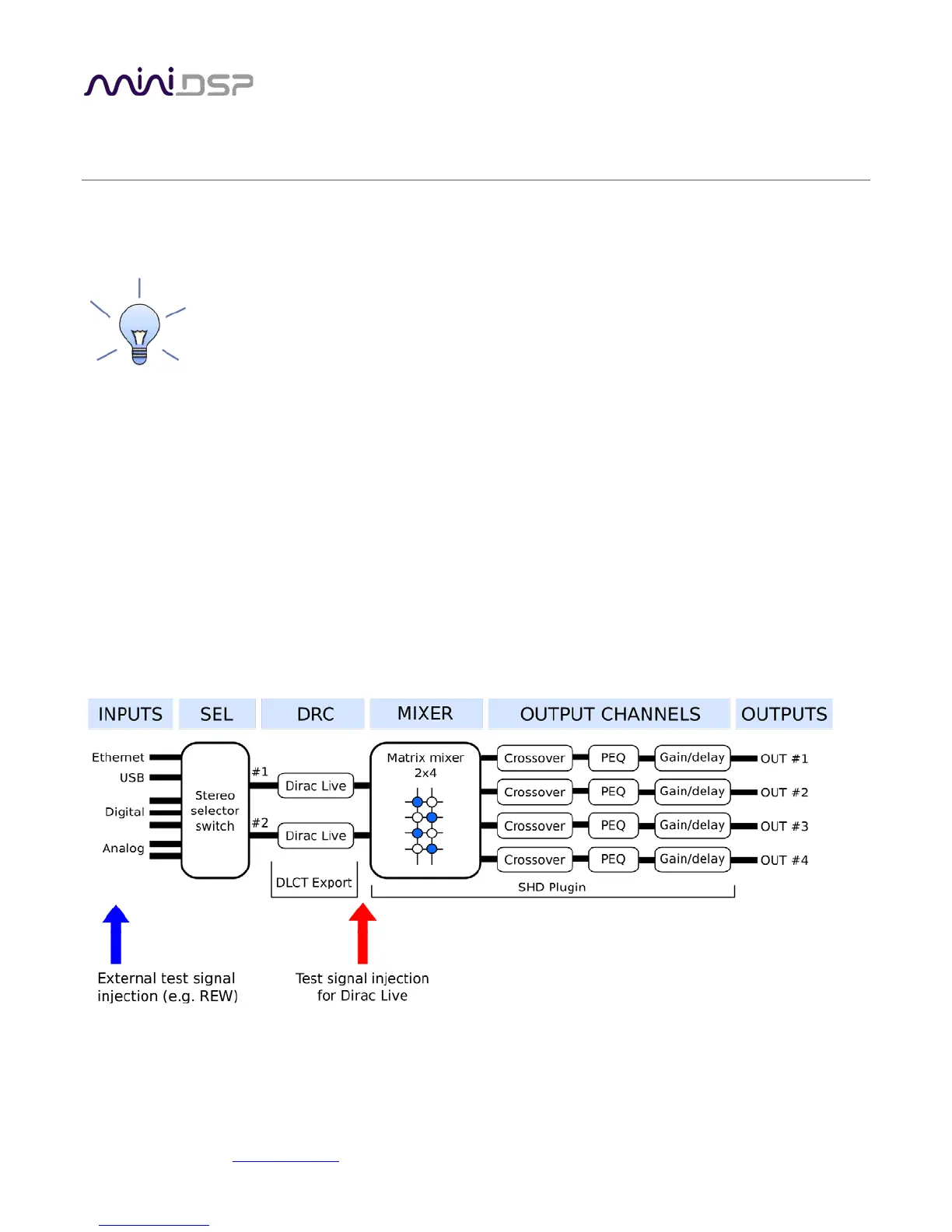
To understand how the SHD Series processor combines Dirac Live with miniDSP’s audio processing, refer to the
signal flow diagram below:
• One of the stereo input sources is selected by the user and passed to two channels of Dirac Live processing
for digital room correction (DRC).
• The Dirac Live outputs are fed into a 2-in 4-out matrix mixer. The two input channels to the mixer, labeled
“Dirac 1” and “Dirac 2” in the plugin interface, route and mix the two input channels in any manner to the
four output channels.
• The outputs from the mixer are processed through a comprehensive set of DSP functions – crossover filters
(high pass and low pass), parametric EQ, and individual gain and delay adjustments. These are all optional –
you can configure them if you want to, according to your particular application.
The two “halves” of the signal flow are configured by two different programs – DLCT, and the SHD plugin. In the
case of DLCT, correction filters are loaded into four “slots.” In the case of the SHD plugin, configurations are set
up or loaded in one of four presets. When a preset is selected, the corresponding Dirac Live filters and the plugin
configuration are loaded into the working DSP memory.



 To Next Page