PRELIMINARY
miniDSP Ltd, Hong Kong / www.minidsp.com / Features and specifications subject to change without prior notice 47
7.4 LOADING FILTER SETS
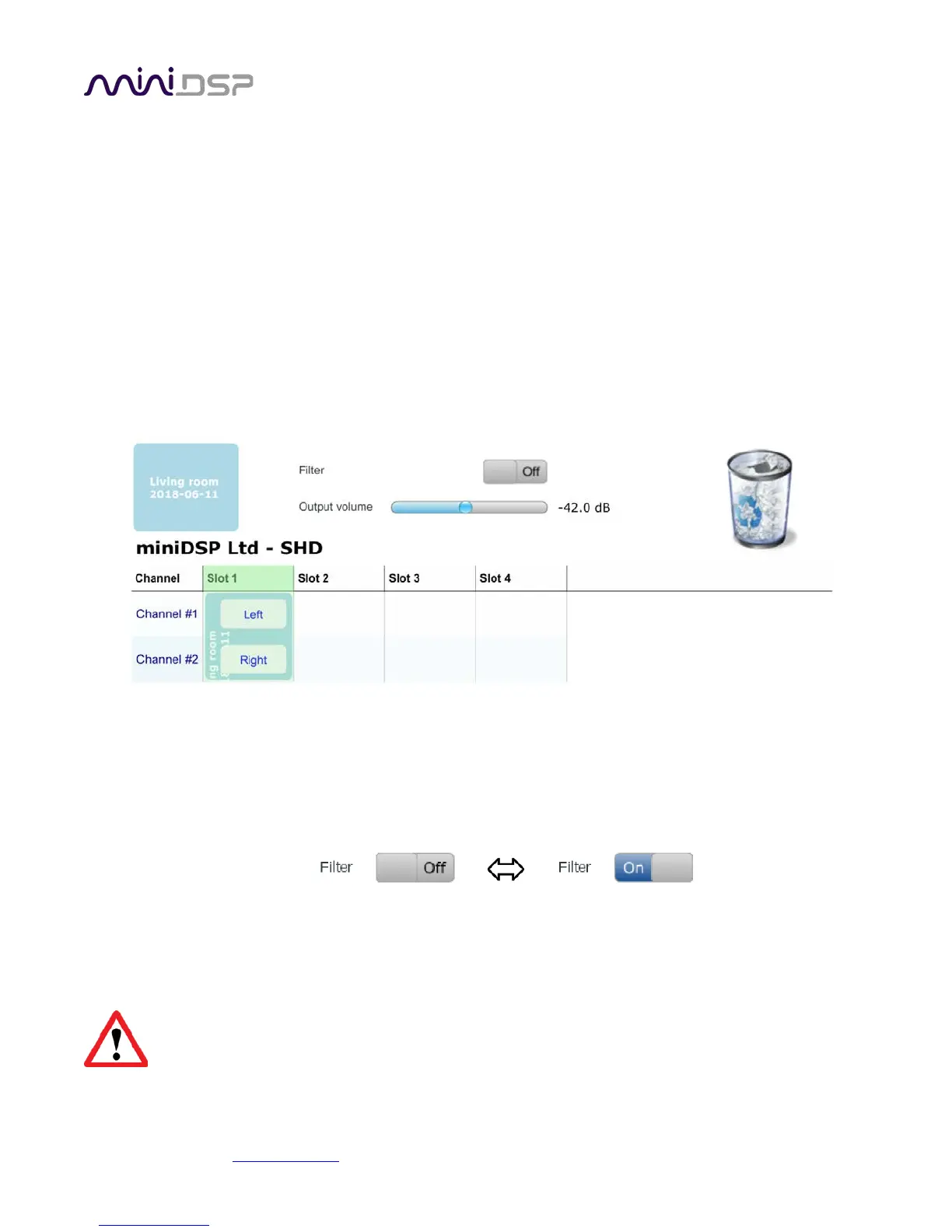
The Export tab initially shows four empty “slots” for filter sets (a filter set is one filter for the left channel and
one filter for the right channel). Filter sets are managed with a “drag and drop” metaphor:
• To load the most recently generated filter set into the processor, drag the box at the top left (labeled “”Living
room 2018-06-11” in the example) and drop it onto an empty slot (*).
• To remove a filter set, click on its name (oriented vertically), drag it from the slot and drop it on the trashcan
icon at the top right.
• To load a filter set into a slot that already has filters loaded, first delete the loaded filter set by dragging it
onto the trashcan icon. Then drag and drop the current filter set onto the now-empty slot.
This example screenshot shows Slot 1 loaded:
The two additional controls on this tab are:
Filter
Turn this on to enable the Dirac Live® correction filters. This can also be done from the front panel or
remote control.
Output volume
Adjust the slider to adjust the output volume of the processor. This can also be done from the front panel
or remote control.
(*) If using advanced/backend processing, ensure that you load the filters into the same slot as the
preset selected when running the measurements for Dirac Live calibration.



 To Next Page