24 (119) Telephone Access System Installation and Operation Manual Version 3.7
LT-969 Copyright January 2017
Enclosure Installation
2.2.1 Installing the Universal enclosure
The Universal enclosure mounts inside the wall with or without the TX3-UFT
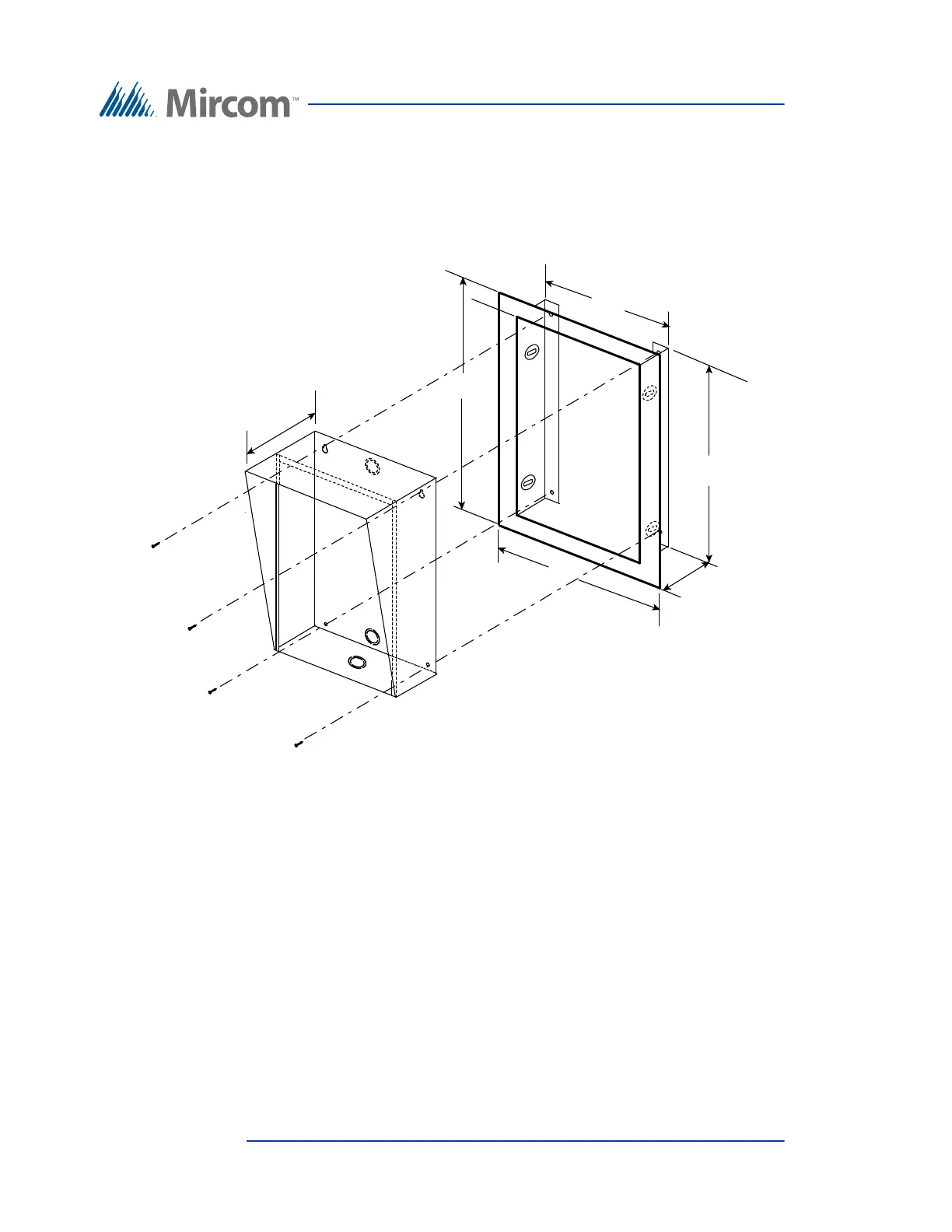
Universal Series Flush Trim Ring TX3-UFT. This Trim Ring houses the
universal series enclosure as shown in Figure 1.
Figure 1. TX3-UFT Universal Series Flush Trim Ring
To install the Universal enclosure with the Flush Trim Ring to the
wall stud
1. Find a suitable location for the enclosure next to a wall stud.
2. Using the enclosure as a template, trace an opening in the wall for the cut
out with one side aligned with the side of the wall stud.
3. Cut an opening in the wall ensuring that one side is aligned with the wall
stud.
10 5/8"
13 1/8 "
16 1/4”
19 5/8"
2 3/4"
4 1/2 "
Dimension of the Enclosure without
the flush trim.
Cut out in wall should be :
16.25” H x 10.6”W x 2.75” D at the bottom
3” at the top
Universal
Enclosure
Semi-Flush Trim
TX3-UFT





 To Next Page