Chapter Six: Embedded Web-Based GUI and Diagnostics Setup Mode
62
Plot Page – Setup Mode
In “Setup Mode” this page enables the user to adjust the Operating Pressure setting to optimize control
performance and plot and collect data. To learn more about how to tune the MFC to your system see page XX
in the xxx section. This section only deals with setting the values.
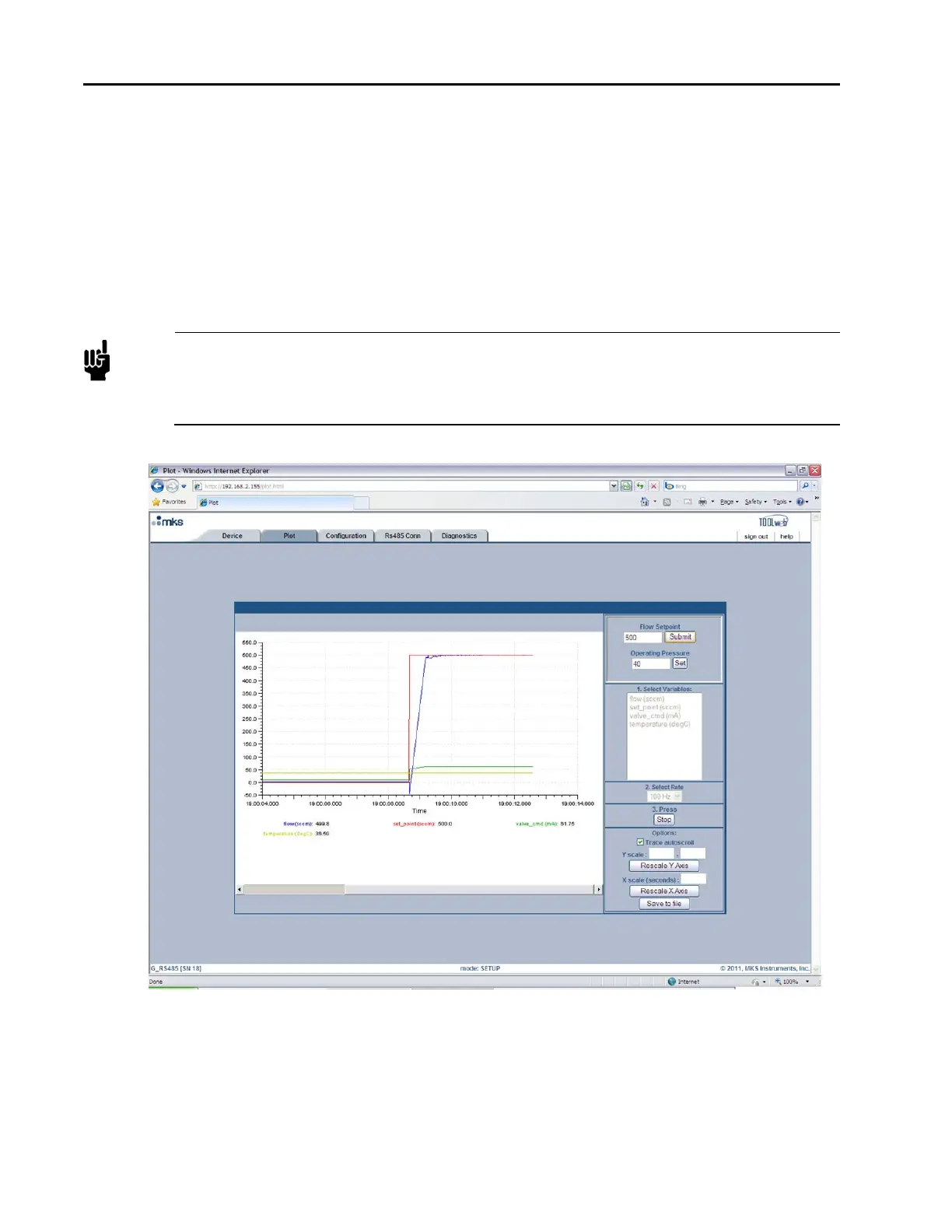
Figure 17, Embedded GUI Plot Page in Setup Mode is a screen capture of the Plot Page in “Setup Mode.” The
Flow Setpoint and Operating pressure are located above the “Select Variables” section in the top right-hand
corner of the page. This page enables you to send a setpoint to the MFC through Ethernet (see notes below),
watch the MFC’s performance on the plot, and adjust the Operating Pressure parameter accordingly to
optimize the performance of the MFC.
Note
For Analog units, sending a setpoint through Ethernet will not work unless the Analog checkbox
is selected. This checkbox tells the device to bypass the analog setpoint on the analog/power
interface. To begin sending setpoints through the analog interface again, either uncheck the
Analog checkbox or close the browser.
Figure 17: Embedded GUI, Plot Page in Setup Mode
Before a MFC leaves the factory the performance is checked with Nitrogen in a typical application. During
this test the control parameters are set so that the device’s performance is optimized.



 To Next Page