Performing initial charging after head cleaning 143
The message on the left will appear.
[4]
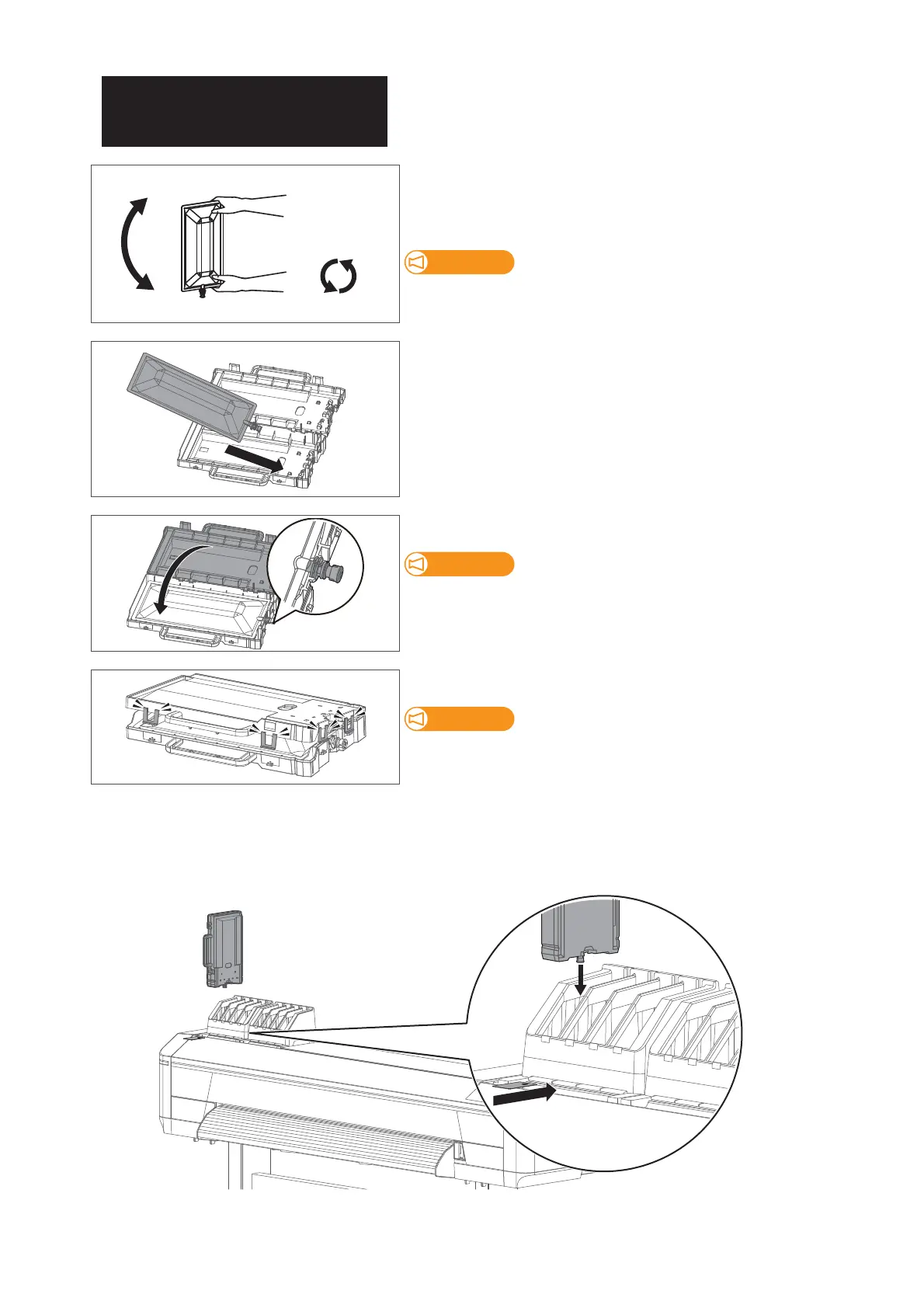
Make sure you agitate the ink bag after you prepare it.
• Face the ink spout side upwards for 3 seconds.
• Invert it and count for 3 seconds.
• Repeat that 3 times.
Be sure to use new ink bags.
If a half-used ink bag does not have enough ink, it will run out of ink
during initial ink charging and will consume more ink.
[5]
Put the ink bag into the case.
[6]
Close the ink bag case.
Make sure the spout of ink bag is properly fitted into the groove in the
case.
If not fitted, the printer cannot correctly detect ink bag.
Close all the latches (×4) of the case properly.
Check that all the latches (×4) are closed.
If not, it may cause ink spillage.
[7]
Insert the ink bag cases and S/C cards into each slot.
• Match the colors of the ink color indicating label on the printer and the label on the ink bag.
• Face the latch side toward you and insert the case into each slot.
• Make sure that they are fully inserted.



 To Next Page