Cleaning around the capping unit 123
Cleaning period:
• When print blurring and dot missing remain after head cleaning is done.
Preparation:
• Cleaning stick
Cleaning around the capping unit
Important!
During cleaning, please note the followings.
• Use a dry cleaning stick. A damp stick can cause damage to the print head.
• Do not touch the tip of a cleaning stick with fingers. Skin oil will damage the print head.
• Do not reuse a cleaning stick. Dust on the stick will damage the print head.
• This cleaning takes about 5 minutes. If it takes longer, the stick will get dry causing damage to the print head.
[1]
Put the printer into the CR maintenance mode.
"Putting the printer into the CR maintenance mode" P. 120
[2]
Open the front cover.
[3]
Open the maintenance cover on the right side.
[4]
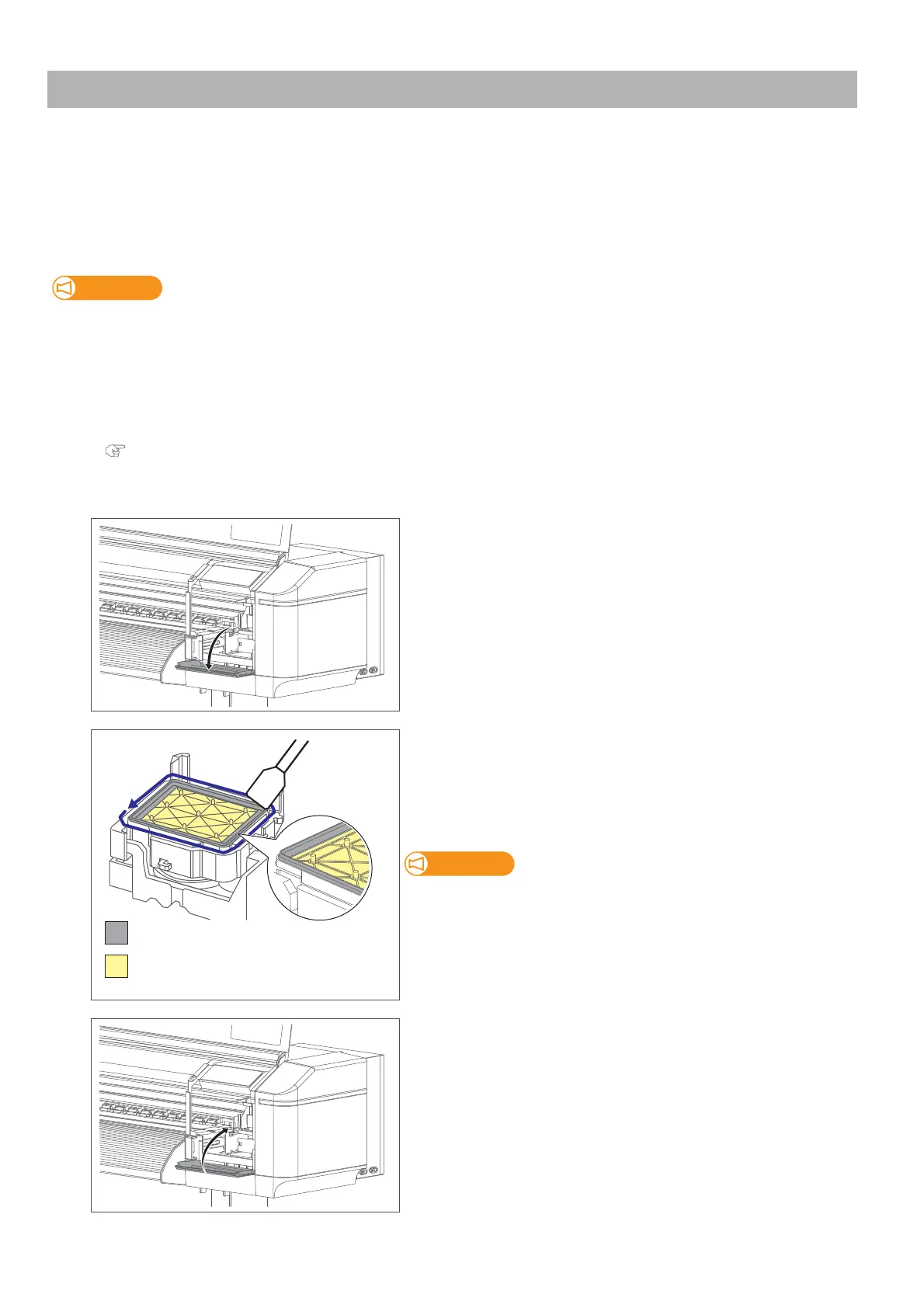
Use the cleaning stick to clean around the rubber part of the capping
unit to remove the ink deposits and dust.
(Capping unit)
XPJ-1641SR: 1
XPJ-1682SR: 2
If it is hard to remove the stain, perform “Short” Head cleaning, and then
clean again.
[5]
Close the maintenance cover.
DO NOT touch the absorber (yellow)
Clean this part (grey)



 To Next Page