22 Load a roll media into the printer
1 Loading a roll media
Items Required:
•Roll media
•Media flange: ×2
Important!
Depending on the size of media, two or more people are required.
Load a roll media into the printer
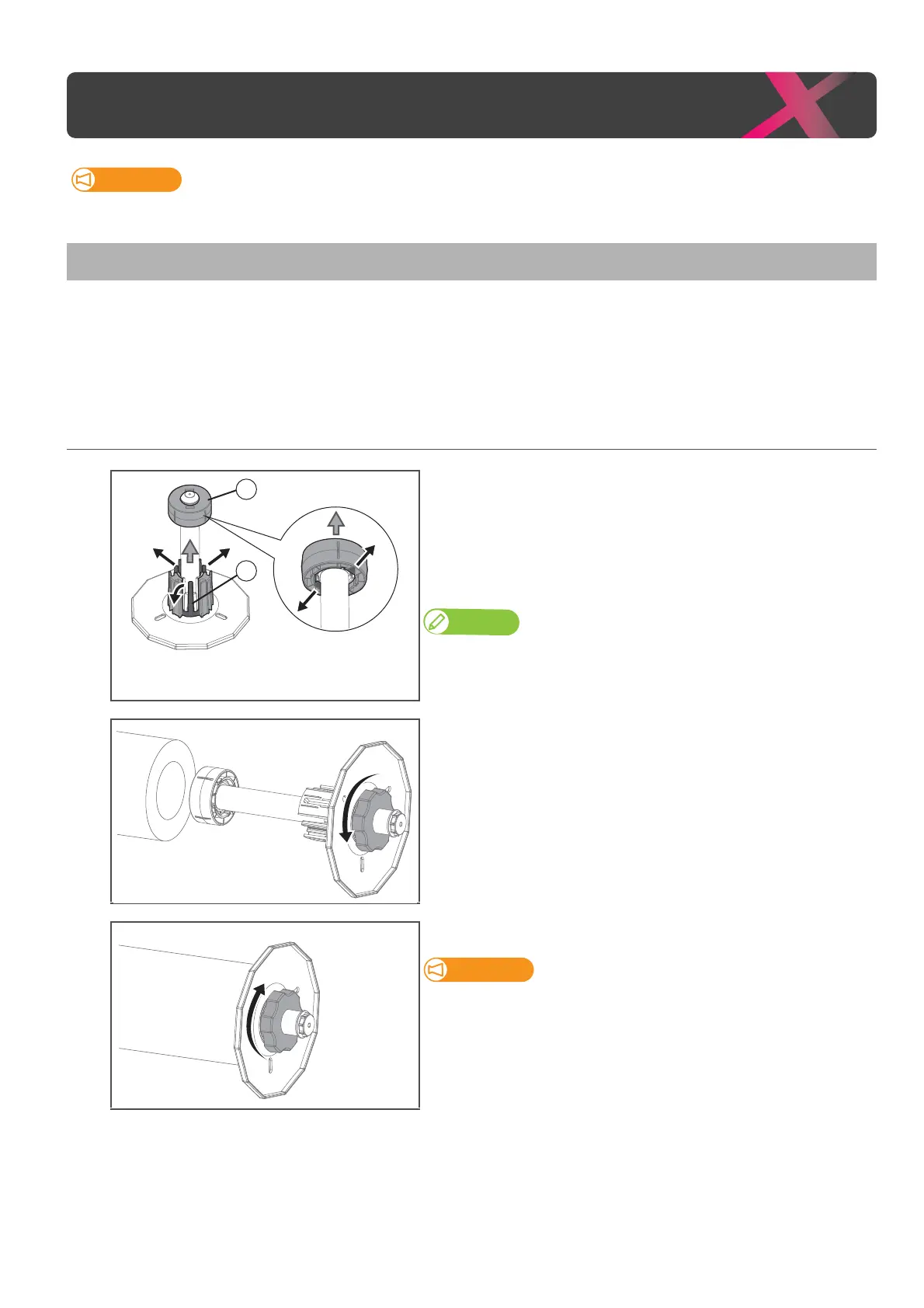
1. Attach flanges to the media
[1]
(If you are using 2-inch core roll media) Remove the 3-inch adapter
from the media flange.
: Pull two tabs on the adapter outward, then remove it from the
flange.
: Pull three tabs on the adapter outward, then remove it from the
flange.
Note
•If
adaptor cannot be removed, turn the handle on the flange anti-clockwise
to loose (see Step 2), then remove it.
• If you are using 3-inch core roll media, skip this step.
[2]
Push the media flange (×2) into the both ends of the media core.
• Before inserting, twist the handle on the flange anticlockwise to unlock it.
[3]
Twist the handle clockwise to lock the flange.
Check that the flange is firmly locked.
If not, the media can be removed from the flanges, affecting the print
quality.



 To Next Page