z
o
r-+
rtl
VI
740
Error
Messages
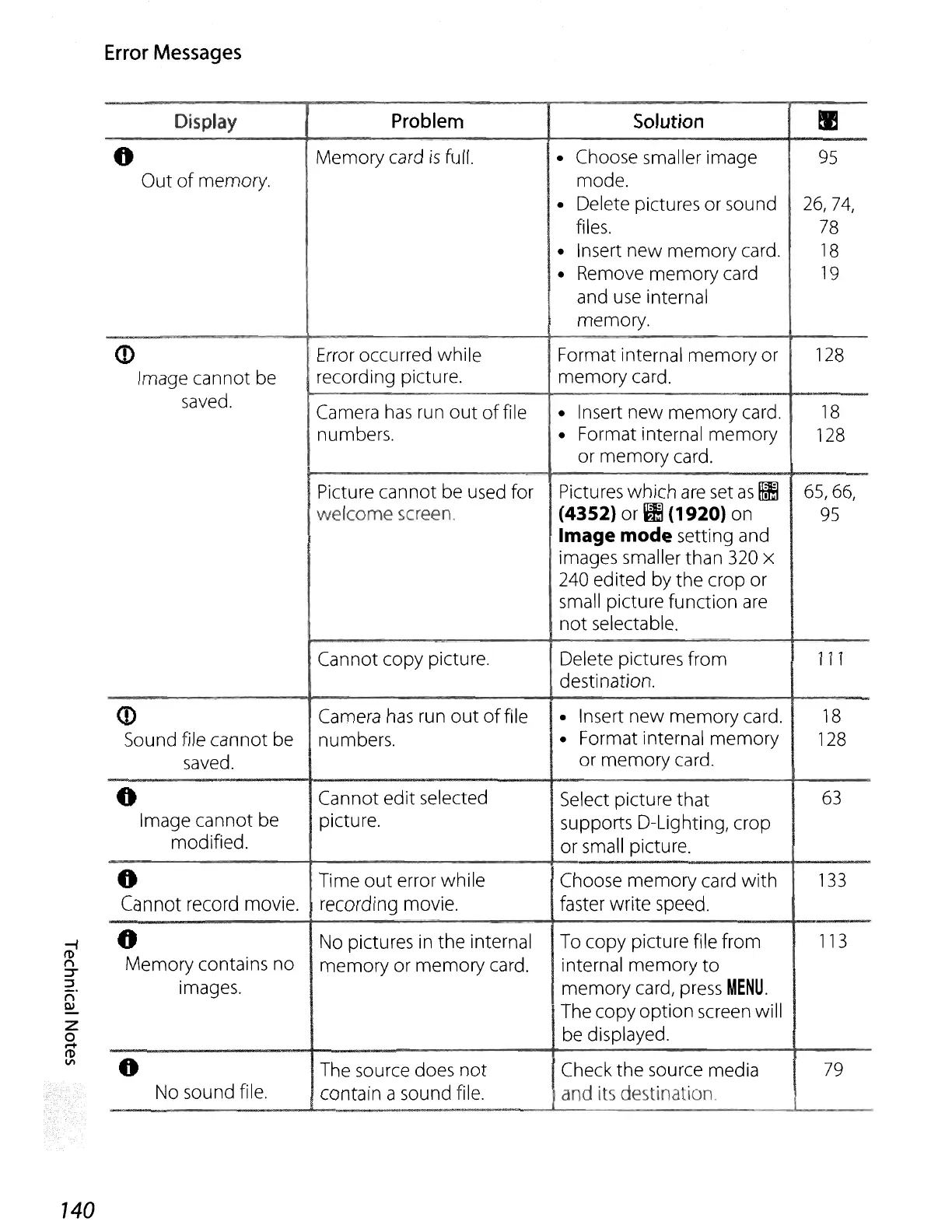
Display
Problem
Solution
~
0
Memory card
is
full.
• Choose smaller image
95
Out
of
memory. mode.
• Delete pictures or sound
26,74,
files.
78
• Insert
new
memory card.
18
• Remove memory card
19
and
use
internal
memory.
<D
Error occurred while Format internal memory or
128
Image cannot
be
recording picture. memory card.
saved.
Camera
has
run
out
of
file
• Insert
new
memory card.
18
numbers.
• Format internal
memory
128
or memory card.
Picture cannot
be
used for Pictures which
are
set
as
III
65,66,
welcome screen.
(43S2)or~(1920)on
95
Image mode setting and
images smaller than
320
x
240
edited by the crop or
small picture function
are
not
selectable.
Cannot copy picture.
Delete pictures from
111
destination.
<D
Camera
has
run
out
of
file
• Insert new memory card.
18
Sound file cannot be
numbers.
• Format internal memory
128
saved.
or memory card.
0
Cannot edit selected
Select picture
that
63
Image cannot be
picture.
supports D-Lighting, crop
modified.
or
small picture.
0
Time
out
error while Choose memory card with
133
Cannot record movie. recording movie. faster write speed.
..
No pictures
in
the
internal To copy picture file from
113
Memory contains no
memory or memory card.
internal memory
to
images.
. memory card, press
MENU.
The copy option screen will
be
displayed.
0
The source does
not
Check the source media
79
No sound file.
contain a sound file. and its destination.















 To Next Page