Error
Messages
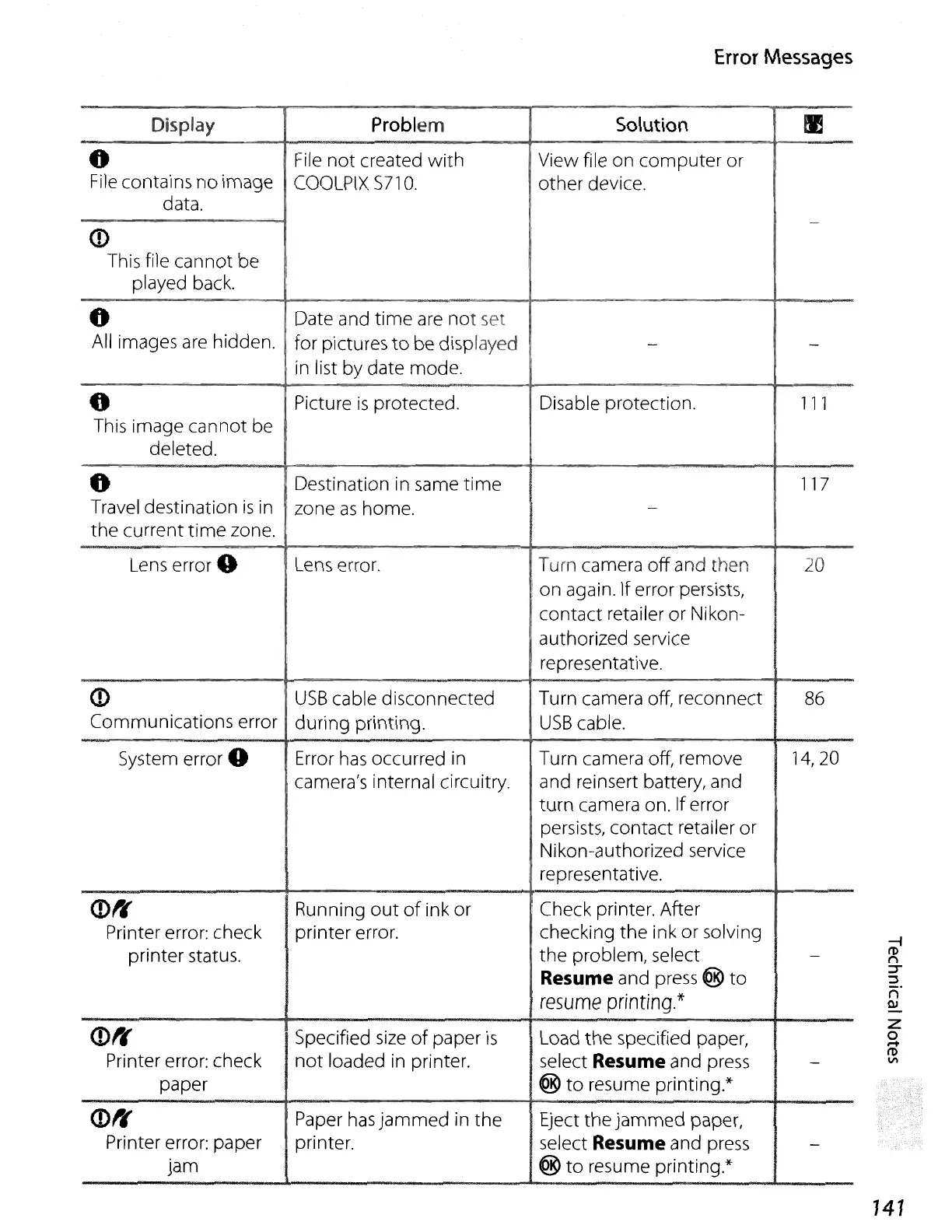
Display
Problem
Solution
!I
0
File
not
created
with
View file on
computer
or
File
contains no image
COOLPIX
S71
O.
other
device.
data.
-
0)
This file cannot be
played back.
0
Date and
time
are
not
set
All images
are
hidden.
for pictures
to
be displayed
-
-
in list by date mode.
0
Picture
is
protected.
Disable protection. 111
This image cannot be
deleted.
0
Destination in same
time
117
Travel destination
is
in
zone
as
home.
-
the
current
time
zone.
Lens
error 0
Lens error. Turn camera
off
and then 20
on
again. If error persists,
contact retailer or Nikon-
authorized service
representative.
0)
USB
cable disconnected Turn camera off, reconnect
86
Communications error
during printing.
USB
cable.
System error
0 Error
has
occurred
in
Turn camera off, remove
14,20
camera's internal circuitry.
and reinsert battery, and
turn camera on. If error
persists, contact retailer or
Nikon-authorized service
representative.
<D',
Running
out
of
ink
or
Check printer. After
Printer error: check printer error.
checking
the
ink
or
solving
printer status.
the
problem, select
-
Resume
and press ®
to
resume
printing.*
<D1r
Specified
size
of
paper
is
Load
the
specified paper,
Printer error: check
not
loaded
in
printer. select
Resume
and press
-
paper
@
to
resume printing.*
0)',
Paper
has
jammed
in
the
Eject
the
jammed
paper,
Printer error: paper printer.
select
Resume
and press
-
jam
@
to
resume printing.*
141















 To Next Page