ACCESS GATEWAY
156 System Administration
Importing Port-Location Assignments {Import}
This procedure shows you how to import port-location assignments from the “location.txt” file. The
location.txt file is stored in: /flash/location.txt (resident in the Access Gateway’s flash memory).
If you have never exported port-location assignments (since installing the Access Gateway
at this site), the location.txt is empty. See also Exporting Port-Location Assignments
{Export} on page 153. You can create your own location.txt file,
FTP to the Access Gateway’s flash directory (for example, [IP address]/flash/ location.txt),
and upload the file. See also Creating a “location.txt” File on page 156.
1.
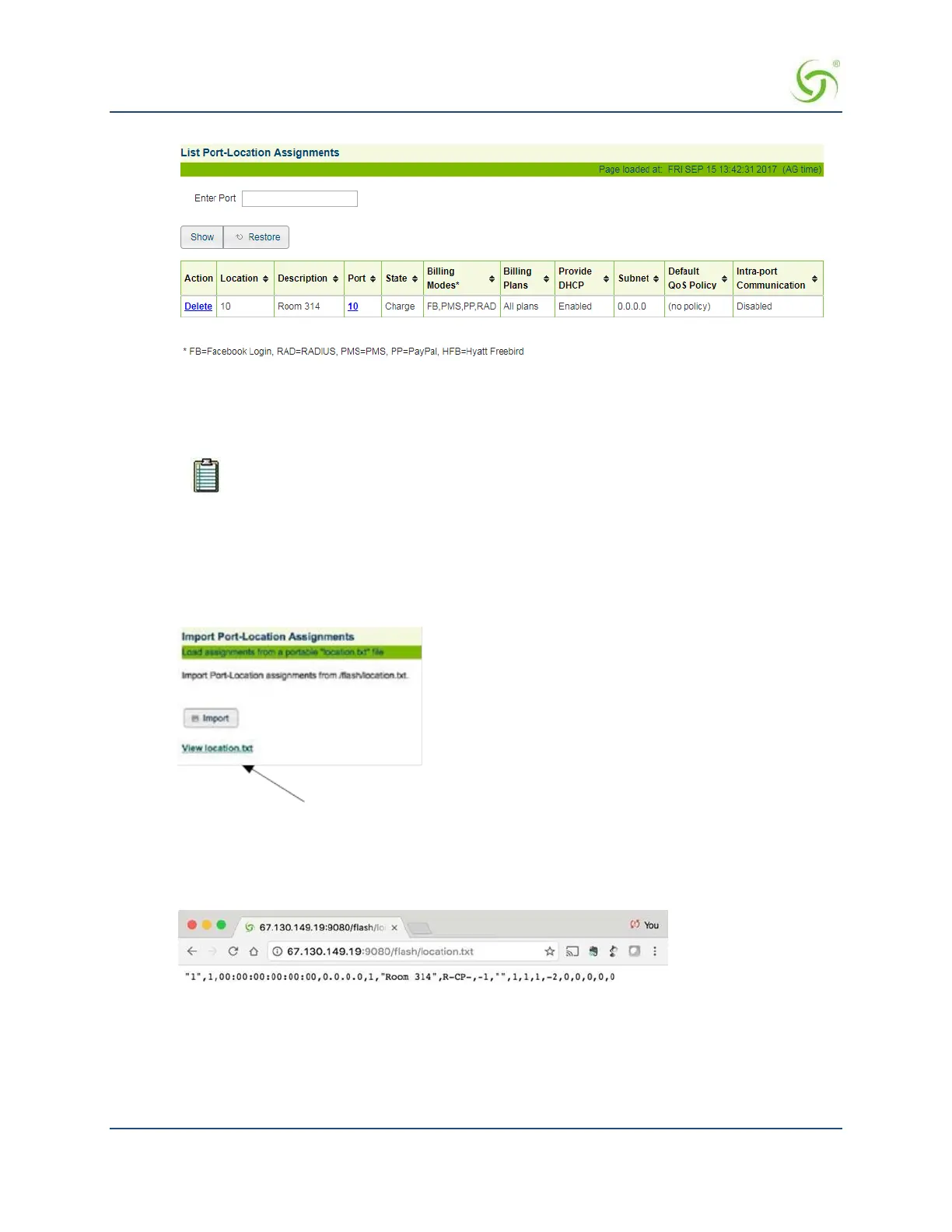
From the Web Management Interface, click on Port-Location, then Import. The Import Port-Location
Assignments screen appears:
Click here to view the “location.txt” file
2.
Click on the Import button to import port-location assignments from the /flash/location.txt file.
3.
Click on the “View location.txt” link if you want to view the current contents of the file.
Creating a “location.txt” File
You can create your own “location.txt” file and upload the file to the Access Gateway’s flash memory at [IP
address]/flash/location.txt.


 To Next Page