ACCESS GATEWAY
192 System Administration
System Menu
Adding and Deleting ARP Table Entries
ARP (Address Resolution Protocol) is used to dynamically bind a high level IP address to a low level physical
hardware (MAC) address. ARP is limited to a single physical network that supports hardware broadcasting.
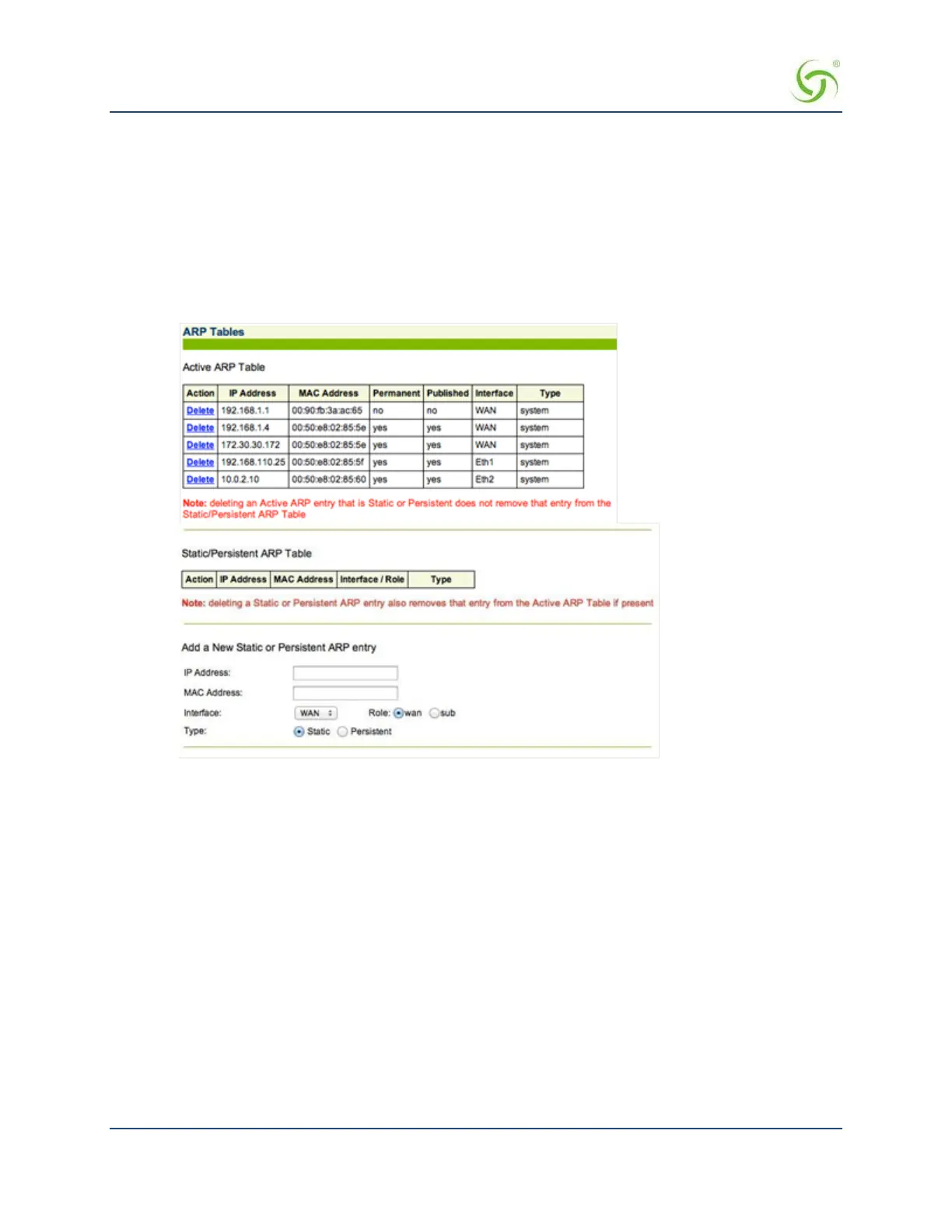
This procedure shows you how to add or delete an ARP table entry.
1.
From the Web Management Interface, click on System, then ARP. The ARP Tables screen appears. You
can view, delete, or add new ARP table entries from this screen.
Configurable Gateway ARP Refresh Interval
The NSE will periodically refresh its ARP cache entry for the gateway IP. When gateway redundancy is
implemented via the use of multiple gateway devices with the same IP address, the periodic refresh enables the
NSE to quickly discover the new MAC address of the gateway.
You can set the refresh frequency on the Location page. The frequency must be between 30 and 600 seconds.
600 seconds is half of the ARP cache refresh interval, so the ARP entry can never expire.
Use the following steps to change the ARP Refresh Interval:


 To Next Page