ACCESS GATEWAY
System Administration 99
On higher-end NSE platforms, the maximum rate the system can achieve may be limited by the line rate of the
interfaces used. In order to benefit from the Fast Forwarding feature on these platforms, you must use fiber
interfaces or multiple 1G standard ethernet (both on the network and subscriber sides).
Fast Forwarding is enabled by default for all new systems. Fast Forwarding, if enabled, does not effect the
following types of sessions:
• General Proxy Sessions
• Sessions that require an Application Level Gateway (ALG); e.g. FTP
• All sessions over WAN interfaces configured for PPPoE or GRE
• Subscriber IPSEC traffic NOT using NAT Traversal (i.e. usingiNAT)
• All traffic over IPSEC tunnels for which the NSE is an end point of the tunnel
Setting the Home Page Redirection Options {Home Page Redirect}
This procedure shows you how to redirect the subscriber’s browser to a specified home page. Subscribers may
also be redirected to a page specified by the solution provider, without any interaction with the authentication
process.
You must configure DNS if you want to enter meaningful URLs instead of numeric IP
addresses into any of the Access Gateway’s configuration screens.
1.
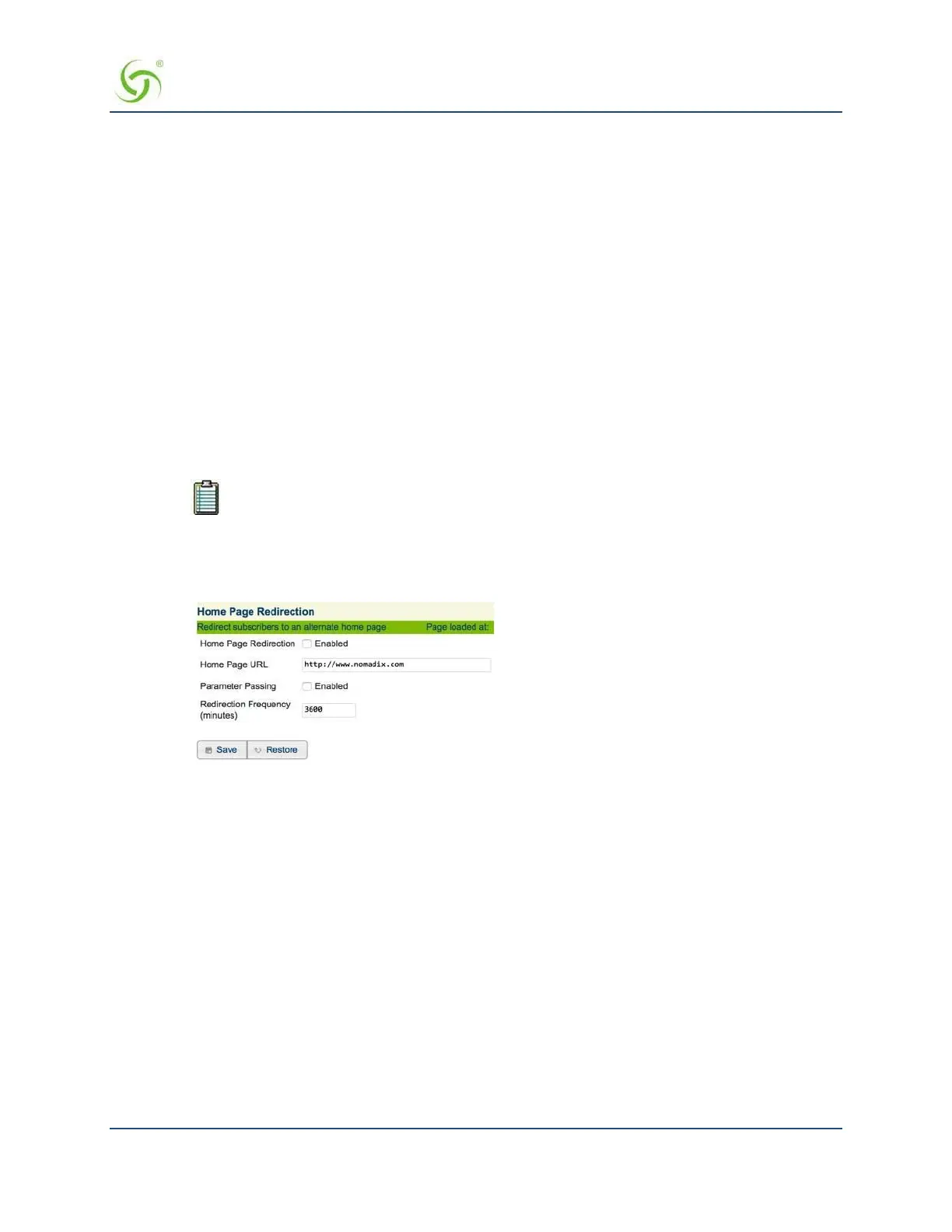
From the Web Management Interface, click on Configuration, then Home Page Redirect. The Home
Page Redirection Settings screen appears:
2.
Click on the check box for Home Page Redirection to enable this feature. If you enable home page
redirection, you must provide a URL for the redirected home page.
3.
Enter the URL of the redirected home page in the Home Page URL field.
4.
If required, click on the check box for Parameter Passing. Parameter passing allows the Access
Gateway to track a subscriber’s initial Web request (usually their home page) and pass the information
on to the solution provider. The solution provider uses this information to ensure that the subscriber can
return to their home page easily.
5.
In the Redirection Frequency field, specify the frequency (in minutes) for home page redirection. This
is the interval at which the subscriber is redirected to the solution provider’s home page automatically.
6.
Click on the Save button to save your changes, or click on the Restore button if you want to reset all the
values to their previous state.
Enabling Intelligent Address Translation (iNAT™)
The Nomadix patented iNAT™ feature contains an advanced, real-time translation engine that analyzes all
data packets being communicated between the private and public address domains. The Nomadix iNAT™



 To Next Page