ACCESS GATEWAY
System Administration 83
2.
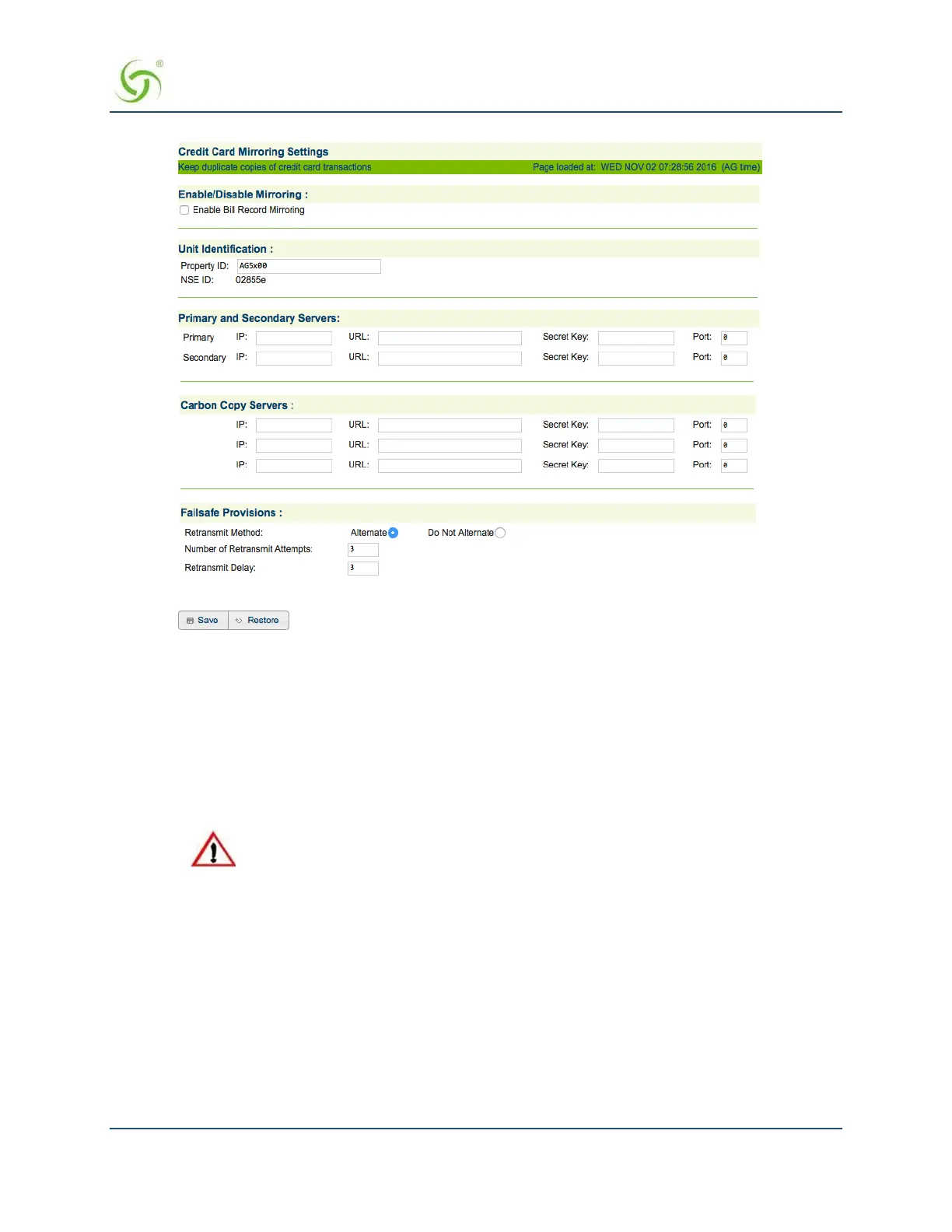
If you want to enable the billing records “mirroring” functionality for credit card transactions,
click on the check box for
Enable Bill Record Mirroring.
3.
Enter the property identification code in the Property ID field.
4.
Enter the communication parameters for the primary server that is to be used for mirroring,
including:
• Primary IP
• URL
• Secret Key
The Access Gateway and the “mirror” servers must use the same secret key.
5.
Repeat Step 4 for the secondary server (if any) and all carbon copy servers.
6.
Define the “fail-safe” provisions, including:
Retransmit Method – Alternate, or do not alternate.
Number of Retransmit Attempts – This tells the system how many times it should attempt to
retransmit billing records before suspending the task.
Retransmit Delay – This specifies the time delay between each retransmission.
7.
Click on the Save button to save your changes, or click on the Restore button if you want to reset all
the values to their previous state.



 To Next Page