Basic Operation
3-44 OPERATION GUIDE
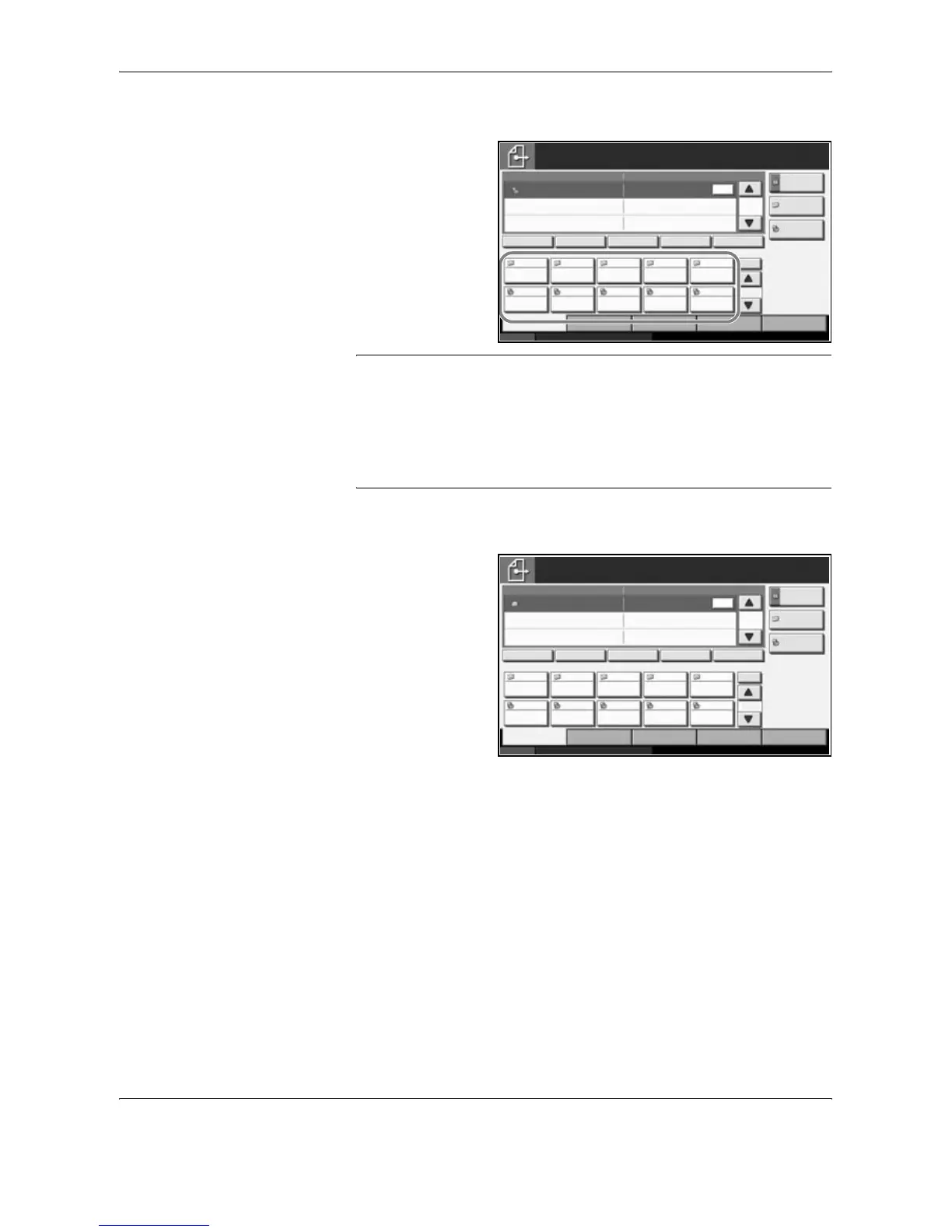
Choosing by One-Touch Key
Select the
destination using the
One-touch Keys.
In the basic screen
for sending, press
the One-touch Keys
where the
destination is
registered.
NOTE: If the One-touch Keys for the desired destination is hidden on the
touch panel, press [T] or [S] to scroll and view next or previous One-
touch Keys.
This procedure assumes that One-touch Keys have already been
registered.
Refer to the Advanced Operation Guide for more information on
registering One-touch Keys.
Choosing by Speed Dial
Access the
destination by
specifying the 3-digit
One-touch Key
number (speed dial).
In the basic screen
for sending, press
the No. key and
enter the 3-digit
one-touch key
number in the
numeric entry
screen.
Sending to Different Types of Destinations (Multi Sending)
Also, depending on the settings, you can send and print at the same time.
Procedures are the same as used in specifying the destinations of
respective types. Continue to enter E-mail address or folder path so that
they appear in the destination list. Press the Start key to launch
transmission to all destinations at one time.
Status 10/10/2007 10:10
Place original.
Ready to send.
Destination
Type of Original/
Transmission
Quick SetupDestination Color/Image Advanced
Setup
Destination Detail
ABC SCANDATA
No.
1/10
1/1
1
To:
Address
Book
Folder Path
Entry
E-mail
Addr Entry
AAA BBB CCC DDD EEE
FFF GGG HHH III JJJ
004003 005001 002
006 007 008 009 010
Chain Detail/Edit Delete RecallOn Hook
Status 10/10/2007 10:10
Place original.
Ready to send.
Destination
Type of Original/
Transmission
Quick SetupDestination Color/Image Advanced
Setup
Destination Detail
ABC SCANDATA
No.
1/10
1/1
1
To:
Address
Book
Folder Path
Entry
E-mail
Addr Entry
AAA BBB CCC DDD EEE
FFF GGG HHH III JJJ
004003 005001 002
006 007 008 009 010
Chain Detail/Edit Delete RecallOn Hook





 To Next Page