Basic Operation
3-32 OPERATION GUIDE
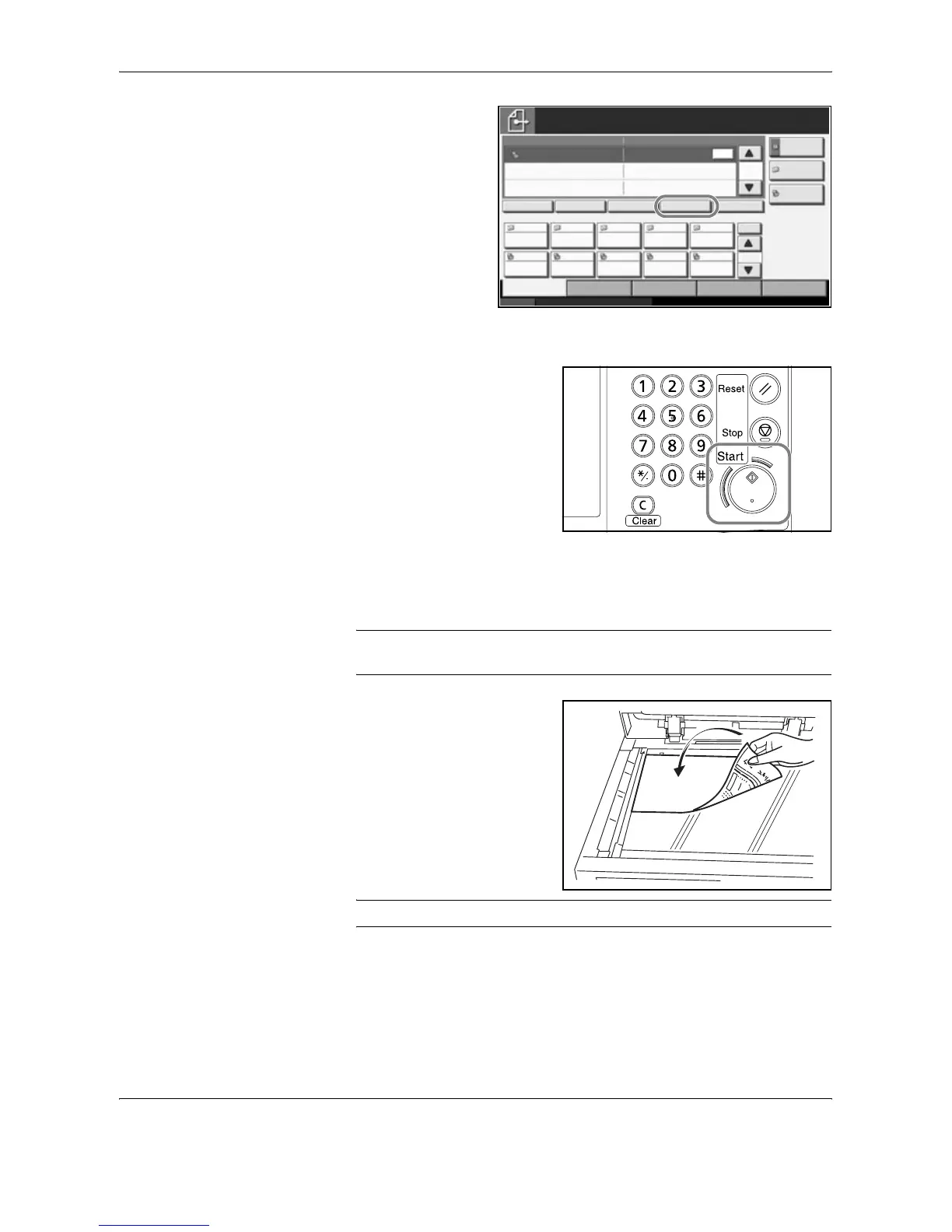
Select a destination
and press [Delete] to
remove the
destination from the
list.
10
Change the original size, scan resolution, etc. if necessary.
11
Press the Start key. The
scanned original data file is
sent to the specified shared
folder of the PC.
Send to Folder (FTP)
Stores a scanned original image in a folder of an FTP server.
NOTE: Be sure that FTP of EWS (Embedded Web Server) is On.
Refer to FTP Settings on page 2-19.
1
Place the originals on the
platen or in the optional
document processor.
NOTE: For loading instructions, refer to Loading Originals on page 2-47.
Status
10/10/2007 10:10
Place original.
Ready to send.
Destination
Type of Original/
Transmission
Quick SetupDestination Color/Image Advanced
Setup
Destination Detail
ABC
/User/ScanData
Address
Book
Folder Path
Entry
E-mail
Addr Entry
No.
1/10
To:
1
AAA BBB CCC DDD EEE
FFF GGG HHH III JJJ
004003 005001 002
006 007 008 009 010
Chain Detail/Edit Delete RecallOn Hook





 To Next Page