Preparation before Use
2-10 OPERATION GUIDE
Configuring a Network (LAN Cable Connection)
The machine comes with a standard network interface and supports each
of TCP/IP, IPX/SPX, NetBEUI and AppleTalk protocols, allowing network
printing on various platforms such as Windows, Macintosh, UNIX and
NetWare.
Setting TCP/IP (When Using Fixed IP Address)
Follow the steps below to set TCP/IP when a fixed IP address is used.
Make sure that an IP address is available by asking your network
administrator to obtain it in advance.
1
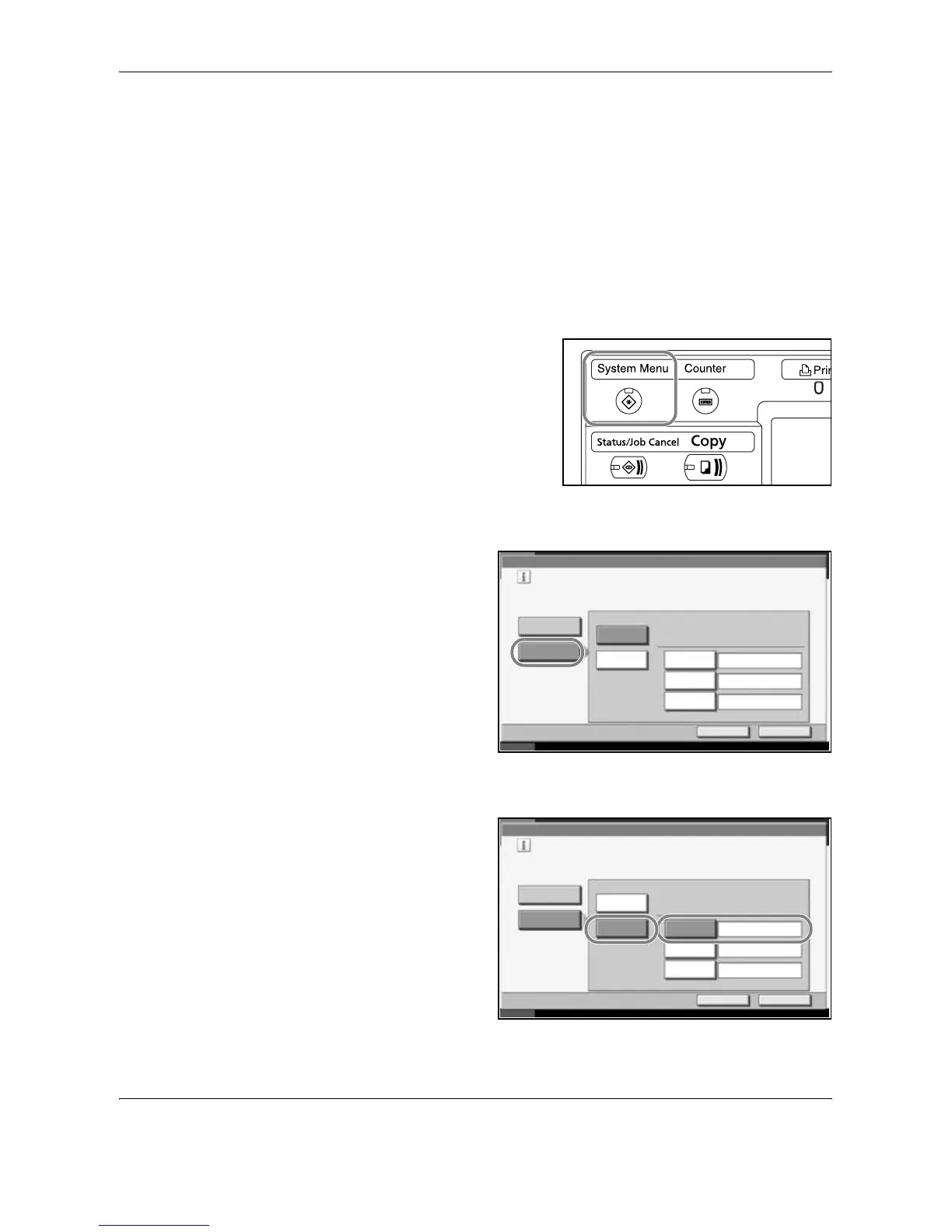
Press the System Menu key.
2
Press [System], [Next] of Network and then [Change] of TCP/IP.
3
Press [On] of TCP/
IP.
4
Press [Off] of DHCP.
5
Press [IP Address]
and enter the IP
address using the
numeric keys.
System - TCP/IP
Use TCP/IP.
On
Off
Cancel OK
Status 10/10/2007 10:10
DHCP
On
Off IP Address
Subnet Mask
Default
Gateway
0.0.0.0
0.0.0.0
0.0.0.0
System - TCP/IP
Use TCP/IP.
On
Off
Cancel OK
Status 10/10/2007 10:10
DHCP
On
Off IP Address
Subnet Mask
Default
Gateway
192.168.1.150
0.0.0.0
0.0.0.0










 To Next Page