Part Names
OPERATION GUIDE 1-5
1
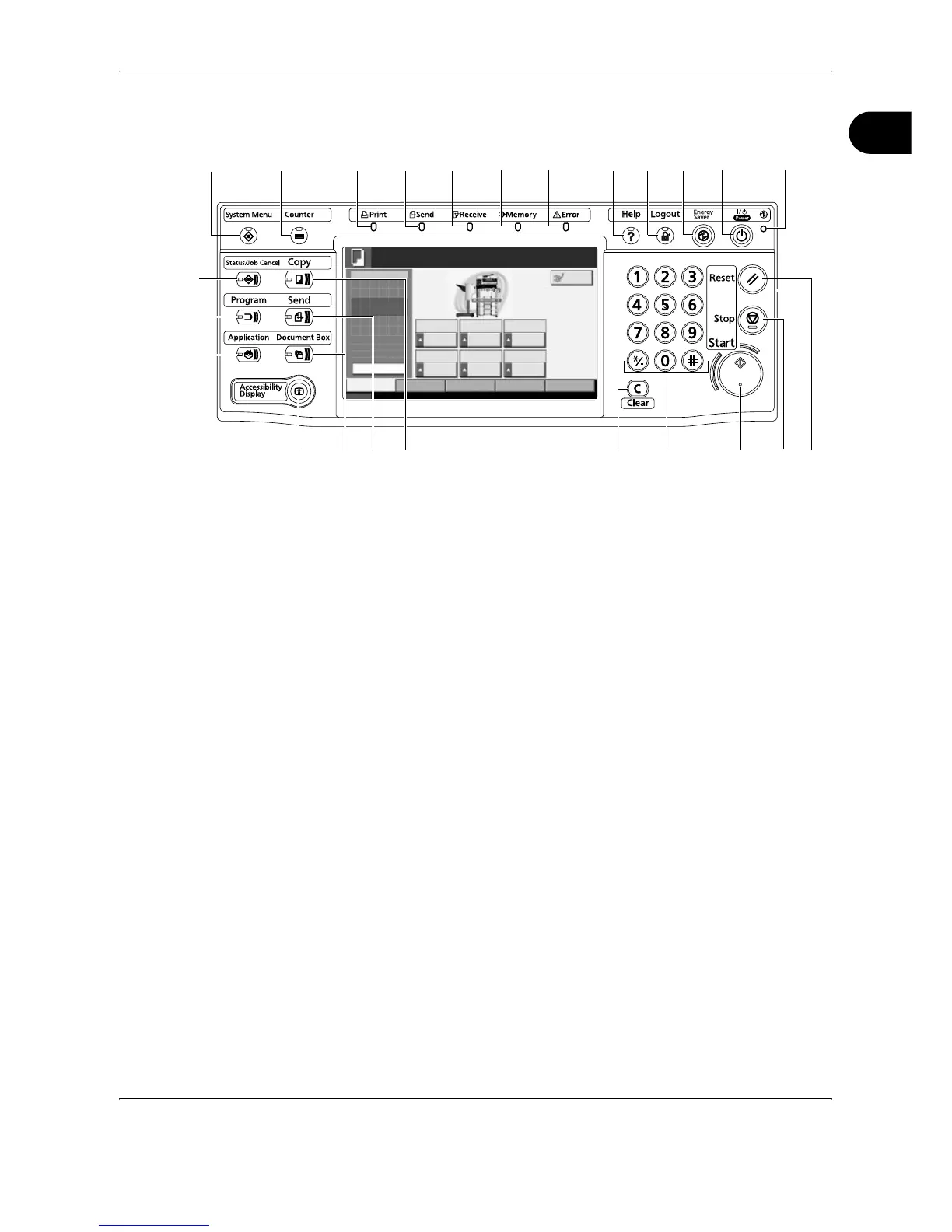
Operation Panel
1 System Menu Key/Indicator
2 Counter Key/Indicator
3 Print Indicator … Blinks during printing operation
4 Send Indicator … Blinks while data is transmitted
5 Receive Indicator … Blinks while data is received
6 Memory Indicator …Blinks while the machine is accessing the hard
disk, fax memory, Data Backup Kit (Option) or
USB memory (general-purpose item)
7 Error Indicator … Blinks when an error occurs and a job is stopped
8 Help Key/Indicator
9 Logout Key/Indicator
10 Energy Saver Key/Indicator
11 Power Key
12 Main Power Indicator
13 Status/Job Cancel Key/Indicator
14 Program Key/Indicator
15 Application Key
16 Accessibility Display Key/Indicator
17 Document Box Key/Indicator
18 Send Key/Indicator
19 Copy Key/Indicator
20 Clear Key
21 Numeric Keys
Status 10/10/2007 10:10
Original
Zoom
Paper
100%
---
:
:
:
---
Image
Quality
Ready to copy.
Set Original.
Copies
Copy Image
Org./Paper/
Finishing
Quick Setup Layout/Edit Advanced
Setup
1
Normal 0 Let ter
Zoom Density Paper
Selection
1-s ided
>>1-sided
Text+Photo Collate
Duplex Original
Image
Collate/
Offset
Auto
Plain
Preview
Interrupt
1 2
3456 10
11
1278
16 17
13
22 2319 20 24
14
9
18
15
21










 To Next Page