Preparation before Use
2-42 OPERATION GUIDE
1
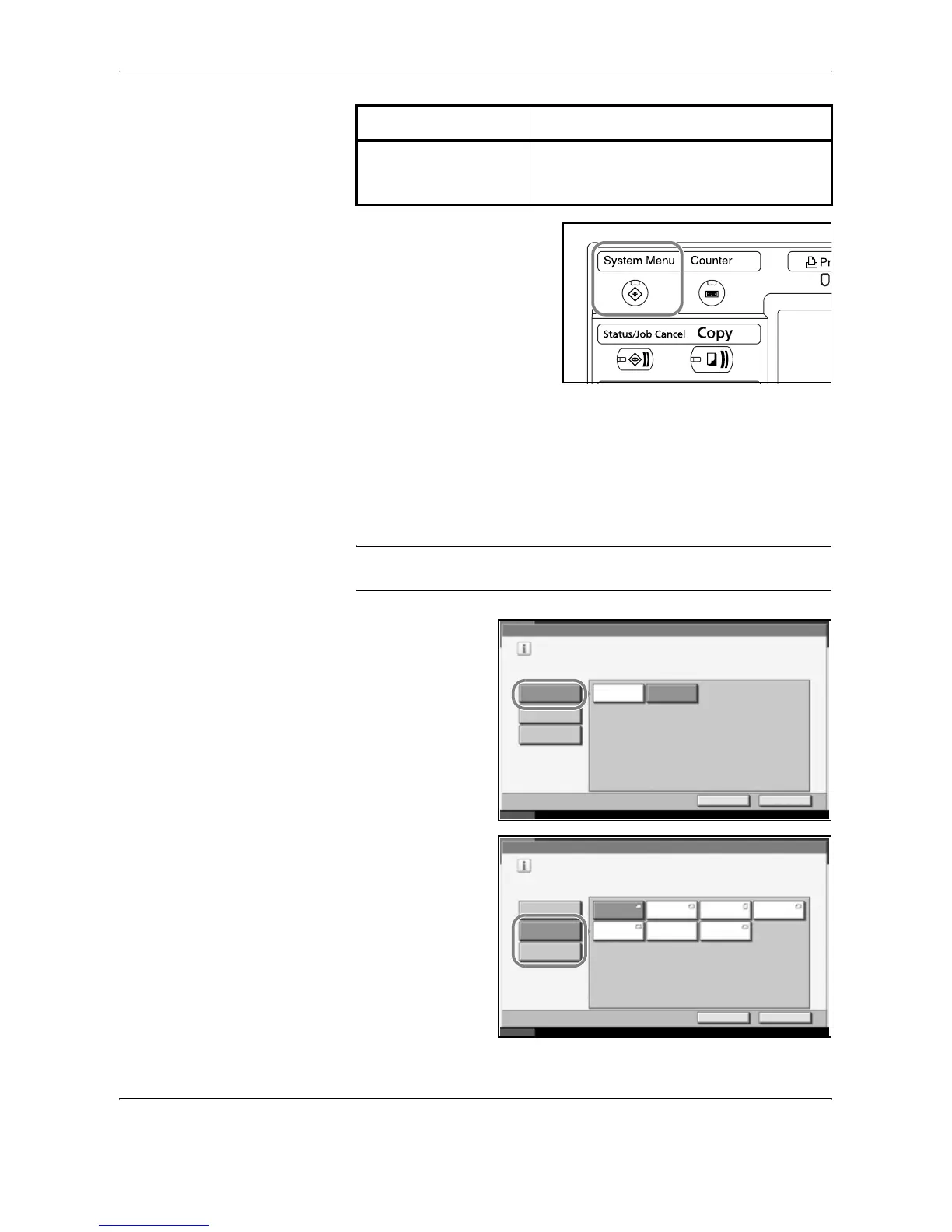
Press the System Menu key.
2
Press [Common Settings], [Next] of Original / Paper Setup, [Next] of
Cassette Setting.
3
Cassette Setting, select one of [Cassette 1] to [Cassette 4] and press
[Next].
Then press Paper Size -> [Change].
NOTE: [Cassette 3] and [Cassette 4] are shown when the optional paper
feeder is installed.
4
For automatic
detection of the
paper size, press
[Auto] and select
[Metric] or [Inch] as
the unit.
To select the paper
size, press
[Standard Sizes 1]
or [Standard Sizes
2] and select the
paper size.
Media Type Plain, Rough, Vellum, Recycled, Preprinted,
Bond, Color, Prepunched, Letterhead, High
Quality and Custom 1~8
Selection Item Selectable Size/Type
Common Settings - Paper Size
Set cassette paper size.
Standard
Sizes 1
Auto
Cancel OK
Status 10/10/2007 10:10
Metric
Inch
Standard
Sizes 2
Common Settings - Custom 1
Set cassette paper size.
Standard
Sizes 1
Auto
Cancel OK
Status 10/10/2007 10:10
Ledger Letter
Standard
Sizes 2
Letter Legal
Statement 8.5x13.5" OficioII










 To Next Page