EasyManua.ls Logo

Olivetti d-Copia 3000MF - Summer Time

Olivetti d-Copia 3000MF
230 pages
Print Icon
To Next Page IconTo Next Page
To Previous Page IconTo Previous Page
Loading...
Preparation before Use
OPERATION GUIDE 2-9
2
5
Press [Change] of Date/Time.
6
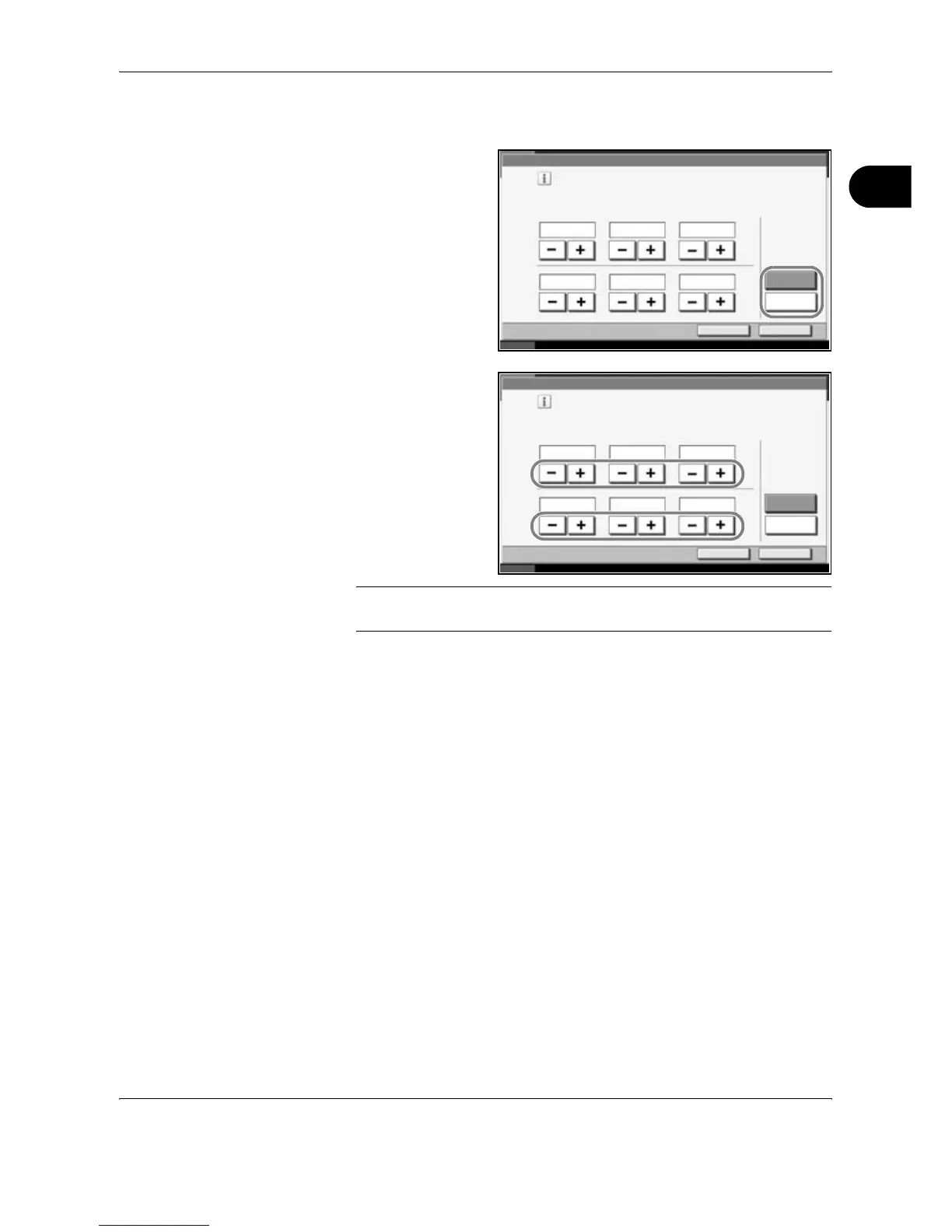
Press [Off] or [On] of
Summer Time.
7
Set the date and
time. Press [+] or [–]
in each setting.
NOTE: Settings are Year (Y), Month (M), Date (D), Hour (H), Minute (M)
and Second (S).
8
Press [OK].
9
When exiting, press [Return to Top] repeatedly to return to the System
Menu default screen.
Date /Timer - Date/Time
Set the date and time.
Cancel OK
Status 10/10/2007 10:10
Off
DMY
SMH
On
Summer Time
2007
15 51 34
10 10
Date /Timer - Date/Time
Set the date and time.
Cancel OK
Status 10/10/2007 10:10
Off
DMY
SMH
On
Summer Time
2007
15 51 34
10 10

Table of Contents

Related product manuals