Troubleshooting
6-6 OPERATION GUIDE
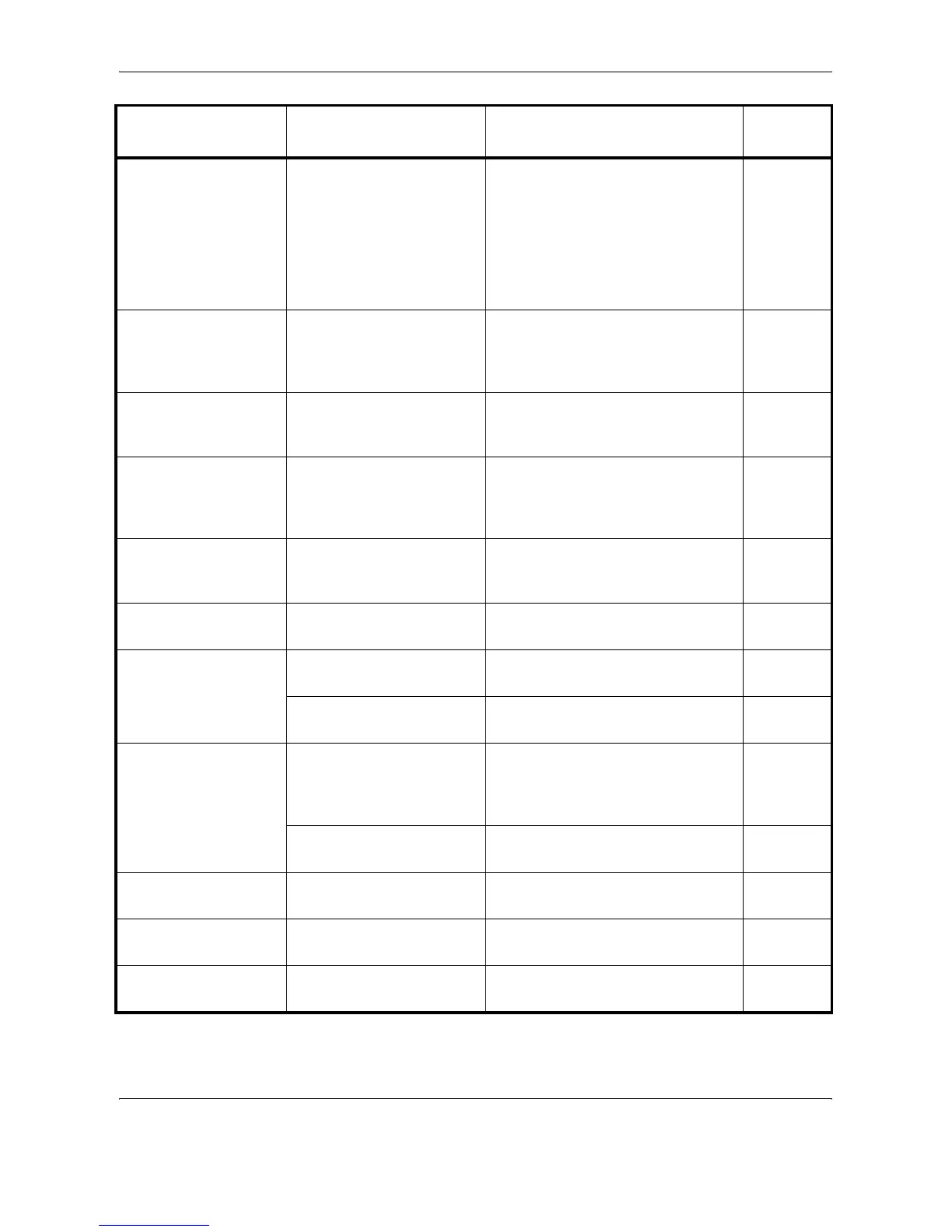
Cannot connect to
Authentication Server.
– Press [End] and check the following
items:
• Registration to Authentication
Serve
• Password and computer address
for Authentication Server
• Connection of Network
—
Cannot duplex print
this paper type.
Did you select a paper size/
media type that cannot be
duplex printed?
Select the available paper size/media
type.
Press [Continue] to print without
duplex printing.
3-16
Cannot execute this
job.
– This job is canceled because it is
restricted by Job Accounting. Press
[End].
—
Cannot offset this
paper type.
Did you select a paper size
(A3, B4, A5-R, B6-R, Folio,
Ledger, Statement and 8K)
that cannot be offset?
Select the available paper size.
Press [Continue] to print without
using Offset.
3-19
Cannot staple this
paper type.
Did you select a paper size/
type that cannot be stapled?
Select the available paper size/type.
Press [Continue] to print without
using Staple.
—
Check the cover. Is there any cover which is
open?
Close the cover indicated on the
touch panel.
—
Check the document
processor.
Is the document processor
open?
Close the document processor. —
Is the top cover of the
document processor open?
Close the top cover of the document
processor.
6-25
Check the finisher. Is the built-in finisher or the
document finisher set
correctly?
Set the built-in finisher or the
document finisher correctly. For
details, refer to the respective
Operation Guides.
—
Is the built-in finisher tray set
correctly?
Set the built-in finisher tray correctly. —
Clean the slit glass. – Clean the slit glass using the
attached cleaning cloth.
5-3
Failed to specify Job
Accounting.
– The job is canceled. Press [End]. —
Failed to store job
retention data.
– The job is canceled. Press [End]. —
Error Message Checkpoints Corrective Actions
Reference
Page





 To Next Page