658
Connecting to the RS-232C Port on the CPU Unit Appendix F
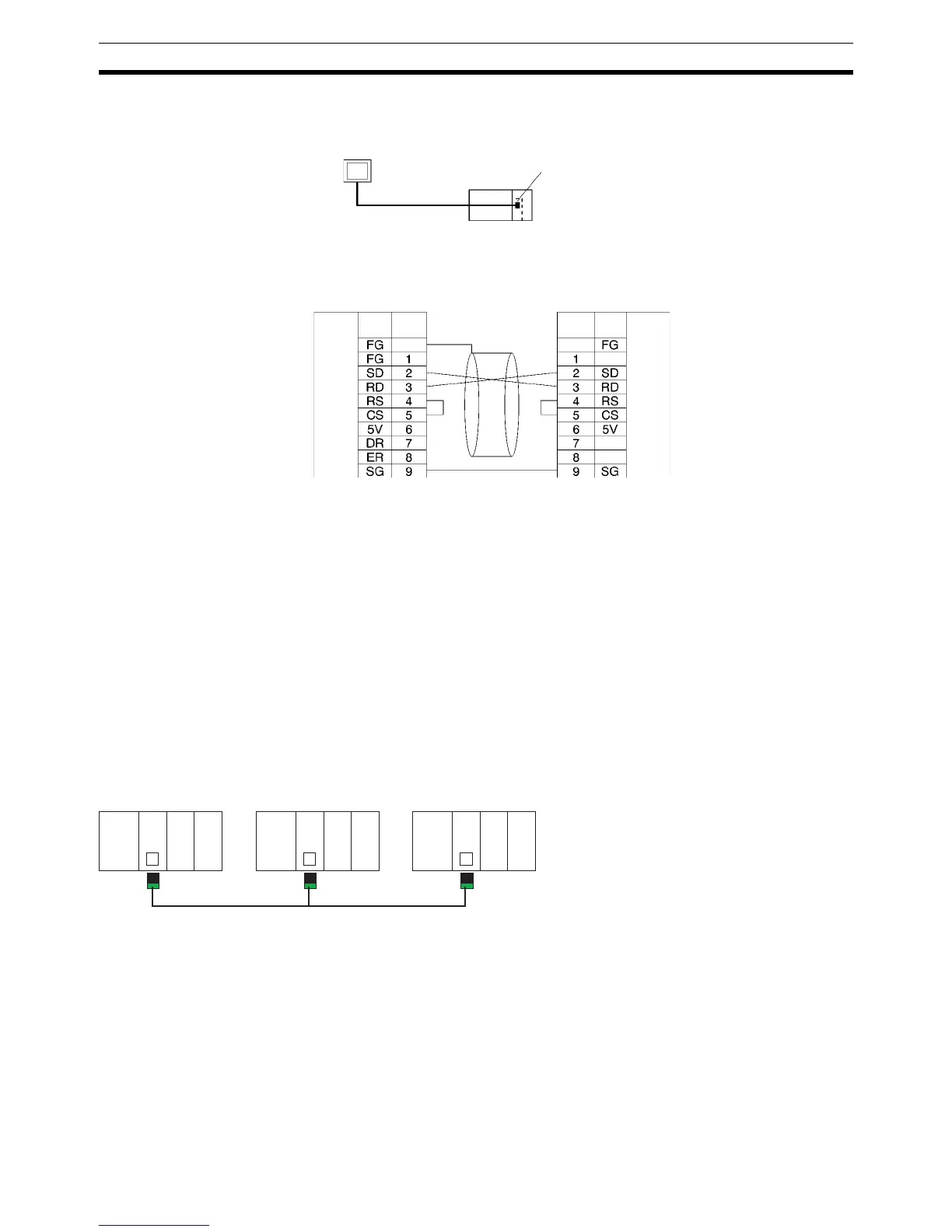
Connection Example to Programmable Terminal (PT)
Direct Connection from RS-232C to RS-232C
• Communications Mode: Host Link (unit number 0 only for Host Link)
NT Link (1:N, N = 1 Unit only)
• OMRON Cables with Connectors:
XW2Z-200T-1: 2 m
XW2Z-500T-1: 5 m
Serial PLC Link Connection Examples (CJ1M CPU Units Only)
This section provides connection examples for using Serial PLC Link. The communications mode used here is
Serial PLC Link.
Connecting an RS-422A Converter (CJ1W-CIF11)
Note The CJ1W-CIF11 is not insulated, so the total transmission distance for the whole transmission path is
50 m max. If the total transmission distance is greater than 50 m, use the insulated NT-AL001, and do
not use the CJ1W-CIF11. If only the NT-AL001 is used, the total transmission distance for the whole
transmission path is 500 m max. Refer to the wiring examples in
Appendix G CJ1W-CIF11 RS-422A
Converter
for wiring diagrams and settings when combining the CJ1W-CIF11 with the NT-AL001. When
the CJ1W-CIF11 is combined with the NT-AL001, however, the total transmission length is 50 m max.
RS-232C
CPU Unit PT
PT
Host Link or NT Link (1:N)
Hood
Hood
RS-232C port
Signal
name
Signal
name
RS-232C
Interface
RS-232C
Interface
D-sub, 9-pin
connector (male)
D-sub, 9-pin
connector (male)
Pin
No.
Pin
No.
CJ1M CPU Unit
(Polling Unit)
RS-422A Converter
CJ1M CPU Unit
(Polled Unit #0)
CJ1M CPU Unit
(Polled Unit #1)
RS-232C port
RS-232C port
RS-232C port
RS-422A Converter
RS-422A
Converter
Serial PLC Link
(Total transmission length: 50 m max.)



 To Next Page