22
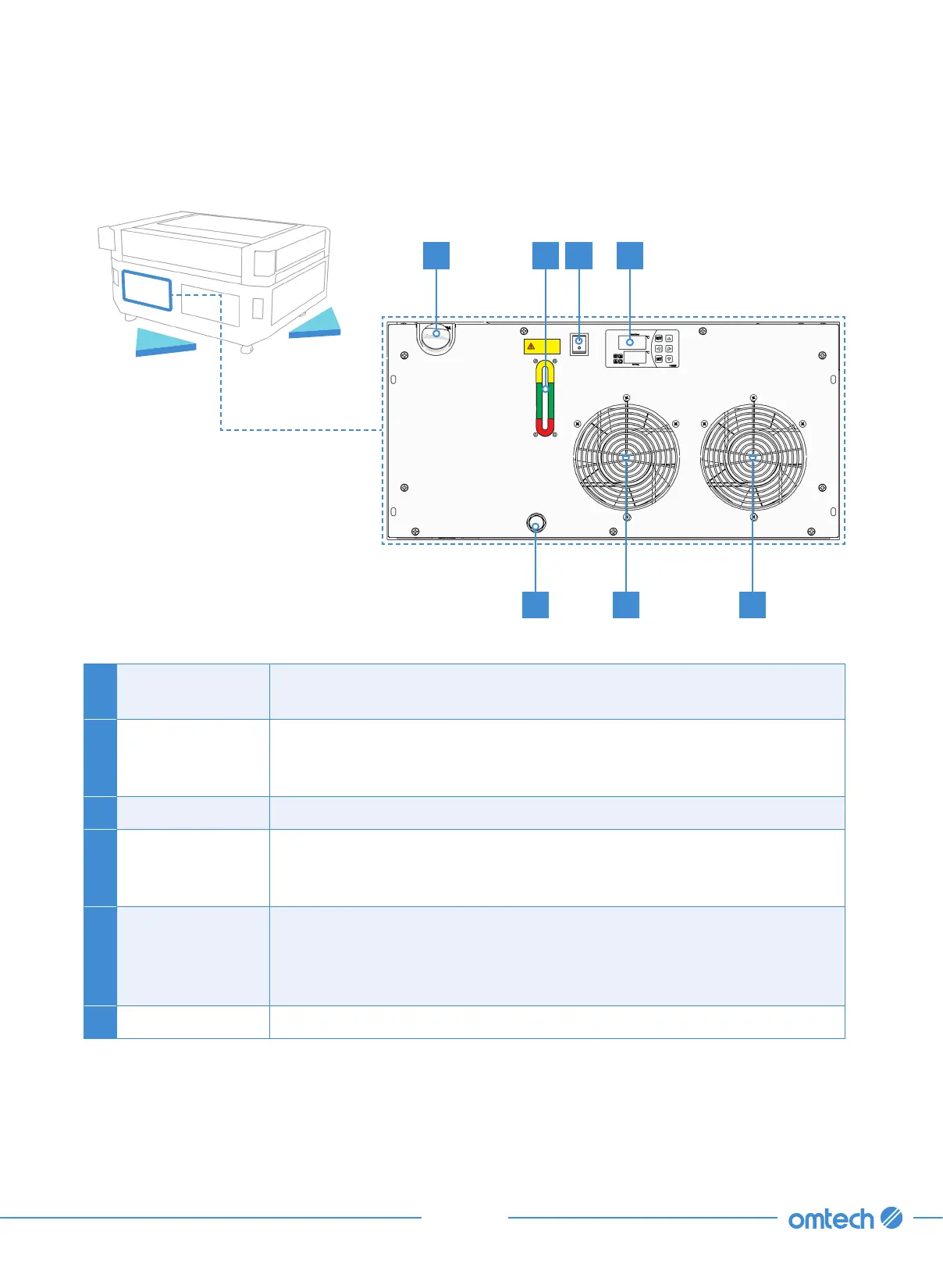
2.5 Water Chiller
A Fill Port
Use this port once it is time to refill the tank with deionized or distilled
water, or laser-safe antifreeze.
B Power Switch
Your water-cooling system should always be on during the use of the
laser but should be switched off during draining, refilling, cleaning, repair,
and other maintenance.
C Control Panel This panel can be used to fine-tune the chiller’s operation.
D Water Gauge
Maintain the cooling liquid level within the green NORMAL range at all
times. You should also use the clear gauge to confirm that the liquid
remains clean, particularly during initial testing.
E Cooling Fans
Although these two fans may not activate at all during brief or
low-intensity use, they come online and help keep the circulating water
or antifreeze cool during extended and high-intensity operation. Be sure
that they are well-ventilated and completely unobstructed during use.
F Drain Port Use this port to fully drain your system’s antifreeze or distilled water.
EF E
A D B C
Back
Left



 To Next Page