INF-27
12-2-4. PLD (FPG) Version Upgrade Procedure
1. Turn on the VTR power.
2. Copy the program software for the AVMON, AVPROC, DVPROC, D-IF, AVIO and SDI as shown in
the table 12-1 into the personal computer.
3. Execute the VSI2312N. exe so that the following screen appears.
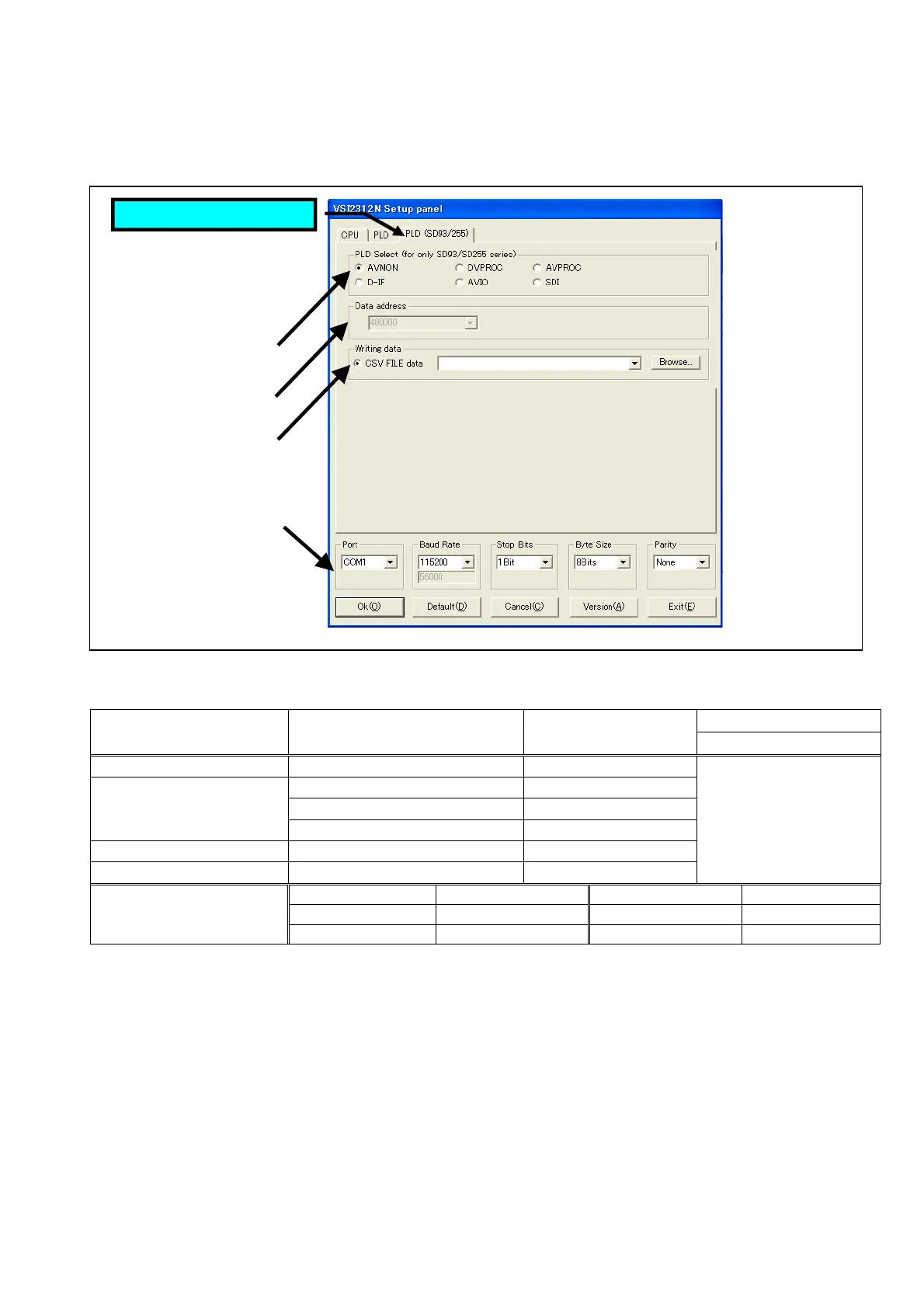
4. Select the PLD (SD93/255) sheet as shown in figure 12-2D-1.
Figure 12-2D-1
5. Select the each item on the Setup Panel as shown table 9-1D-2.
(3) Writing data
Board Name (Slot No.) Name of PLD
(Ref. No.)
(1) Software
Select
AVMON Board (F2) AVMON FPG [IC3200] AVMON
AVPROC FPG [IC1201, 901] AVPROC
DVPROC FPG [IC1501] DVPROC
DPROC Board (F3)
D-I/F FPG [IC10501] D-I/F
AVIO Board (F4) AVIO FPG [IC3400] AVIO
SDI Board (F5) SDI FPG [IC255] SDI
ttf
Port COM1 Baud Rate 115200
Stop Bits 1Bit Byte size 8Bits
(4) Setting for PC
Parity None
* The numbers (1) – (4) in the above tables show the number in figure 9-1D-1 (Setup Panel).
Table 12-2D-2
6. Click “OK” button so that the following screen appears and check sum is calculated.
7. Click “Start” button so that the software programming will start.
8. Confirm the bar in the Process window reach to 100% that means the software programming complete
as shown in figure 9-1D-4.
Select PLD (SD93/225)
(1)
(2)
(3)
(4)














 To Next Page