56
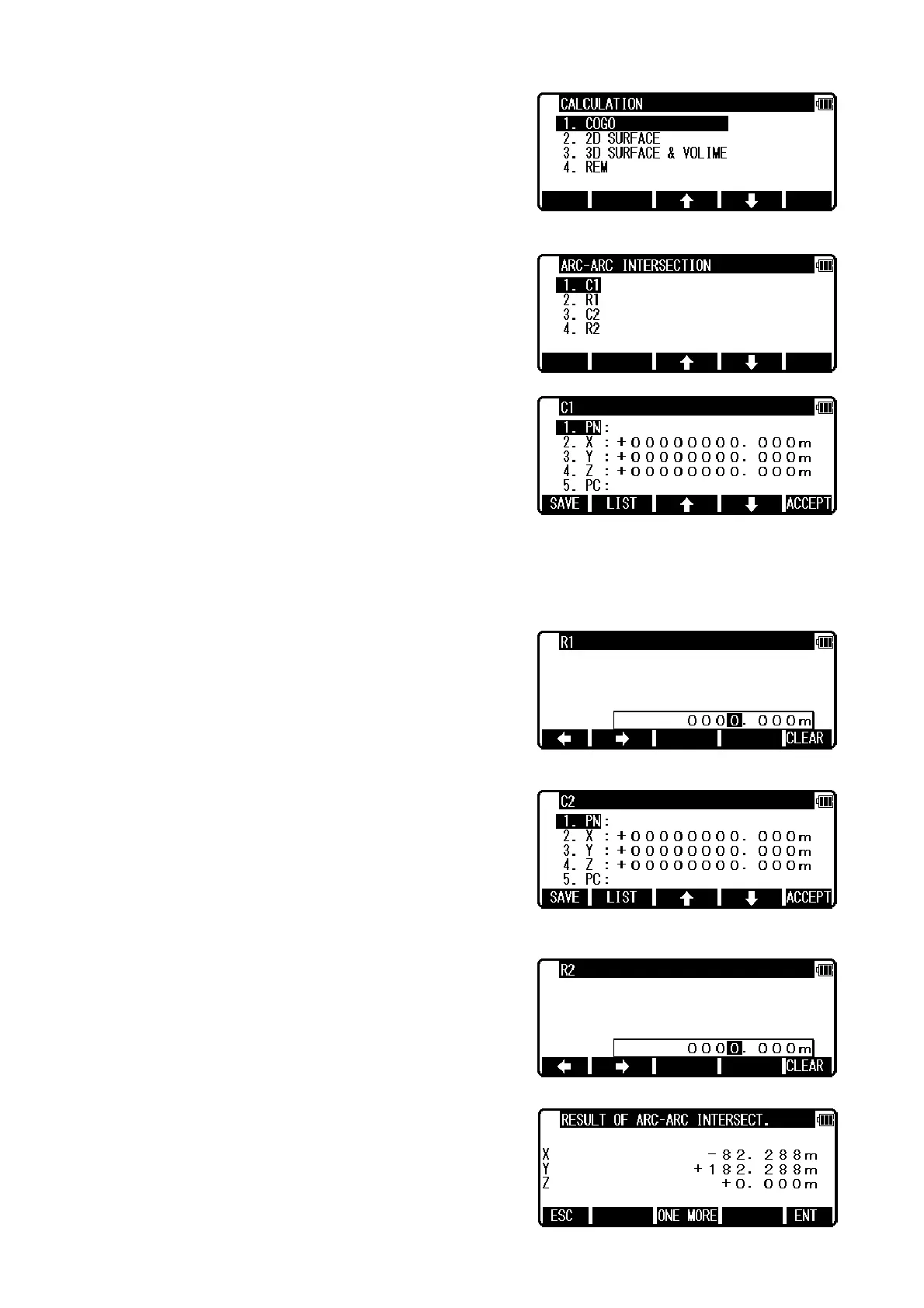
Select 1.COGO and press [ENT] to view the COGO screen.
Select the 6. ARC-ARC INTERSECTION and press [ENT] to view ARC-ARC INTERSECTION screen.
Select 1. C1 and press [ENT] to view C1 screen.
C1 ( Center 1 ) point is center point of Arc 1.
Input PN ( Point Name ), X, Y, Z, and PC ( Point Code ) of C1 point or import from the memory of
rectangular coordinate as C1 by [F2][LIST].
If you finish the input of C1 value, press [F5][ACCEPT]. Then you go to R1 input screen.
Input the radius of Arc 1 as R1 value. If you finish the input of R1, press [F5][ACCEPT]. Then you go
to C2 input screen.
C2 ( Center 2 ) point is center point of Arc 2.
Input PN ( Point Name ), X, Y, Z, and PC ( Point Code ) of C2 point or import from the memory of
rectangular coordinate as C2 by [F2][LIST].
If you finish the input of C2 value, press [F5][ACCEPT].
Then you go to R2 input screen.
Input the radius of Arc 2 as R2 value. If you finish the input
of R2, press [ENT]. Then you go to RESULT OF ARC-ARC
INTERSECTION screen.


 To Next Page
 Loading...