62
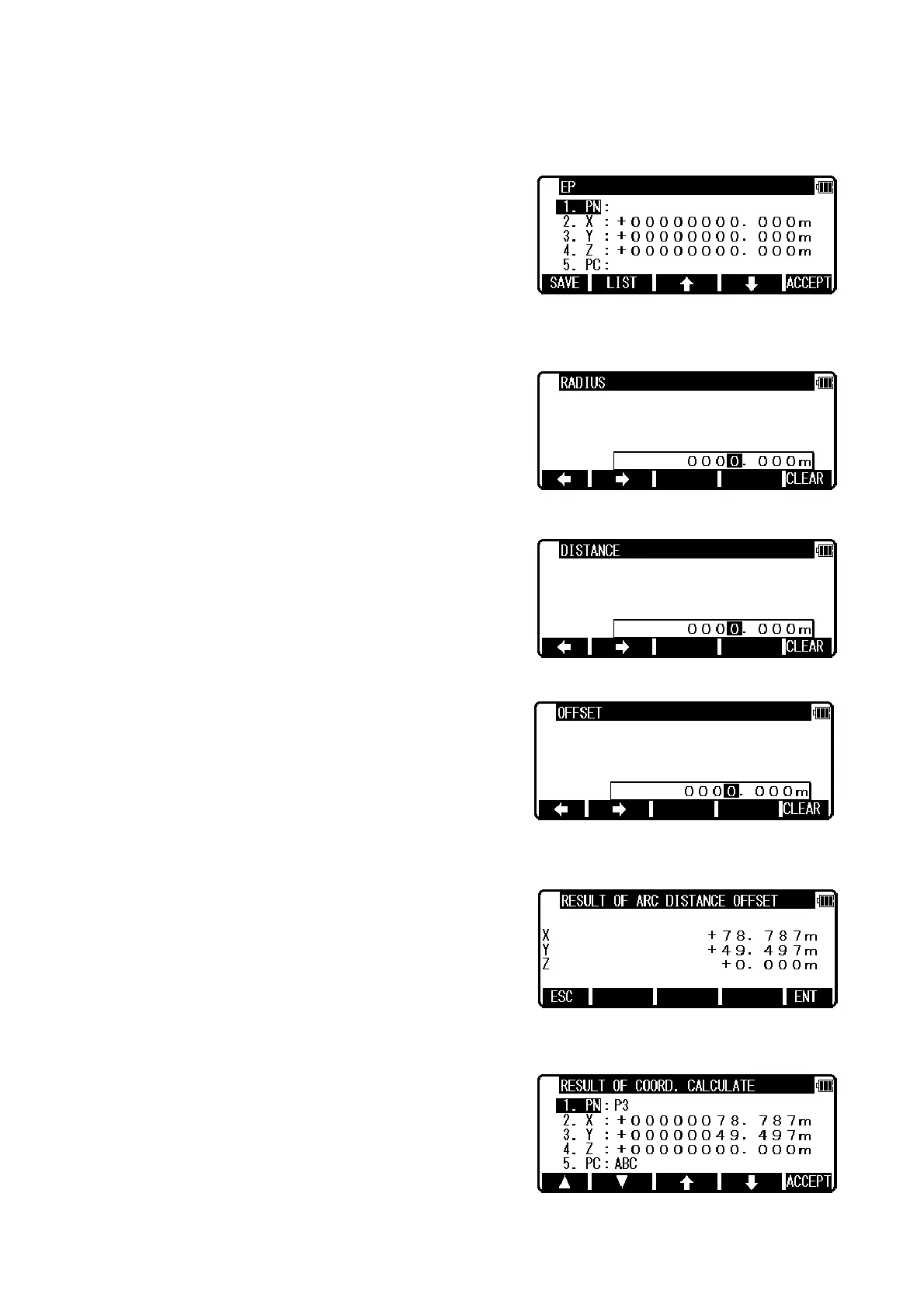
Input PN ( Point Name ), X, Y, Z, and PC ( Point Code ) of SP point or import from the memory of
rectangular coordinate as SP by [F2][LIST].
If you finish the input of SP value, press [F5][ACCEPT]. Then you go to EP input screen.
Input EP data like an input of SP. If you finish input of EP, press [F5][ACCEPT]. Then you go to
RADIUS input screen.
Input RADIUS ( Radius of circle ). If you finish the input of RADIUS, press [ENT]. Then you go to
DISTANCE input screen.
Input DI STANCE ( Distance from SP to point on the arc ). If you finish the input of DISTANCE, press
[ENT]. Then you go to OFFSET input screen.
Input OFFSET ( Offset distance from the arc to offset point ). If you finish the input of OFFSET, press
[ENT]. Then you go to RESULT OF ARC DISTANCE OFFSET screen.
You can see the coordinates of offset point from the arc.
Press [F5][ENT] to save the coordinates of offset point.


 To Next Page
 Loading...