21
Contents of “PointCodeList.csv”:
1,,PointCodeList,
31,,1,ABC,,,,
31,,2,DEF,,,,
31,,3,GHI,,,,
31,,4,JKL,,,,
31,,5,MNO,,,,
31,,6,PQR,,,,
31,,7,STU,,,,
31,,8,VW,,,,
31,,9,XYZ,,,,
Format of the “PointCodeList” file
Field 1 Field 2 Field 3 Field 4 Field 5 Field 6 Field 7
Description
Record Type No. Name Description
Ex. Line 1
1, , PointCodeList, ,
Job record Job No.:
(N/A)
Job Name (Fixed for
“PointCodeList”.)
Ex. Line 2
31, , 2, DEF, , , ,
Coord. data record Point No.:
(N/A)
Point Name
(Shoul not duplicated
and Max. 15 Character.)
Point Code
(Max. 15
Character.)
Setting the PROTOCOL:
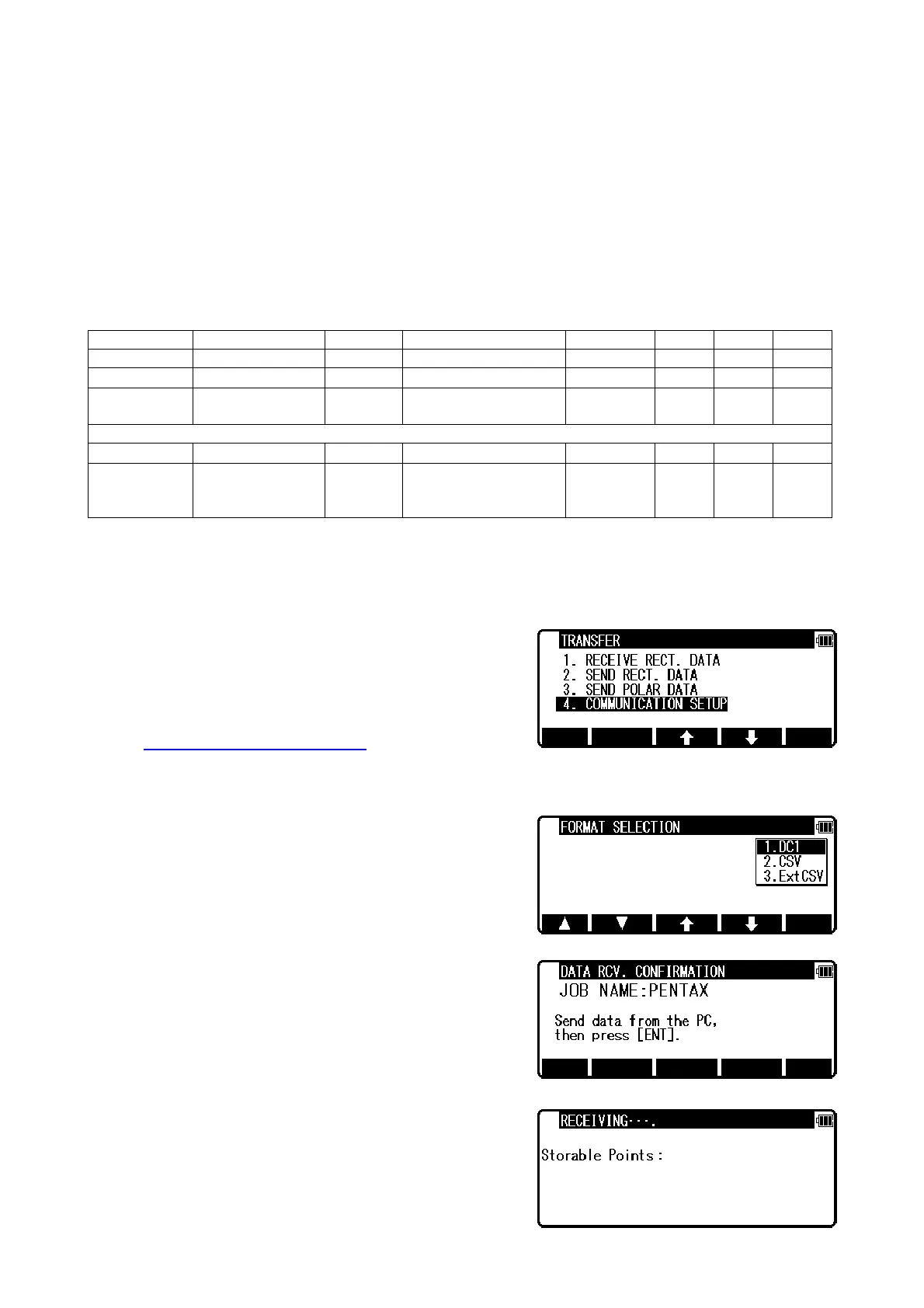
Press the [F3][I/O] of the PowerTopoLite screen to view the TRANSFER screen.
To check the communication setting, select the “4. COMMUNICATION SETUP” in the “TRANSFER”
screen and press [ENT] to view “COMM. SETTING SELECTION” screen.
Then select “1. RECEIVE RECT.DATA” and set
“1. BAUD RATE” to “1200”,
“6. XON/XOFF” to “OFF” for using “DL-01”,
“ON” for using “HYPER TERMINAL”.
“7. PROTOCOL” to “OFF”
“8. RECORD DELIMITER” to “CR+LF”
and press [ACCEPT].
( cf. “12.3.1 Receiving data setting
” )
Receive rect. Data:
The Rect. data is sent from the PC and stored in the internal memory of the instrument.
Select the 1. RECEIVE RECT. DATA and press [ENT] to
view FORMAT SELECTION screen.
Select the DC1 format and press [ENT] to view DATA RCV.
CONFIRMATION screen.
(Same procedure is performed for CSV format.)
Set the PC to be ready to send and press [ENT] to receive
the data from the PC.


 To Next Page
 Loading...