User’s Manual of IXT-900 PoE series
101
The configuration of promiscuous and isolated ports applies to all private VLANs. When traffic comes in on a promiscuous port
in a private VLAN, the VLAN mask from the VLAN table is applied. When traffic comes in on an isolated port, the private VLAN
mask is applied in addition to the VLAN mask from the VLAN table. This reduces the ports to which forwarding can be done to
just the promiscuous ports within the private VLAN.
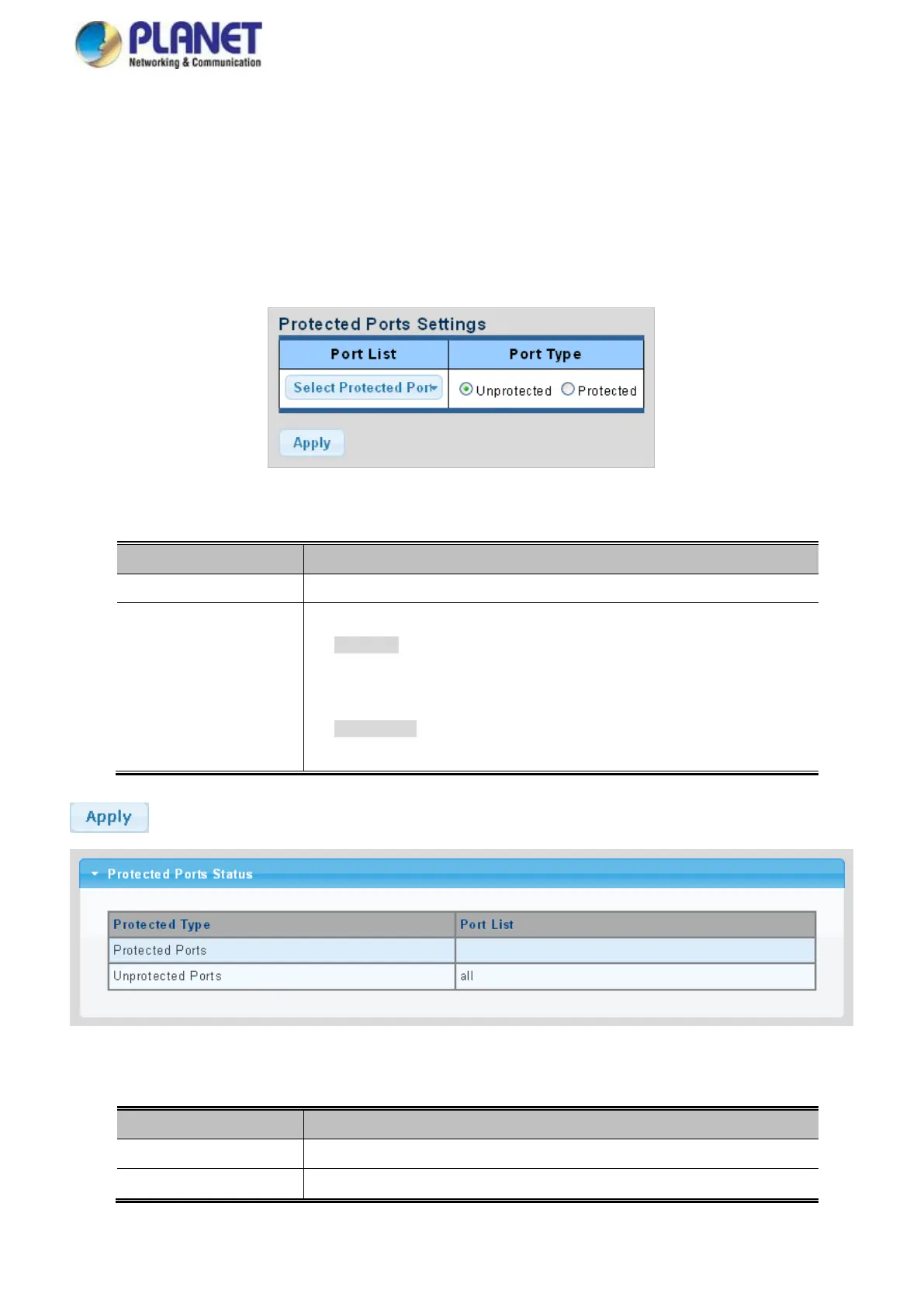
The port settings relate to the currently unit, as reflected by the page header. The Port Isolation Configuration screens in Figure
4-3-12 and Figure 4-3-13 appear.
Figure 4-3-12 Protected Ports Settings Screenshot
The page includes the following fields:
Select port number from this drop-down list.
Displays protected port types.
- Protected: A single stand-alone VLAN that contains one promiscuous port
and one or more isolated (or host) ports. This VLAN conveys traffic between
the isolated ports and a lone promiscuous port.
- Unprotected: A promiscuous port can communicate with all the interfaces
within a private VLAN. This is the default setting.
Buttons
: Click to apply changes.
Figure 4-3-13 Port Isolation Status Screenshot
The page includes the following fields:
Display the current protected ports
Display the current unprotected ports



 To Next Page