User’s Manual of IXT-900 PoE series
47
4.2.1 Management
4.2.1.1 System Information
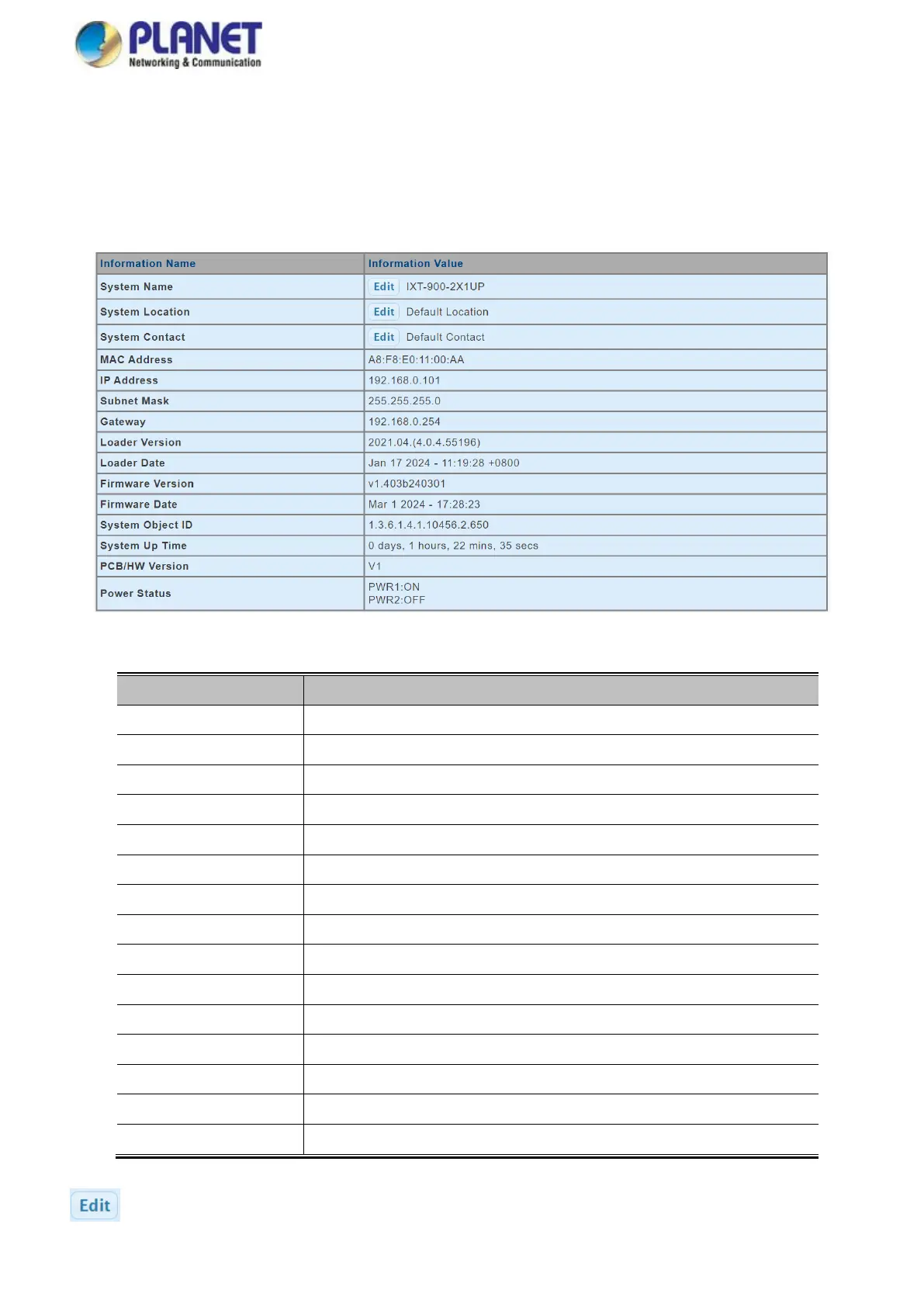
The System Info page provides information for the current device information. System Info page helps the administrator to
identify the hardware MAC address, software version and system uptime. The screens are shown in Figure 4-2-1 and Figure
4-2-2.
Figure 4-2-1 System Information Screenshot
The page includes the following fields:
Display the current system name
Display the current system location
Display the current system contact
The MAC address of this Managed Media Converter.
Each media converter has its own serial number.
The IP address of this Managed Media Converter.
The subnet mask of this Managed Media Converter.
The gateway of this Managed Media Converter.
The loader version of this Managed Media Converter.
The loader date of this Managed Media Converter.
The firmware version of this Managed Media Converter.
The firmware date of this Managed Media Converter.
The system object ID of the Managed Media Converter.
The period of time the device has been operational.
The hardware version of this Managed Media Converter.
Buttons
: Click to edit parameter.



 To Next Page