EasyManua.ls Logo

Planet IXT-900-1X1UP - Security; Access Security; Telnet

Planet IXT-900-1X1UP
190 pages
Print Icon
To Next Page IconTo Next Page
To Previous Page IconTo Previous Page
Loading...
User’s Manual of IXT-900 PoE series
153
4.5 Security
This section is to control the access of the Managed Media Converter, including the user access and management control.
The Security Page contains links to the following main topics:
Access Security
4.5.1 Access Security
This section is to control the access of the Managed Media Converter, including the different access methods – Telnet, SSH,
HTTP and HTTPs.
4.5.1.1 Telnet
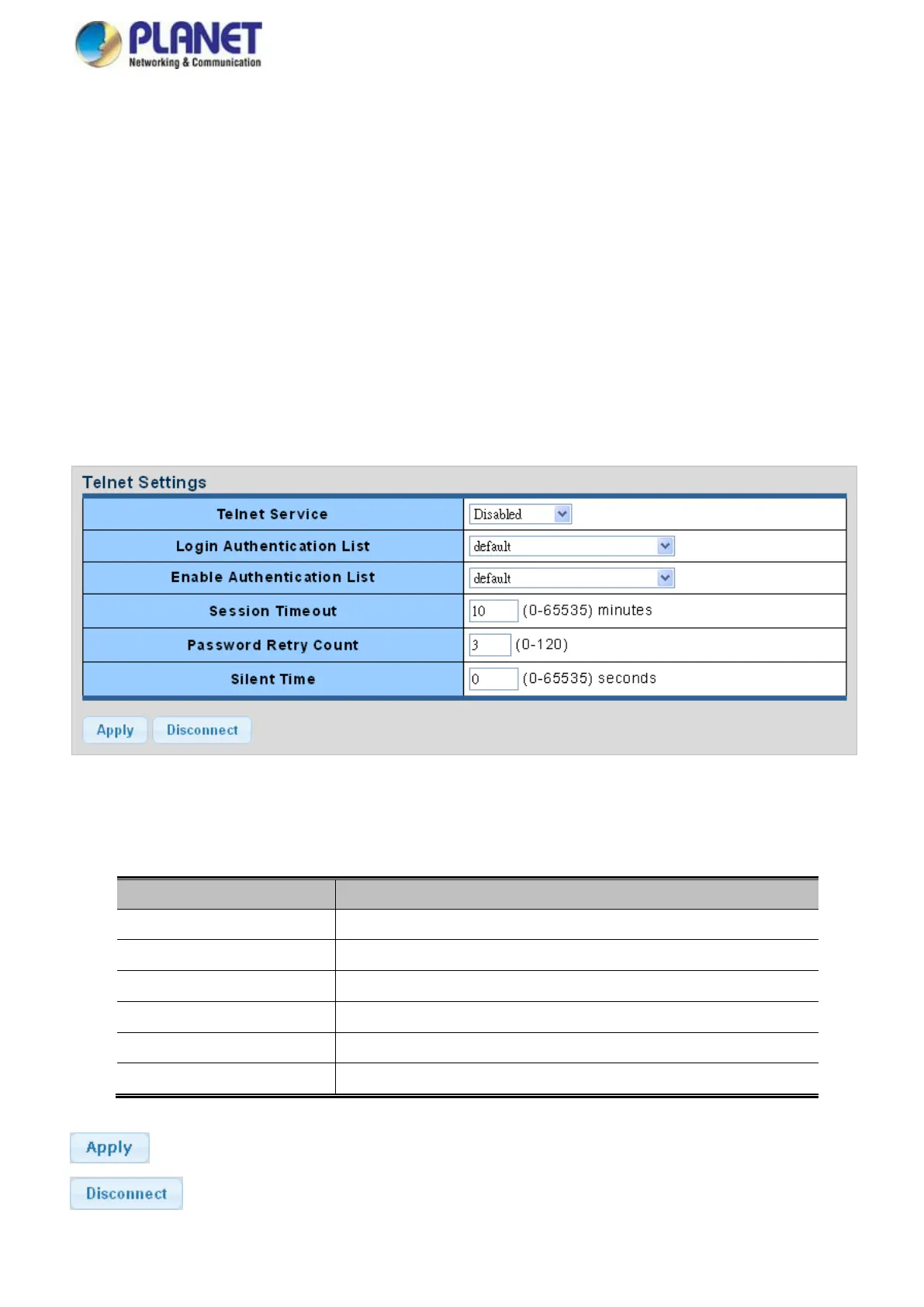
The Telnet Settings and Information screen in Figure 4-5-1 & Figure 4-5-2 appear.
Figure 4-5-1 Telnet Settings Page Screenshot
The page includes the following fields:

Object
Description
Telnet Service
Disable or enable telnet service.
Login Authentication List
Select login authentication list for this drop down list.
Enable Authentication List
Select enable authentication list for this drop down list.
Session Timeout
Set the session timeout value.
Password Retry Count
Set the password retry count value.
Silent Time
Set the silent time value.
Buttons
: Click to apply changes
: Click to disconnect telnet communication

Table of Contents

Related product manuals