PowerMeasuringModule PMM
35,0(6
77
Revision 13 EN - 02/2023
14 EtherCAT
®
connection
EtherCAT
®
stands for Ethernet for Control Automation Technology and is an Ethernet-based field bus.
EtherCAT
®
is optimized for the recognized bus or line structures of field buses. Within this topology, the
EtherCAT
®
slave participants are connected in a series. To make this possible, each EtherCAT
®
slave partici-
pant has an incoming and a continuing Ethernet connection.
The EtherCAT
®
network is configured in Windows
®
with the TwinCAT
®
automation software. The electronic
data sheets of the connected EtherCAT
®
devices, the so-called ESI files (EtherCAT
®
Slave Information) are
required for configuration. Each EtherCAT
®
device needs an individual ESI file made available by the respec-
tive device manufacturer.
TwinCAT
®
3 contains all languages in accordance with IEC-61131-3. The program for the PMM is written in
ST (Structured Text).
Requirements for connecting via EtherCAT
®
:
• The TwinCAT
®
software is installed on the PC
(detailed installation instructions can be found on the website of the manufacturer Beckhoff).
• The ESI file PRIMES PMM ECS Vx.x.xml is copied in the TwinCAT directory (usually in the folder
c:\TwinCAT\3.x\Config\Io\EtherCAT).
The ESI file PRIMES PMM ECS Vx.x.xml is located on the supplied PRIMES data medium.
• The PMM is connected via Ethernet patch cables of CAT5e quality or higher.
The following descriptions relate to the TwinCAT
®
Version 3.1. The TwinCAT
®
displays shown can
be changed in keeping with the build version.
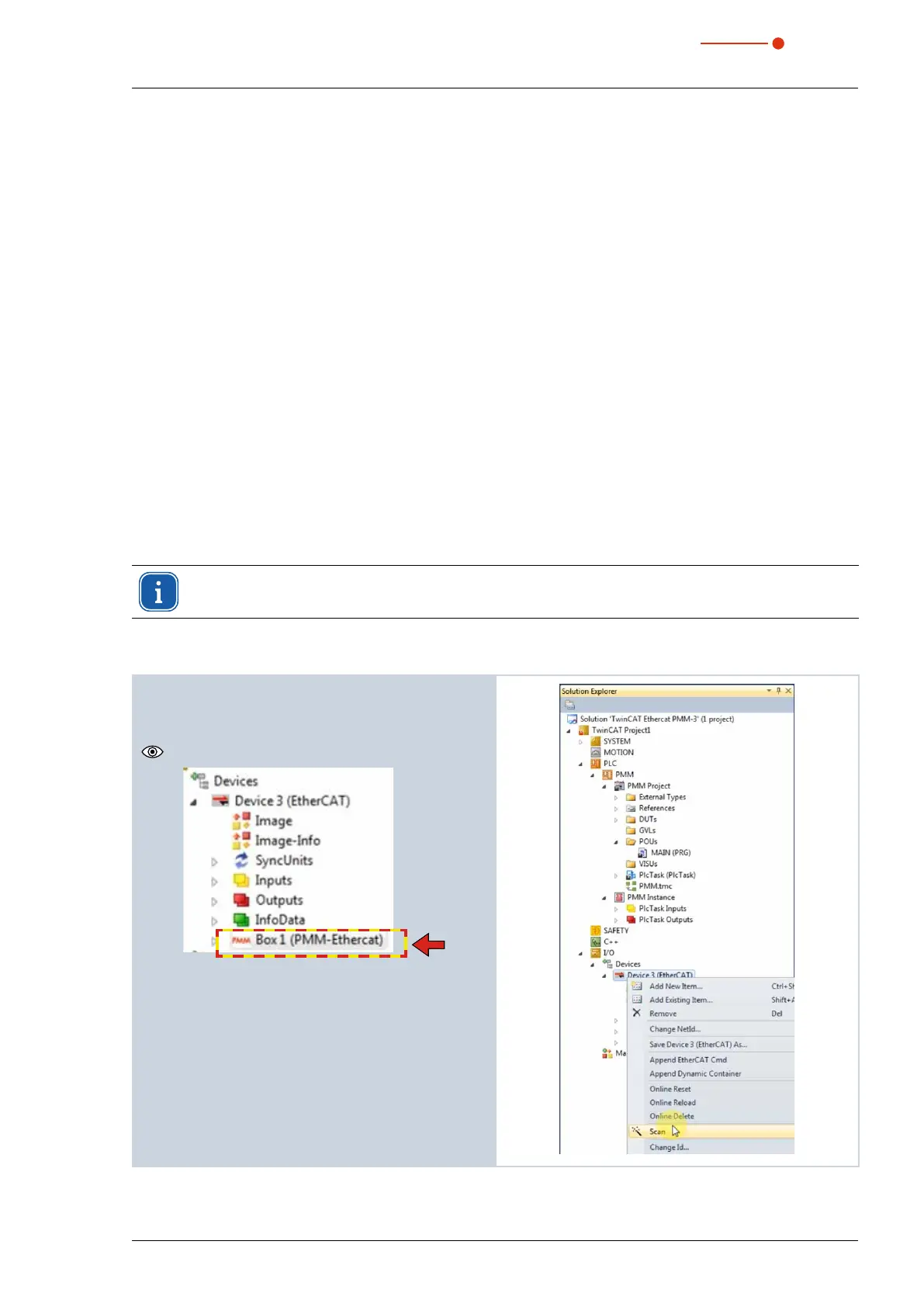
14.1 Connect the PMM to the device tree
1. Start the TwinCAT system manager.
2. Mark the project tree I/O --> Devices the device
iconDevice (EtherCAT) and click on Scan in the
context menu.
The PMM icon appears in the device tree.



 To Next Page