MOVE_BA_V1.0EN - 102
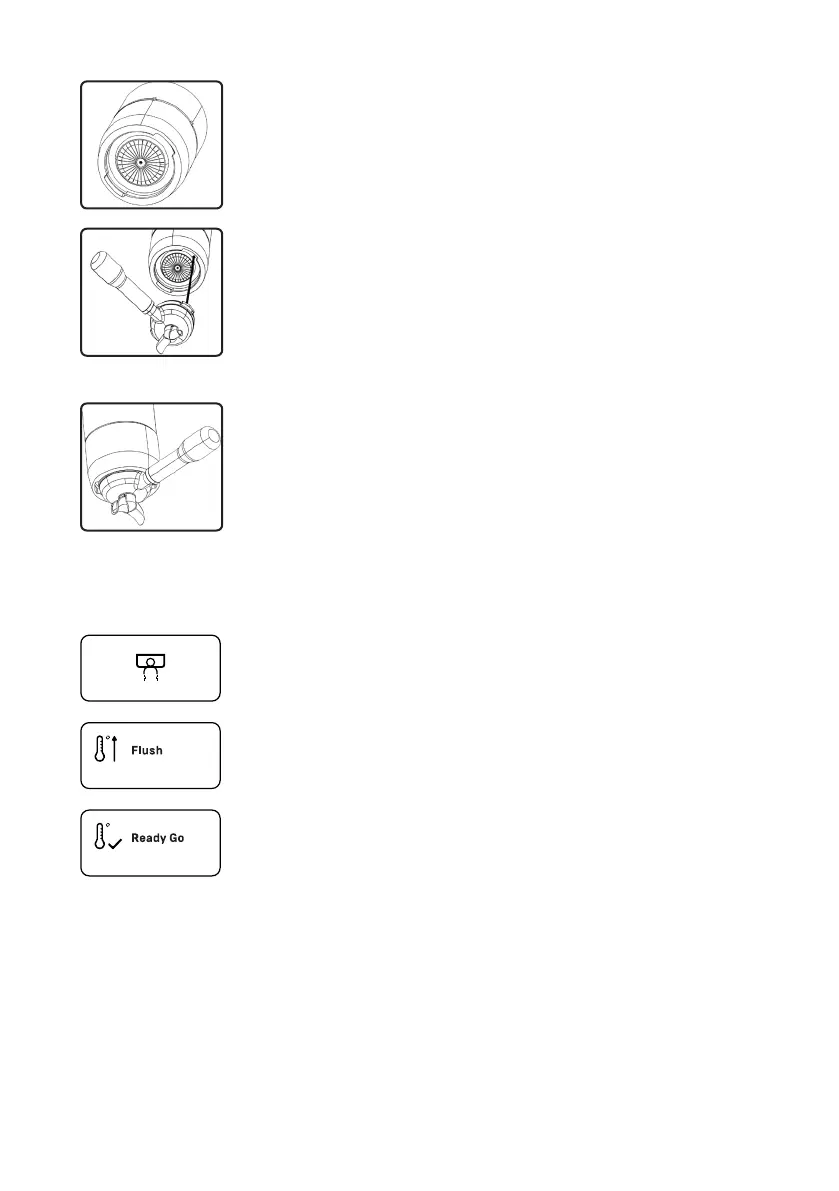
View of brew group from below
1. Hold the portalter with one hand.
2. Position the portalter under the brew group so
that the handle of the portalter is at an angle of
approx. 45° to the left.
3. Push the portalter into the holder of the brew
group until the wings on the portalter engage in
the recesses on the brew group.
4. Carefully turn the portalter handle to the right until
you feel some resistance.
9 The portalter is now installed in the brew group.
9.8 Performing a ush
Pull icon
This icon appears when one of the pull buttons is pressed to
start the pulling process.
“Flush” icon
Request to ush
“Ready Go” icon
Request to end the ush process
9.8.1 Flush after heating up
The machine heats up after being switched on. If the function “Enable Fast
Heating” is activated, the machine quickly heats up to approx. 120°C in order
to heat up the brew group faster. When this temperature has been reached,
the “Flush” icon appears on the display. This icon indicates that a ush needs
to be performed within 60seconds in order to lower the boiler temperature to
the normal set temperature:



 To Next Page