MOVE_BA_V1.0EN - 84
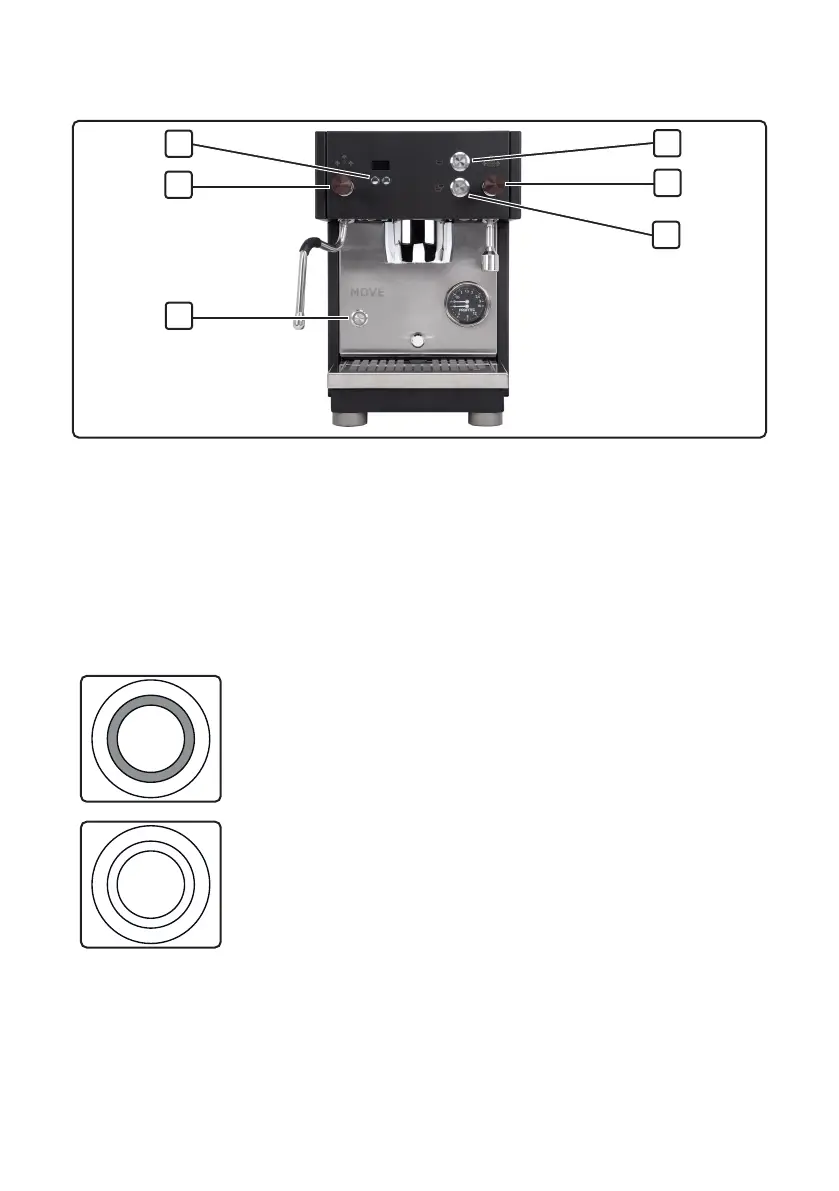
5.2 Control elements
Fig.2 Control elements
1 Display buttons
2 Steam tilt valve
3 On/off button
4 Bottom pull button
5 Hot water tilt valve
6 Top pull button
5.2.1 On/off button
The machine is switched on and off using the on/off button (3, Fig.2). The LED
ring of the button indicates the following states:
Off
• The machine is switched off
On
• The machine is switched on.
• If the LED ring and display are switched on, the
machine is ready to use.
• If the LED ring lights up but the display and the
LED rings of the pull buttons are switched off, the
machine is in ECO mode (see Chapter 9.1.4, “ECO
mode”).
2
4
1
3
5
6



 To Next Page