MOVE_BA_V1.0EN - 108
10.1.2 Menus for advanced user settings
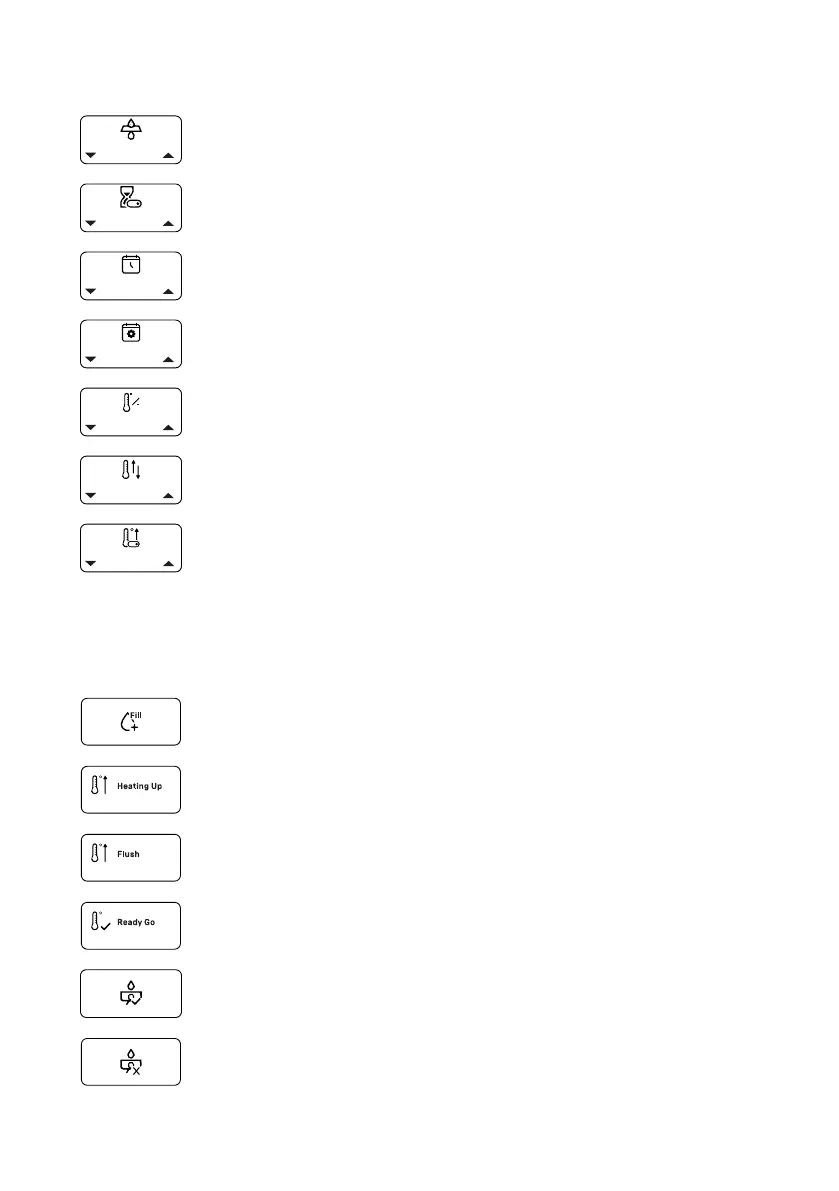
“Filter Reminder” menu: Set reminder for changing the lter (see
Chapter 10.4.1, “Filter Reminder”)
“Timer Enable” menu: Activate or deactivate the timer for automat-
ically switching the machine on or off (see Chapter 10.4.4, “Timer
Enable”)
“Clock Set” menu: Set the time (see Chapter 10.4.2, “Clock Set”)
“Schedule Set” menu: Program times for automatically switching
the machine on and off (see Chapter 10.4.3, “Schedule Set”)
“Temperature Unit” menu: Set the unit of temperature °C or °F (see
Chapter 10.4.5, “Temperature Unit”)
“Coffee Offset Correction” menu: Set the offset value between the
machine temperature measuring point and the output temperature
(see Chapter 10.4.6, “Coffee Offset Correction”)
“Enable Fast Heating” menu: Activate or deactivate fast machine
heat-up (“Fast Heating”) (see Chapter 10.4.7, “Enable Fast Heating”)
10.1.3 Further icons on the display
In addition to the menus, there are more icons that indicate a particular status
or prompt user action during operation.
Fill mode (see Chapter 8, “Initial start-up”)
The machine heats up (see Chapter 8, “Initial start-up”)
Request to ush (see Chapter 9.8, “Performing a ush”)
Request to end the ush process (see Chapter 9.8, “Performing a
ush”)
Pre-infusion activated (see Chapter 9.3.2, “Activating or deactivating
pre-infusion”)
Pre-infusion deactivated (see Chapter 9.3.2, “Activating or deacti-
vating pre-infusion”)



 To Next Page