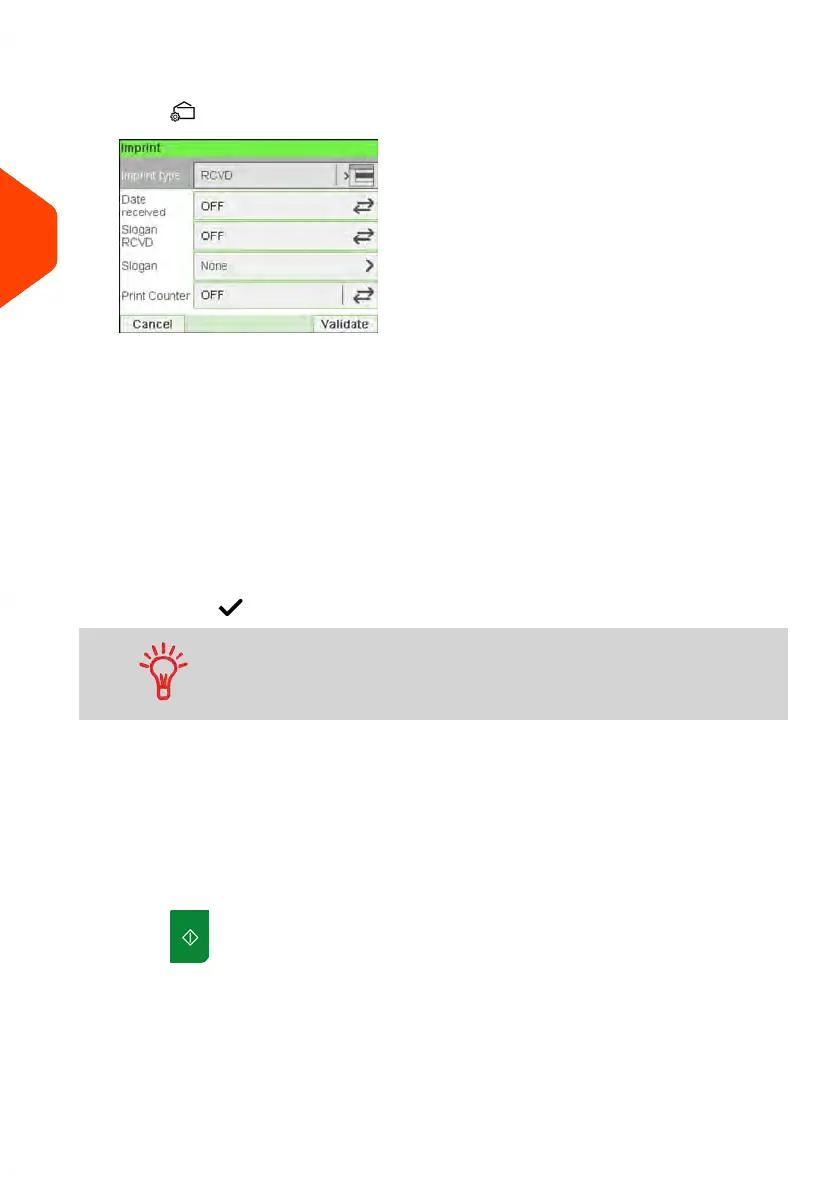
2. Check or change the type of imprint, if you are not in [Received] mode.
Press to access the Imprint screen:
To change the type of imprint, select Imprint type and then select [Received] in
the Type of imprint screen. For more details, see How to Change the Current 'Type
of Imprint' on page 37.
Additionally, you can:
- Activate or deactivate printing Date received.
- Activate or deactivate printing 'Received'.
- Add slogan to print using Slogan element.
- Activate the Print Counter.
- Select the option to change. The buttons indicate the current status of the
options. The screen indicates the current status of the options.
-
Press to return to the home screen.
To select an option on the screen, use related keys located on
the right hand side of the display.
You can also apply this optional setting:
1. Move the imprint away from the envelope edge for thick envelopes: see How to
Move the Imprint (Print Offset) on page 86.
You are now ready to print.
On the [Received] home screen:
1.
Press . System motors start running.
54
| Page 54 | Jun-21-2021 12:11 |
3
Processing Mail



 To Next Page