360° CAMERA
6
Vehicle - 99
A bird's eye view of the vehicle and its
surroundings is displayed in zone
B
on the multimedia system screen.
You can adjust the "360° Camera"
display using the icon
2
.
For further information, please refer to
the "360° Camera" section in your
vehicle user manual.
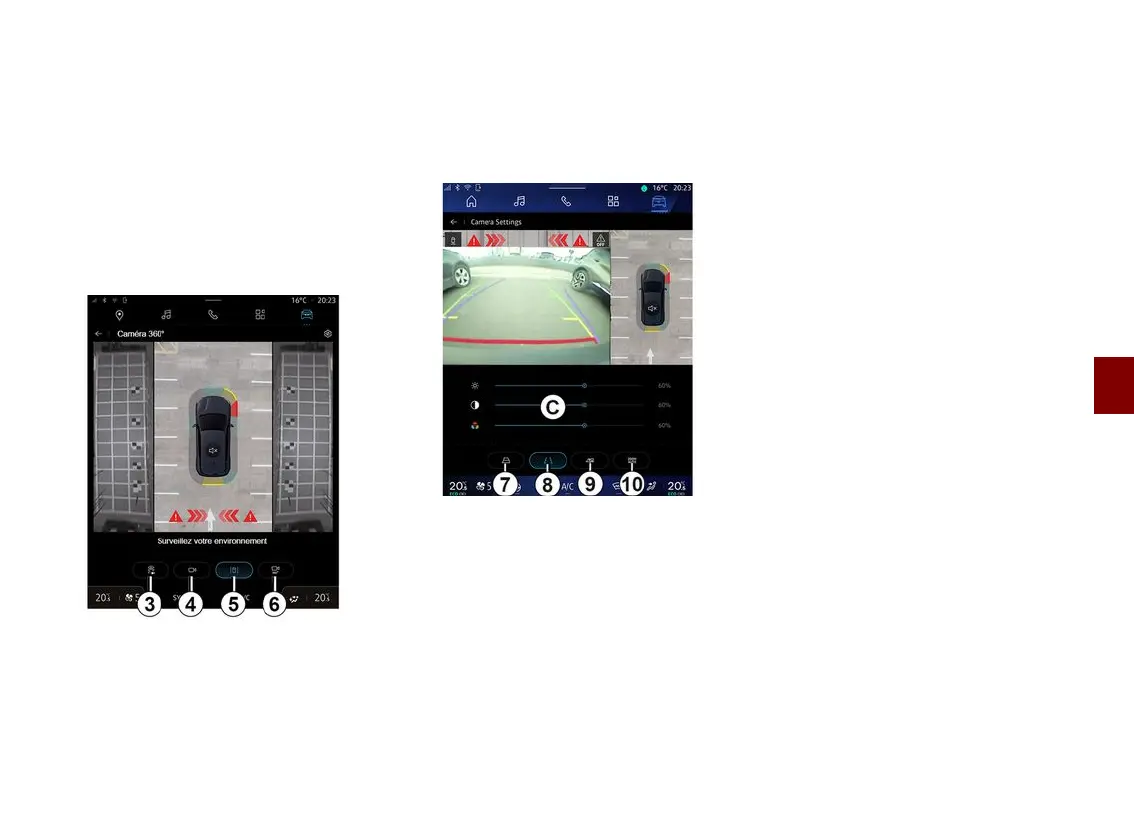
Camera choice
You can also select the type of view to
display on the screen:
– standard front/rear view and bird's
eye view
3
;
– panoramic front/rear view
4
;
– side views
5
;
– 3D view
6
.
Note: the "360° Camera" can be
accessed using the "Favourites" button
on the steering wheel control.
Settings
From the "360° Camera" menu, press
the camera settings icon
2
. Use this
menu to configure the camera:
– press
7
to activate or deactivate the
display of the moving guide lines;
– press
8
to activate or deactivate the
display of the fixed guide lines;
– press
9
to activate or deactivate the
display of the trailer guide lines;
– press
10
to activate or deactivate
the automatic zoom;
– move the adjustment bars
C
to set
the brightness, contrast and colours of
the image.



 To Next Page