PHONE SETTINGS
4
Phone - 77
For safety reasons, carry
out these operations
when the vehicle is
stationary.
These features are only
available while the vehicle
is stationary.
"Settings" menu
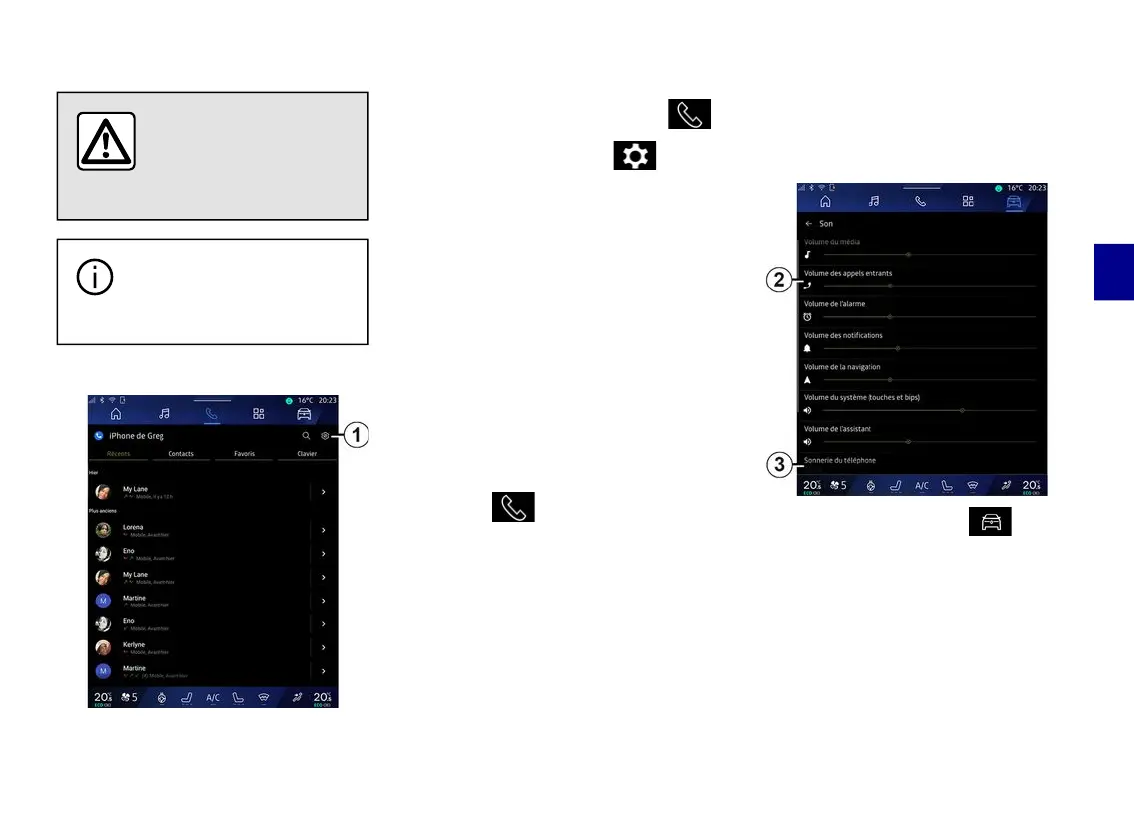
With the phone connected to the
system, from the "Phone" World ,
press the "Settings" icon
1
.
From the "Settings" menu you can
access the following settings:
– "Telephone connected";
– "Active call";
– "Confidentiality";
– "Home screen";
– "Contact list order";
– « Devices Manager » ;
– "Bluetooth® settings".
"Home screen"
This setting can be used to select the
tab which will be displayed when the
"Phone" World home screen is
launched :
– "Recent" (default);
– "Contacts";
– « Favourites » ;
– « Keyboard ».
"Contact list order"
This setting can be used to display
contacts in alphabetical order,
categorised by:
– "First name";
– « Name ».
Note: the selection will take effect the
next time the multimedia system is
restarted.
"Phone ringtone"
From the "Vehicle" world , press
the "Settings" menu, then "Sound", to:
– adjust the "Incoming call volume"
2
;
– select the type of "Phone ringtone"
3
.
For further information, please refer to
the section on "System settings".



 To Next Page